| View previous topic :: View next topic |
| Author |
Message |
messer
Senior

Joined: 08 Mar 2012
Posts: 2059
Location: Europe
|
 Posted: 08/08/2012 19:18 Post subject: GML Commander 4.03 (1999) Posted: 08/08/2012 19:18 Post subject: GML Commander 4.03 (1999) |
 |
|
GML Commander ServoDrive AB 4.03 (1999)
https://rapidshare.com/files/3567769696/GmlComm403.ZIP
86392 KB
1223123456 |
|
| Back to top |
|
 |
messer
Senior
Joined: 08 Mar 2012
Posts: 2059
Location: Europe
|
| Posted: 29/01/2014 19:48 Post subject: GML Commander 4.03 for AB Servodrives |
|
|
GML Commander 4.03 for AB Servodrives
For 1394SJT-xx C/T IMC-Sclass and Turbo integrated motion controllers it's required GML software to configure and program..
download link:
http://www.datafilehost.com/d/2a27b5f6
see serial above.. |
|
| Back to top |
|
|
messer
Senior
Joined: 08 Mar 2012
Posts: 2059
Location: Europe
|
| Posted: 29/01/2014 20:09 Post subject: How do I interpret the fault code number on the 1394 drive |
|
|
How do I interpret the fault code number on the 1394 drive
| Code: | Bit field definition:
xxLLLSSSSSFFFFFF
FFFFFF: type of fault (see text and description below)
SSSSS : source of fault (see text and description below)
LLL : severity level of fault (see text and description below)
xx : unused bits.
FFFFFF type of fault
000000 {"No Que Entry"}
000001 {"~~~~Memory^"} /* hardware memory error detected */
000010 {"~~~~CAN Hdwr^"} /* SCANbus hardware error detected */
000011 {"~~~~Hdwr Fault^"} /* control hardware error detected */
000100 {"~~~~Sftwr Flt^"} /* software error detected */
000101 {"~~~~NV Memory^"} /* non-volatile memory is corrupt */
000110 {"~~~~Cntctr Flt^"} /* customer wiring of input contactor incorrect */
000111 {"~~~~Serial Flt^"} /* if "Cus:", we lost communications to controlling SCANbus perpheral.
if "Ax0,1,2,3,Sys or Hdw:" hardware problem (check system terminator) */
001000 {"~~~~Bus Ovr Vlt^"} /* DC bus went over voltage - undersized shunt */
001001 {"~~~~Bus Low Vlt^"} /* DC bus is low voltage - low input line */
001010 {"~~~~Ctrl Power^"} /* Loss of control power */
001011 {"~~~~Phase Loss^"} /* loss of one input power phase - blown fuse */
001100 {"~~~~Ground Flt^"} /* ground fault detected */
001101 {"~~~~PwrOn Enble^"} /* customer had an axis enable active during power-on or an active fault reset */
001110 {"~~~~Power Fault^"} /* axis module detected a power fault */
001111 {"~~~~I(t) Fault^"} /* axis module detected an i(t) fault */
010000 {"~~~~Bus Loss^"} /* axis module lost DC bus - blown link fuse */
010001 {"~~~~Ovr Temp^"} /* module is over temperature */
010010 {"~~~~Fdbck Loss^"} /* loss of feedback from a motor */
010011 {"~~~~Cur Scaling^"} /* axis module is not set to proper current scaling (hardware) */
010100 {"~~~~Unknown Flt^"} /* fault is detected, but source unknown (check system terminator) */
010101 {"~~~~ATune Fault^"} /* error was detected during autotune process */
010110 {"~~~~Test Mode^"} /* Test mode is active */
010111 {"~~~~A/D/A Tst 0^"} /* self test fault */
011000 {"~~~~A/D/A Tst 1^"} /* self test fault */
011001 {"~~~~Ovr Spd^"} /* motor velocity exceeded overspeed trip limit */
011010 {"~~~~Unkn Module^"} /* a module unknown to this version of software is present */
011011 {"~~~~Shunt TmOut^"} /* the shunt resistor tip has timed out */
011100 {"~~~~Cur Limit^"} /* the system module has reached its current limit */
011101 {"~~~~Pre Charge^"} /* the bus voltage did not rise fast enough during the precharge state */
011110 {"~~~~Bus Config^"} /* the configured bus voltage mode does not match the hardware configuration */
SSSSS source of fault
00000 {"Ax0:"} - axis 0 module is the source of the fault.
00001 {"Ax1:"} - axis 1 module is the source of the fault.
00010 {"Ax2:"} - axis 2 module is the source of the fault.
00011 {"Ax3:"} - axis 3 module is the source of the fault.
00100 {"Sys:"} - system module is the source of the fault.
00101 {"CPU:"} - host CPU is source of fault (hardware).
00110 {"DSP:"} - DSP CPU is source of fault (hardware).
00111 {"Cus:"} - customer action is source of fault.
01000 {"Hdw:"} - drive hardware is source of fault.
LLL level of fault
000 {" "},FLT_WARNING - fault is only a warning
001 {" "},FLT_SOFT - fault is potentially clearable from "reset request"
010 {"!"},FLT_HARD - fault is not clearable, drive must be power cycled
|
|
|
| Back to top |
|
|
Rupert1987
Junior

Joined: 28 Jun 2017
Posts: 1
Location: Mexico
|
| Posted: 28/06/2017 17:49 Post subject: GML ALLEN BRADLLEY PROGRAM TO DECODE SCRIPT |
|
|
Hi, below is the link for download the program to decode the script in GML Commander AB, thanks. I hope help you...!
https://www.dropbox.com/s/dr0g52966401u3o/vb6.rar?dl=0 |
|
| Back to top |
|
|
akbar_torkashwand
Member

Joined: 09 Nov 2018
Posts: 228
|
| Posted: 24/02/2020 12:41 Post subject: |
|
|
Hi
I have problem with 1394 motion controller.
1394 Digital AC Multi-Axis
according to manual I have to re-download program to controller. I don't have original program but we have two same machine. I want to upload program from correct machine and download it to faulted machine.
Is it possible to upload hole program from controller?
I can online with controller but I couldn't upload program from controller.
how I can upload hole program from controller? |
|
| Back to top |
|
|
mafepegrad
Junior
Joined: 15 Aug 2018
Posts: 7
|
| Posted: 24/02/2020 20:48 Post subject: |
|
|
try to use
https://anonfile.com/R5FaE5c0o2/gmlc-rm002_-en-p_pdf
https://anonfile.com/ZbF5E3c0o0/1394-um000_-en-p_pdf
https://anonfile.com/n6GbE8c0oa/GML_Commander_4.03_rar |
|
| Back to top |
|
|
akbar_torkashwand
Member
Joined: 09 Nov 2018
Posts: 228
|
| Posted: 24/02/2020 22:18 Post subject: |
|
|
| mafepegrad wrote: | try to use
https://anonfile.com/R5FaE5c0o2/gmlc-rm002_-en-p_pdf
https://anonfile.com/ZbF5E3c0o0/1394-um000_-en-p_pdf
https://anonfile.com/n6GbE8c0oa/GML_Commander_4.03_rar |
Thanks a lot.
I have XP windows , I can connect to the controller. But how can I upload the needed program?
1- in the GML Commander software I click on Diagram\Online connection and wait until Normal-Online appears in toolbar software.
2- after that I go to Diagram\Upload option and then I select "ALL"
3- after that , I click OK , time out communication error appears.
I use RS232 cable with this pin-out
2---------2
3--------3
5--------5
Am I right? or must I use another windows or cable?
where is my mistake? |
|
| Back to top |
|
|
mafepegrad
Junior
Joined: 15 Aug 2018
Posts: 7
|
| Posted: 25/02/2020 09:52 Post subject: |
|
|
For DIP switch (SW1-SW6) make sure the Serial port A configured as RS-232
Have you tried a null modem serial cable?
https://www.lammertbies.nl/comm/info/rs-232-null-modem
https://www.aggsoft.com/rs232-pinout-cable/nullmodem-db9-to-db9.htm
https://www.decisivetactics.com/support/view?article=crossover-or-null-modem-vs-straight-through-serial-cable |
|
| Back to top |
|
|
akbar_torkashwand
Member
Joined: 09 Nov 2018
Posts: 228
|
| Posted: 25/02/2020 10:29 Post subject: |
|
|
yes I tried with NULL MODEM RS232 Cable. It's not work.
but with straight RS232 cable, I can connect to controller.
all DIP switch (SW1-SW6) are in left position.
I can connect but I couldn't upload. |
|
| Back to top |
|
|
mafepegrad
Junior
Joined: 15 Aug 2018
Posts: 7
|
| Posted: 25/02/2020 14:58 Post subject: |
|
|
try to check your connection with rs232 bunde
https://www.aggsoft.com/rs232-pinout-cable/nullmodem-db9-to-db9.htm |
|
| Back to top |
|
|
akbar_torkashwand
Member
Joined: 09 Nov 2018
Posts: 228
|
| Posted: 25/02/2020 17:14 Post subject: |
|
|
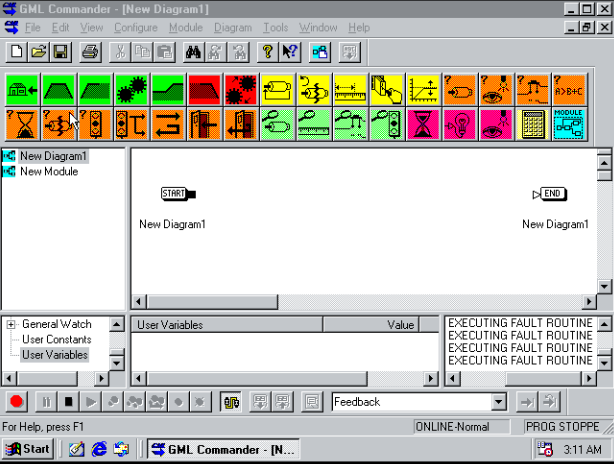
I said,I can connect to controller but I can't download and upload program.
upload and download icons are not active.
How can I active upload and download icons?
also you can see "ONLIN-NORMAL" on toolbar. |
|
| Back to top |
|
|
kacdiz
Junior
Joined: 04 Sep 2018
Posts: 2
|
| Posted: 25/02/2020 20:48 Post subject: |
|
|
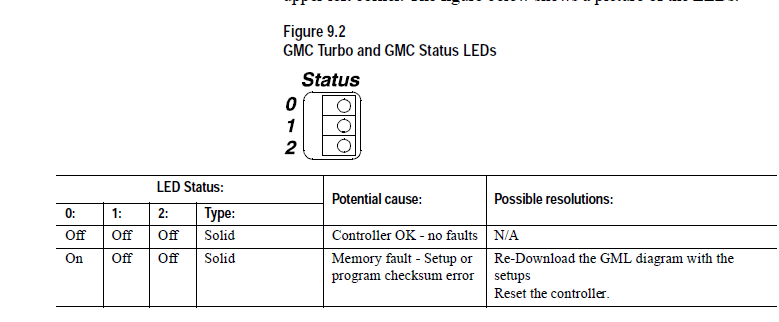
What is status of LEDs?
The status LEDs are located inside the system module in the upper left corner. |
|
| Back to top |
|
|
akbar_torkashwand
Member
Joined: 09 Nov 2018
Posts: 228
|
| Posted: 25/02/2020 21:14 Post subject: |
|
|
I think you mean this LEDs. all of them are off. that means,the controller has no fault. am I right?
 |
|
| Back to top |
|
|
kacdiz
Junior
Joined: 04 Sep 2018
Posts: 2
|
| Posted: 25/02/2020 21:21 Post subject: |
|
|
The controller is verified it is stopped?
The big problem is you can't upload a GML diagram from a controller.
The controller contains a script program compiled and downloaded from a GML program.
It also contains setup data for each axis which is separate from the script file.
It is possible to re-generate (by hand) a GML file from a script file, but it's very tedious. You have to translate the script commands individually.
Try to upload script files and setup data for each axis.... |
|
| Back to top |
|
|
akbar_torkashwand
Member
Joined: 09 Nov 2018
Posts: 228
|
| Posted: 25/02/2020 21:52 Post subject: |
|
|
No , I didn't verify our program. I don't have autentic program.
we only turned off our machine and after a year we turned on again.
I don't know ,why the program stopped.
In fact, we have two same machines. I want to upload program from this machine and download to another controller on other machine.
Is it possible?
If I do that, other machine is work correctly?
also I want to know why download and upload icons are deactivated? |
|
| Back to top |
|
|
Taiap86
Junior
Joined: 18 Oct 2018
Posts: 5
|
| Posted: 11/09/2020 17:18 Post subject: |
|
|
Compatible With the following Motion Control Firmware:
1394 Turbo GMC System iCODE Firmware: V3.5 to V3.9
1394 GMC System iCODE Firmware: V3.0 to V3.9
1394L GMC System iCODE Firmware: v3.9
Compact IMCS/23x iCODE Firmware: V3.0 to V3.9
IMCS/20x and S/21x iCODE Firmware: V2.3 or V2.4
4.1) GML Commander will only open GML3.6 or later diagrams. If a diagram is older than 3.6 it must be opened in GML 3.6 or later GML 3.x version, and saved before GML Commander can open it.
4.2) GML Commander only supports IMCS Class Firmware 2.3 or greater.
4.3) GML Commander does not support Runtime Display in the Configuration Menu - Use the Configure Auto-Display in the application to get this functionality. This allows portability from one diagram to the next, (using copy and paste) which is not possible if they are tag definitions.
4.4) GML Commander does not support Runset Menu Items in the Configuration Menu - Use the Edit Value and Toggle Choice blocks in the application to get this functionality. This allows portability from one diagram to the next, (using copy and paste) which is not possible if they are tag definitions.
4.5) GML Commander does not support the following GML 3.x blocks:
Do Setups
Do Runset Menu
Send Remote Command
4.6) GML 3.x will only allow 10 characters in the axis name when referenced in an expression, truncating any other characters in the name as defined in Axis Use. GML Commander allows the longer names and will report an error "Illegal Expression" stating the axis name in the equation does not exist, if you are converting a GML 3.x file. You can either truncate the name in the control options, or replace all the expressions that contain the old axis reference, with a new, longer axis reference. Before converting GML 3.x files, it is advised to check for long axis names.
4.7) GML Commander will enforce the control's minimum lock tolerance of 1/(Conversion Constant). GML 3.x did not let you know that the control truncated this value on download.
4.8) GML Commander has reduced the number of program blocks by combining the functionality of similar blocks used in GML 3.x. Because of this, once a GML 3.x diagram has been opened and converted by GML Commander, it CANNOT be saved as or reverted back to a GML 3.x diagram. It is highly recommended to maintain a backup copy of the autentic GML 3.x diagram if future work may need to be performed using GML 3.x software.
4.9) GML Commander has different "default" values for various Axis Configuration parameters than GML 3.x. The affected parameters, with their new default settings include:
Overtravel Limit Switch - Normally Closed
Drive Fault Input - Normally Closed
Motor Thermal Fault (1394/T) - Normally Closed |
|
| Back to top |
|
|
usefi5961
Junior 2

Joined: 16 Jan 2019
Posts: 41
|
| Posted: 23/08/2021 15:00 Post subject: 1398 pdm 020 software needed |
|
|
Dear all,I need software for 1398 pdm 020 servo drive.
Please send me this software to :usefi5961@yahoo.com
Thanks and best regards. |
|
| Back to top |
|
|
mafepegrad
Junior
Joined: 15 Aug 2018
Posts: 7
|
| Posted: 23/08/2021 21:14 Post subject: GML Ultra 1.0.1 for Windows |
|
|
GML Ultra 1.0.1 for Windows
Compatible With the following Motion Control Firmware:
ULTRA Plus iqCODE Firmware: V3.20, V3.23
GML Ultra for Windows has the following requirements:
- 486 or Higher PC Compatible with at least 4MB (MegaBytes) of RAM.
8MB of RAM is recommended for higher system performance. VGA Monitor
running in standard 640 by 480 Resolution. If you choose to run in
800 by 600 or 1024 by 768 Resolutions, you should select small fonts
to obtain the correct font/dialog spacing.
- Windows 3.1/3.11 or Windows95 or Windows NT by Microsoft Corporation.
Normally, you should run GML Ultra in Windows 386 Enhanced Mode,
starting Windows by typing "win /3".
GML Ultra will also run in Standard Mode.
GML Ultra does not run in Windows Real Mode.
links
https://ulozto.net/file/ZnCmNM48IFPl/gml-ultra-1-0-1-zip
https://anonfiles.com/n16bA8Dau7/GML_Ultra_1.0.1_zip
[URL=https://veryfiles.com/ahnnhp7feg45]GML_Ultra_1.0.1.zip - 1.1 MB[/URL] |
|
| Back to top |
|
|
mafepegrad
Junior
Joined: 15 Aug 2018
Posts: 7
|
| Posted: 23/08/2021 21:23 Post subject: |
|
|
https://anonfiles.com/z686AcDcu4/DriveFileConversionUtility_zip
https://anonfiles.com/1f87AeDau6/1398-um014_-en-p_pdf
https://anonfiles.com/3088A0Dfue/1398-um013_-en-p_pdf
https://anonfiles.com/Z68bA6D8u6/GML_Commander_4.03_rar
https://anonfiles.com/bb9fAcD8u1/GmlComm403_ZIP
https://anonfiles.com/p79dAdD6u2/Ultraware_1_83.FW_exe
https://anonfiles.com/r59cAbDdu4/Ultraware_1_82.IsExe_exe
https://anonfiles.com/ve9eAaD9u6/Ultraware1.64_zip
https://anonfiles.com/xa9cAcDduf/gmlc-rm002_-en-p_pdf
https://anonfiles.com/309fA8D8u2/GML_Commander_rar
https://anonfiles.com/Da94A4D2ua/Ultraware_1_84_exe
https://anonfiles.com/p9AdAdDau3/DriveToolsFull_5_01_rar
https://ulozto.net/tamhle/592zZA7DbEmr/ |
|
| Back to top |
|
|
dszobarr
Junior
Joined: 23 Sep 2021
Posts: 2
|
| Posted: 21/11/2021 19:01 Post subject: |
|
|
| Do you have UltraMaster links? |
|
| Back to top |
|
|
|

 FAQ
FAQ Search
 Memberlist
 Usergroups
 Register
 Profile
 Log in to check your private messages
 Log in


