 |
plc.myforum.ro
PLCs users www.plc.myforum.ro!
|
| View previous topic :: View next topic |
| Author |
Message |
grig100
Member 3


Joined: 01 Jan 2015
Posts: 752
|
 Posted: 07/04/2021 16:31 Post subject: Getting Started with Industrial Remote Communication Posted: 07/04/2021 16:31 Post subject: Getting Started with Industrial Remote Communication |
 |
|
Getting Started with Industrial Remote Communication
https://support.industry.siemens.com/cs/document/64721753/
TeleControl
Teleservice
Secure access to remote SIMATIC stations
Remote Networks
SMS and E-mail
TeleControl via WinCC / PCS7 |
|
| Back to top |
|
 |
grig100
Member 3
Joined: 01 Jan 2015
Posts: 752
|
| Posted: 07/04/2021 16:38 Post subject: SSL VPN Client |
|
|
SSL VPN Client: Establishing a secure connection between a PC station and the Siemens Remote Service Platform
https://support.industry.siemens.com/cs/document/109779871/
The software and further information on establishing a secure connection between a PC station and the Siemens Remote Service Platform can be found in this article.
You need the cRSP SSL client to set up a secure connection between a remote system, the SSL VPN client and the DMZ, the common Remote Service Platform (cRSP).
The SSL VPN client uses port 443 and communicates via the Internet directly with the servers of the security zone (DMZ). The connection is always set up from your local system to the cRSP.
The SSL VPN client only needs port 443. To prevent uncontrolled access to the Internet, we recommend setting up a firewall between the system and the Internet access. We also recommend implementing a sufficient security concept based on the recommendations in IEC62443. Protection of the system from the Internet is not controlled via the SSL VPN client.
The VPN tunnel can be used for all applications based on TCP/IP. For a remote desktop connection, for example, you can use the RDP (Remote Desktop Protocol) or a VNC software solution.

SSL VPN Client
The SSL VPN tunnel connection at the client is terminated behind the customer Internet access. The SSL VPN client installed on the target system, in this example, forms the tunnel endpoint of this connection.
The connection is set up from the SSL VPN client to the Siemens Remote Service Platform.
SSL VPN Gateway (optional)
In case customer devices (target devices) are to be made available behind the SSL VPN client (tunnel endpoint) directly via the Remote Platform, the SSL VPN gateway must be installed additionally.
Requirements
Internet access over a local network
Port 443 from the target system to the Internet access for communication (outgoing port 443 must not be blocked by the firewall)
Suitable customer device on which the SSL VPN software can be installed
Supported operating systems SSL VPN Client V1.5.3
| Code: |
Windows
Microsoft Windows XP SP3 (32-/64-Bit)
Microsoft Windows Server 2003 (32-Bit)
Microsoft Windows 7 (32-/64-Bit)
Microsoft Windows Server 2008 (32-/64-Bit)
Microsoft Windows Server 2008 R2 (64-Bit)
Microsoft Windows 8.x (32-/64-Bit)
Microsoft Windows Server 2012 (64-Bit)
Microsoft Windows Server 2012 R2 (64-Bit)
Microsoft Windows 10 PC Edition (32-/64-Bit)
Microsoft Windows Server 2016 Server Core (64-Bit)
Microsoft Windows Server 2016 Server with Desktop Experience (64-Bit)
Microsoft Windows Server 2019 Server Core (64-Bit)
Microsoft Windows Server 2019 Server with Desktop Experience (64-Bit)
Linux
Linux Open Embedded 2.6.3x
OpenSUSE 10.x, 11.x, 12.x
Debian 7 ("Wheezy"), x86-32 (32-Bit) & x86-64 (64-Bit)
Debian 8 ("Jessie"), x86-32 (32-Bit) & x86-64 (64-Bit)
Debian 9 ("Stretch"), x86-32 (32-Bit) & x86-64 (64-Bit)
Oracle Linux 7.2, x86-64 (64-Bit)
Solaris
Oracle Solaris 10 1/13 s10x_u11wos_24a X86 (64-Bit)
Oracle Solaris 10 9/10 s10x_u9wos_14a X86 (64-Bit)
Supported operating systems SSL VPN Gateway V1.0.6
The SSL VPN gateway is implemented as a 32-bit application and can be installed and operated on the following platforms:
Windows
Microsoft Windows XP SP3 (32-/64-Bit)
Microsoft Windows Server 2003 (32-Bit)
Microsoft Windows 7 (32-/64-Bit)
Microsoft Windows Server 2008 (32-/64-Bit)
Microsoft Windows Server 2008 R2 (64-Bit)
Microsoft Windows 8.x (32-/64-Bit)
Microsoft Windows Server 2012 (64-Bit)
Microsoft Windows Server 2012 R2 (64-Bit)
Microsoft Windows 10 PC Edition (32-/64-Bit)
Linux
OpenSUSE 10.x, 11.x, 12.x
Debian 7 ("Wheezy"), x86-32 (32-Bit) & x86-64 (64-Bit)
Debian 8 ("Jessie"), x86-32 (32-Bit) & x86-64 (64-Bit)
Debian 9 ("Stretch"), x86-32 (32-Bit) & x86-64 (64-Bit)
Oracle Linux 7.2, x86-64 (64-Bit)
|
https://anonfiles.com/Bc694bp4u2/23810112_sinaut_internet_doku_v23_e_pdf
https://anonfiles.com/Dd604ap6ue/23810112_sinaut_msc_internet_doku_e_pdf
https://anonfiles.com/H56e47p0ua/23810112_sinaut_lan_doku_v20_e_pdf
https://anonfiles.com/Ja6044p2u9/22376747_Firewall_SCALANCE_S_V21_eng_pdf
https://anonfiles.com/Pb6c4bpdud/23810112_sinaut_internet_msc_code_zip
https://anonfiles.com/R36a42p1u0/24960449_ssc_remoteaccess_umts_code_v10_zip
https://anonfiles.com/Vf6c44p0ue/24960449_ssc_remoteaccess_umts_doku_v1_en_pdf
https://anonfiles.com/Z4634ap9u4/23810112_sinaut_internet_code_v20_zip
https://anonfiles.com/b47544p8u5/Archive_zip
https://anonfiles.com/f77145pbu1/23810112_sinaut_lan_code_v20_zip
https://anonfiles.com/hb714bpfud/24960449_s612_remoteaccess_umts_code_v30_zip
https://anonfiles.com/jf734fp7uc/23810112_configuration_8_v1_0_e_zip
https://anonfiles.com/n47849p7uf/55394146_cRSP_Gateway-V.1.0.6_Win_zip
https://anonfiles.com/p17a43p7u3/24960449_s612_remoteaccess_umts_doku_v3_en_pdf
https://anonfiles.com/tb7e46p1u3/55394146_SSL-VPN-Client-V1.5.3-Win_zip
https://anonfiles.com/z77143p9ue/55394146_SSL-VPN-Client-V1.5.3-Solaris_zip
https://anonfiles.com/V47b4cpdu7/55394146_cRSP_Gateway-V.1.0.6_Linux_zip
https://anonfiles.com/7a8b44p7u2/55394146_SSL-VPN-Client-V1.5.3-Linux_zip |
|
| Back to top |
|
|
grig100
Member 3
Joined: 01 Jan 2015
Posts: 752
|
| Posted: 07/04/2021 16:39 Post subject: |
|
|
Secure Remote Access to SIMATIC Stations via Internet and UMTS
https://support.industry.siemens.com/cs/document/24960449/
Task Due to the increasing networking through the Ethernet, remote diagnostic and/or remote maintenance also takes on a high priority in modern automation systems. Today’s internet access mechanisms (radio, broadband) united with the security components by Siemens are a successful combination. Th...
Task
Due to the increasing networking through the Ethernet, remote diagnostic and/or remote maintenance also takes on a high priority in modern automation systems. Today’s internet access mechanisms (radio, broadband) united with the security components by Siemens are a successful combination. The task is now to connect several SIMATIC remote stations with devices (S7-CPUs, HMI devices, Ethernet CPs, etc.) via a wireless transmission medium with a service center via the industrial Ethernet. A PG/PC in the service center or in any place is to carry out all the service and diagnostic functions.
Solution
Siemens offers a large selection of components with security functionality to secure access to and from production plants: With these modules a secured connection can be established by means of an IPSec VPN tunnel. The following picture shows the entire constellation.
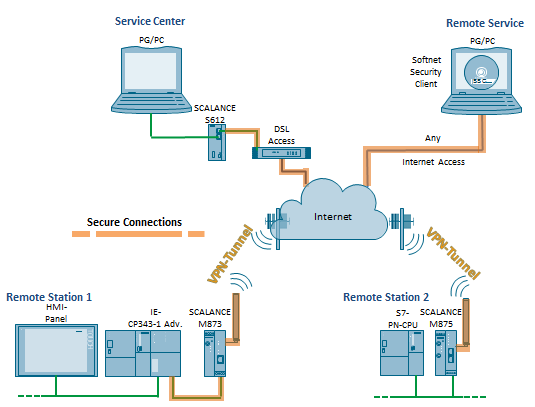
The first document shows the use of the UMTS router SCALANCE M875, the security module SCALANCE S612 V3 and the security CP 343-1 Advanced V3
The focus of the second document here is in the use of dynamic IP addresses and access via dynamic DNS. This is demonstrated by a VPN connection between the security module UMTS router SCALANCE M875 and the SOFTNET Security Client, which is installed on the Remote Service PG
Both documents show you all configuration steps in detail that are required to establish the VPN tunnels between the security components.
Diagnostic scenarios of the documents:
STEP 7 standard diagnostic
STEP 7 program upload and download
HTML access to webpages of the modules
Secure FTP data communication (FTPES) (document 1)
Time synchronization with NTP (secure) (document 1)
Downloads
https://anonfiles.com/Bc694bp4u2/23810112_sinaut_internet_doku_v23_e_pdf
https://anonfiles.com/Dd604ap6ue/23810112_sinaut_msc_internet_doku_e_pdf
https://anonfiles.com/H56e47p0ua/23810112_sinaut_lan_doku_v20_e_pdf
https://anonfiles.com/Ja6044p2u9/22376747_Firewall_SCALANCE_S_V21_eng_pdf
https://anonfiles.com/Pb6c4bpdud/23810112_sinaut_internet_msc_code_zip
https://anonfiles.com/R36a42p1u0/24960449_ssc_remoteaccess_umts_code_v10_zip
https://anonfiles.com/Vf6c44p0ue/24960449_ssc_remoteaccess_umts_doku_v1_en_pdf
https://anonfiles.com/Z4634ap9u4/23810112_sinaut_internet_code_v20_zip
https://anonfiles.com/b47544p8u5/Archive_zip
https://anonfiles.com/f77145pbu1/23810112_sinaut_lan_code_v20_zip
https://anonfiles.com/hb714bpfud/24960449_s612_remoteaccess_umts_code_v30_zip
https://anonfiles.com/jf734fp7uc/23810112_configuration_8_v1_0_e_zip
https://anonfiles.com/n47849p7uf/55394146_cRSP_Gateway-V.1.0.6_Win_zip
https://anonfiles.com/p17a43p7u3/24960449_s612_remoteaccess_umts_doku_v3_en_pdf
https://anonfiles.com/tb7e46p1u3/55394146_SSL-VPN-Client-V1.5.3-Win_zip
https://anonfiles.com/z77143p9ue/55394146_SSL-VPN-Client-V1.5.3-Solaris_zip
https://anonfiles.com/V47b4cpdu7/55394146_cRSP_Gateway-V.1.0.6_Linux_zip
https://anonfiles.com/7a8b44p7u2/55394146_SSL-VPN-Client-V1.5.3-Linux_zip |
|
| Back to top |
|
|
ExecOn
Junior

Joined: 08 Nov 2018
Posts: 6
|
| Posted: 08/04/2021 10:18 Post subject: Overview: Secure Remote Access with VPN |
|
|
Overview: Secure Remote Access with VPN
https://support.industry.siemens.com/cs/document/26662448/
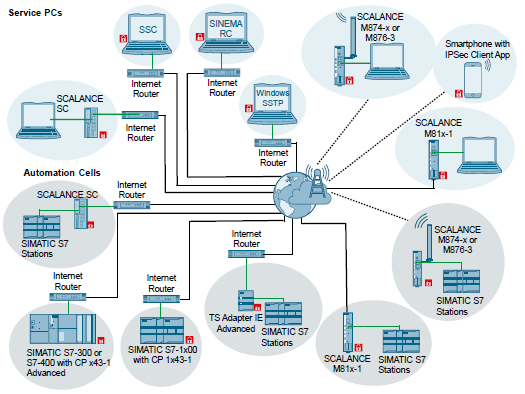
An introduction to IP based remote Networks and to the related product range of Siemens. For the possible configurations of an IP based remote network there is an overview along with the requirements and the link to the configuration description.
The geographical distribution of automation cells increases the demand for telecontrol (remote control) and teleservice (remote maintenance/diagnostics) in a remote network. The comprehensive Remote Networks portfolio from Siemens offers connection to both conventional (dedicated line, telephone) and IP-based infrastructures (e.g. the Internet).
Solution
This document focuses on IP-based networks. You can find an overview of the classic dial-up networks in the archive below.
As remote access to the plant is implemented via a public network (e.g., the Internet), protection against data manipulation and spying is particularly important. For this purpose the following modules of the Siemens Security Integrated Portfolio in virtual private networks (VPN) are used:
SCALANCE S615
SCALANCE SC-600
SCALANCE M-800
SINEMA Remote Connect
CP x43-1 Adv.
CP 1x43-1
CP 1243-7
CP 1243-8 IRC
CP 1543SP-1
CP 1542SP-1 IRC
CP 1628
TS Adapter IE Advanced
LOGO! CMR
RTU 3000C
https://anonfiles.com/Z0gcE1p8uf/26662448_wan_v1_0_archive_en_zip
https://anonfiles.com/b5h1E4pbuc/26662448_Remote_Networks_Overview_DOKU_V3_1_en_pdf |
|
| Back to top |
|
|
|
|
You cannot post new topics in this forum
You cannot reply to topics in this forum
You cannot edit your posts in this forum
You cannot delete your posts in this forum
You cannot vote in polls in this forum
|
Powered by phpBB © 2001, 2005 phpBB Group
Fa-ti si tu propriul forum GRATUIT, pe www.myforum.ro |
 FAQ
FAQ Search
 Memberlist
 Usergroups
 Register
 Profile
 Log in to check your private messages
 Log in


