 |
plc.myforum.ro
PLCs users www.plc.myforum.ro!
|
| View previous topic :: View next topic |
| Author |
Message |
maersk
Member 3


Joined: 17 Aug 2014
Posts: 891
|
 Posted: 21/03/2019 11:03 Post subject: generate Energy Suite visu automatically with SiVArc WinCC P Posted: 21/03/2019 11:03 Post subject: generate Energy Suite visu automatically with SiVArc WinCC P |
 |
|
How do you generate the Energy Suite visualization automatically with SiVArc in WinCC Professional?
https://support.industry.siemens.com/cs/document/109758574/
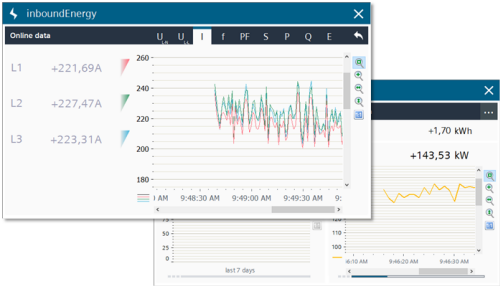
For WinCC Professional you can use SiVArc to automatically generate the Energy Suite visualization for all configured energy objects.
In TIA Portal V15.1 and higher the visualization for energy objects is included in the global library "Energy Suite". The visualization is prepared for use with SiVArc, so you can generate the objects in just a few steps without prior SiVArc configuration knowledge.
Requirements
You need the following software components:
STEP 7 Professional V15.1 and WinCC Professional V15.1
SIMATIC Visualization Architect V15.1
SIMATIC S7 controller with created energy objects.
Make sure that the controller is networked with the WinCC Runtime Professional and that the controller can be compiled without error.
SIMATIC Visualization Architect V15.1
https://support.industry.siemens.com/cs/attachments/109761214/SiVarc_V15_1.exe
Downloads Library LEnSVisu_SiVArc
https://support.industry.siemens.com/cs/attachments/109758574/109758574_LEnSVisu_SiVArc.zip
Instructions
Download the library "LEnSVisu_SiVArc" under Downloads.
Open your project and the library "LEnSVisu_SivArc" in the TIA Portal.
Note
Open the library with write protection.
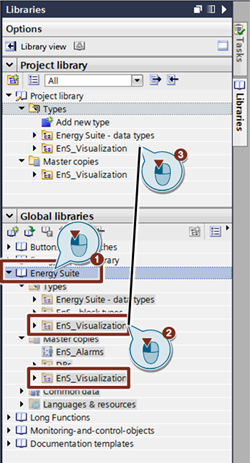
Open the global library "Energy Suite" and copy the "EnS_Visualization" folder from the "Types" folder and from the "Master copies" folder into your project.
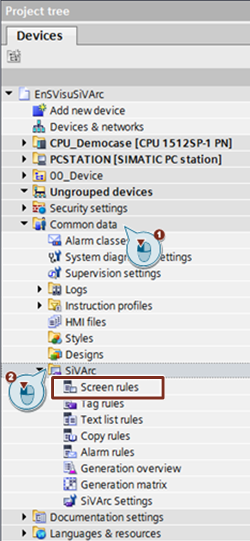
Open the SiVArc screen rules editor ("Project tree > Common data > SiVArc").
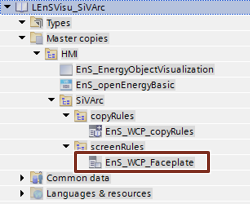
Drag-and-drop the "EnS_WCP_Faceplate" rules from the library into the opened editor.
Open the SiVArc copy rules editor ("Project tree > Common data > SiVArc").
Drag-and-drop the "EnS_WCP_CopyRules" rules group from the library into the opened editor.
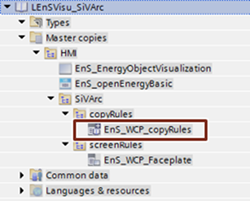
Start the SiVArc generator. For this you select the WinCC Runtime Professional in the TIA Portal project tree and click the following buttons in the TIA Portal menu bar.
Note
The control program must be compiled without error for this step.

Generation result
Faceplates are created for all the Energy Suite objects on the HMI screen "EnS_EnergyObjectVisualization" and linked with the energy data from the controller.
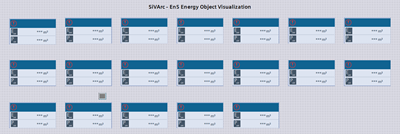
Note
A maximum of 35 Energy Suite faceplates can be generated on one HMI screen. If you have created more than 35 energy objects, additional screens are generated aurtomatically.
Open the HMI screen "EnS_EnergyObjectVisualization" and mark all the faceplates.
In the inspector window you open the "Events" tab. Add the VBS script "EnS_openEnergyBasic" to a click event of the faceplates via "Properties > Events > openEnergyBasic".
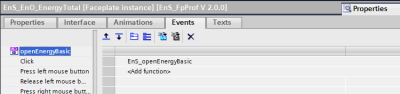
Start the WinCC Runtime. All the generated faceplates are now completely operable and are interconnected with the energy objects from the controller. |
|
| Back to top |
|
 |
|
|
You cannot post new topics in this forum
You cannot reply to topics in this forum
You cannot edit your posts in this forum
You cannot delete your posts in this forum
You cannot vote in polls in this forum
|
Powered by phpBB © 2001, 2005 phpBB Group
Fa-ti si tu propriul forum GRATUIT, pe www.myforum.ro |
 FAQ
FAQ Search
 Memberlist
 Usergroups
 Register
 Profile
 Log in to check your private messages
 Log in


