| View previous topic :: View next topic |
| Author |
Message |
maersk
Member 3


Joined: 17 Aug 2014
Posts: 891
|
 Posted: 04/11/2015 21:56 Post subject: Gate control for the High Speed Counter (HSC) of the S7-1200 Posted: 04/11/2015 21:56 Post subject: Gate control for the High Speed Counter (HSC) of the S7-1200 |
 |
|
How do you implement a software gate control for the High Speed Counter (HSC) of the SIMATIC S7-1200?
https://support.industry.siemens.com/cs/document/109479811/how-do-you-implement-a-software-gate-control-for-the-high-speed-counter-%28hsc%29-of-the-simatic-s7-1200
For specific applications it is necessary to switch the high-speed counters on and off during runtime in order not to capture unwanted counting pulses, for example those due to vibrations. Using the "HscGate" FB you can implement this gate control for the high-speed counters of the S7-1200.
"HscGate" FB
This function block has been developed with the STEP 7 V13 SP1 Update4 and tested with a CPU 1211C DC/DC/DC firmware V4.1.3.
It is called in the cyclic organization block "Main".
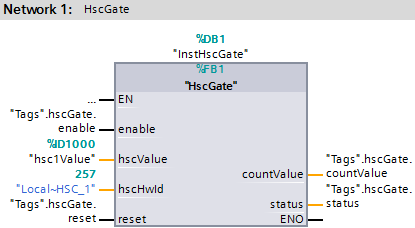
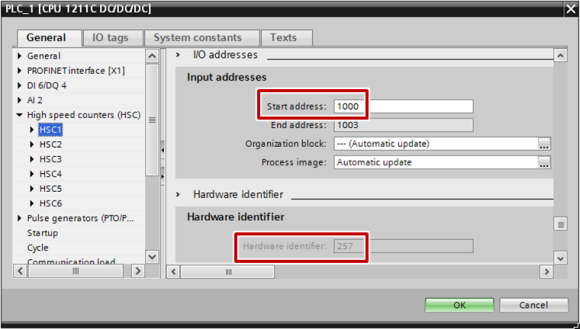
The "hscValue" and "hscHwId" inputs are taken from the settings of the high-speed counter in the CPU properties.
For this you mark your CPU in the project navigation in STEP 7 (TIA Portal) and right-click to open the Properties.
Go the "General" tab and navigate to the "High-speed counters (HSC)" item.
For the selected (enabled) High Speed Counter (HSC) you open the subitems "Input addresses" and "HW identifier".
Take the start address as input double-word for the "hscValue" parameter and the hardware identifier for the "hscHwId" parameter.
Program flow chart
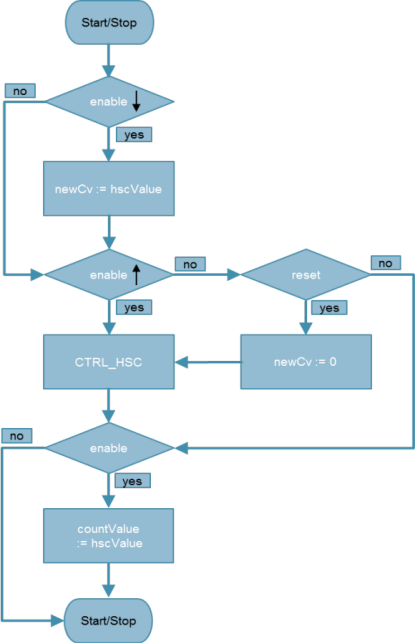
A negative edge at the "enable" input transfers the current value of the high-speed counter to the counter value "newCV".
A positive edge at the "enable" input sets the high-speed counter to the store counter value "newCV" with the help of the SFB "CTRL_HSC".
With the Reset demand ("reset") the counter value "newCV" is set to 0 before it is transferred to the high-speed counter.
When "enable" = TRUE, the value of the high-speed counter is transferred to the "countValue" output.
Therefore with "enable" = TRUE the counter value of the high-speed counter is identical to the "countValue" output. Only when "enable" = FALSE does the high-speed counter count on in comparison to the "countValue" output.
In this way, when doing the event configuration of the high-speed counter the tag at the "enable" input must also be taken into account.
https://support.industry.siemens.com/cs/attachments/109479811/109479811_S7-1200_HscGate.zip
CTRL_HSC (Control high-speed counter) instruction
https://support.industry.siemens.com/cs/mdm/109478121?c=72565309451&lc=en-WW |
|
| Back to top |
|
 |
maersk
Member 3
Joined: 17 Aug 2014
Posts: 891
|
| Posted: 21/06/2018 16:59 Post subject: S7-1200: Application Examples for High-Speed Counters (HSC) |
|
|
S7-1200: Application Examples for High-Speed Counters (HSC)
https://support.industry.siemens.com/cs/document/109742346/
This application example presents different possible applications for high-speed counters (HSC) of an S7-1200.
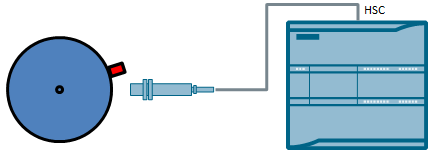
Example 1: Measuring the speed in case of only one pulse or a few pulses per rotation
In the first example, the instruction "CTRL_HSC_EXT" is used to determine the speed of a rotary motion in case of only one pulse or a few pulses per rotation.
Example 2: Determining the length by means of an HW gate
The second example explains the use of an HW gate. In this case, the pulses of an incremental encoder are counted as long as a light barrier detects an object. The number of pulses is used to calculate the size of an object given a known length of travel per pulse.

Example 3: Determining the velocity by means of an HW gate
In the third example, the pulses of an incremental encoder (PWM) of the S7-1200 are counted by means of the HW gate as long as a light barrier detects an object. The number of pulses and the cycle time of the PWM signal are used to determine the duration of the High signal at the HW gate. The velocity will be calculated from the duration and the defined known size of an object.

Documentation and example project
https://support.industry.siemens.com/cs/attachments/109742346/109742346_HSC_S7_1200_DOKU_V10_en.pdf
https://support.industry.siemens.com/cs/attachments/109742346/109742346_HSC_S7_1200_CODE_v10.zip |
|
| Back to top |
|
|
maersk
Member 3
Joined: 17 Aug 2014
Posts: 891
|
| Posted: 21/06/2018 17:01 Post subject: S7-1200 Length and Speed Measurement using HSC |
|
|
How do you realize Length and Speed Measurement using High-Speed Counters of SIMATIC S7-1200?
https://support.industry.siemens.com/cs/document/109754525/
In most cases, high-speed counters are used in conjunction with a rotary encoder to measure motor speed or the distance or length of workpieces on a conveyor belt. Using the following example, the length and speed measurement is shown strikingly by the high-speed counters, by the simplest means, such as the integrated PWM generator of the S7-1200 and light barriers.

The device is a sloping aluminum rail on which a pencil is passed through two light barriers (mounted on a board). The light barriers are connected to the digital inputs of the S7-1200. A pulse generator of the S7-1200 outputs constant digital time pulses via pulse width modulation (PWM). The pulse output is fed back to the digital input of the high-speed counter (HSC). When the first light barrier (gate) is darkened, the high-speed counter measures the number of pulses. A second light barrier (capture), at a known distance from the gate light barrier, detects the speed of the pencil. The length of the pencil can be determined from the speed and time of darkening and displayed on an HMI panel.
The pencil is accelerated by the inclined plane and can also be decelerated by a magnet (principle: eddy current brake) or can be re-accelerated with a tensioning device (principle: bow and arrow). A cardboard tunnel is mounted directly in front of the board to guide the pencil and protect the light barriers
https://www.youtube.com/watch?v=eB-k6HW58xA
Downloads
https://support.industry.siemens.com/cs/attachments/109754525/109754525_S71200_HSC_CalcVeloLength_DOC_V10_en.pdf
https://support.industry.siemens.com/cs/attachments/109754525/109754525_S71200_HSC_CalcVeloLength_TiaV15_PROJ_V10.zip
Further Information
https://support.industry.siemens.com/cs/document/109742346/s7-1200%3A-application-examples-for-high-speed-counters
https://support.industry.siemens.com/cs/attachments/109741593/s71200_system_manual_en-US_en-US.pdf |
|
| Back to top |
|
|
puno
Junior

Joined: 28 Sep 2015
Posts: 14
|
| Posted: 22/06/2018 13:04 Post subject: |
|
|
| Thank you! |
|
| Back to top |
|
|
|

 FAQ
FAQ Search
 Memberlist
 Usergroups
 Register
 Profile
 Log in to check your private messages
 Log in


