| View previous topic :: View next topic |
| Author |
Message |
grig100
Member 3


Joined: 01 Jan 2015
Posts: 752
|
 Posted: 21/12/2015 14:37 Post subject: FTP communication with S7-1500 and CP 1543-1 Posted: 21/12/2015 14:37 Post subject: FTP communication with S7-1500 and CP 1543-1 |
 |
|
FTP communication with S7-1500 and CP 1543-1
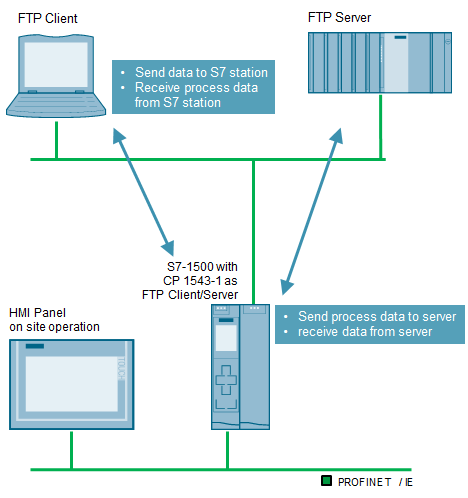
This application example introduces an example project which illustrates how to realize FTP communication with an S7-1500 and CP 1543-1. Based on two scenarios, we show you how to handle the FTP server and FTP client functionality.
S7-1500 as FTP server:
The S7-1500 station is the FTP server via CP 1543-1 and can either receive data from an FTP client or send data to an FTP client upon request.
S7-1500 as FTP client:
The S7-1500 station is the FTP client via CP 1543-1 and can execute the following FTP commands:
STORE (the client saves a file on the server)
RETRIEVE (the client requests a file from the server)
DELETE (the client deletes a file from the server)
APPEND (the client attaches data to a file on the server)
RETRIEVE_PART (the client requests parts of the data of a file from the server)
The FTP client functionality is encapsulated in a compact function block (“FTP_1500_Communication”), which performs all the necessary steps for coordinating the FTP communication for you. This function block can be easily integrated into some programs. The scenarios can be easily demonstrated via a simple user interface.

https://support.industry.siemens.com/cs/attachments/103550797/103550797_FTP_1500_DOKU_V20_en.pdf
https://support.industry.siemens.com/cs/attachments/103550797/103550797_FTP_1500_CODE_V20.zip
Check also:
FTP communication with S7-300/400
https://support.industry.siemens.com/cs/attachments/21605954/21605954_FTP_300_DOKU_V20_en.pdf
https://support.industry.siemens.com/cs/attachments/21605954/21605954_FTP_300_CODE_V20.zip
FTP Client Communication with S7-1200/1500
https://support.industry.siemens.com/cs/attachments/81367009/81367009_FTP_S7-1X00_DOKU_V2_0_en.pdf
https://support.industry.siemens.com/cs/attachments/81367009/81367009_FTP_S7-1X00_CODE_V1_0.zip
Last edited by grig100 on 25/04/2018 16:55; edited 1 time in total |
|
| Back to top |
|
 |
grig100
Member 3
Joined: 01 Jan 2015
Posts: 752
|
| Posted: 31/07/2017 12:25 Post subject: FTP Client Communication with S7-1200/1500 |
|
|
FTP Client Communication with S7-1200/1500
https://support.industry.siemens.com/cs/document/81367009/
The widely distributed File Transfer Protocol (FTP) offers you the possibility of storing data on almost any server system of all the known operating systems.

In this application example we provide you with a function block (Ftp1X00Cmd) that implements a FTP client into the S7-CPU. The block can perform the following FTP commands:
CONNECT
STORE
RETRIEVE
DELETE
APPEND
DISCONNECT
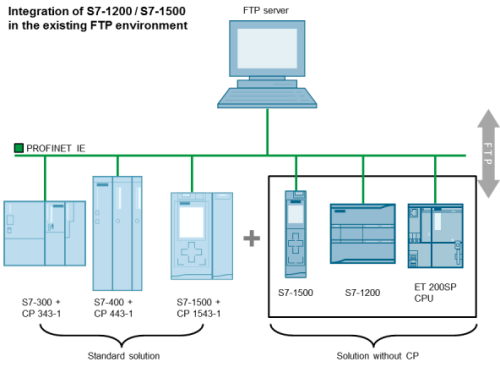
The following screen shows what components can be used by this application example in the FTP communication.
The FTP block introduced here enables the very easy use of a S7-1200/S7-1500 CPU as FTP client with the most frequent FTP commands. The FTP command set corresponds to that of the S7-300/400/1500 CPs.
Documentation and example project Code for STEP 7 V14 SP1
https://support.industry.siemens.com/cs/attachments/81367009/81367009_FTP_S7-1X00_DOKU_V3_0_en.pdf
https://support.industry.siemens.com/cs/attachments/81367009/81367009_FTP_S7_1X00_PROJ_V2_0.zip
Last edited by grig100 on 25/04/2018 16:55; edited 1 time in total |
|
| Back to top |
|
|
grig100
Member 3
Joined: 01 Jan 2015
Posts: 752
|
| Posted: 31/07/2017 12:26 Post subject: FTP communication with S7-300/400 |
|
|
FTP communication with S7-300/400
https://support.industry.siemens.com/cs/document/21605954/
This application example introduces an example project which illustrates how to realize FTP communication with an S7-300 or S7-400 and CP x43-1 Advanced. Based on two scenarios, we show you how to handle the FTP server and FTP client functionality.
S7-300/400 as FTP server:
The S7-300/400 station is the FTP server via CP x43-1 Advanced and can either receive data from an FTP client or send data to an FTP client upon request.
S7-300/400 as FTP client:
The S7-300/400 station is FTP client via CPx43-1 Advanced and can execute the following FTP commands:
STORE (the client saves a file on the server)
RETRIEVE (the client requests a file from the server)
DELETE (the client deletes a file from the server)
APPEND (the client attaches data to a file on the server)
RETRIEVE_PART (the client requests parts of the data of a file from the server)
The FTP client functionality is encapsulated in a compact function block (“FTP_1500_Communication”), which performs all the necessary steps for coordinating the FTP communication for you. This function block can be easily integrated into some programs. The scenarios can be easily demonstrated via a simple user interface.
The figure below shows the pictorial schematic and the hardware combination of this example application.

STEP 7 V13 example project with S7-300/400 and CP x43-1 Advanced
https://support.industry.siemens.com/cs/attachments/21605954/21605954_FTP_300_DOKU_V20_en.pdf
https://support.industry.siemens.com/cs/attachments/21605954/21605954_FTP_300_CODE_V20.zip
Last edited by grig100 on 25/04/2018 16:56; edited 1 time in total |
|
| Back to top |
|
|
grig100
Member 3
Joined: 01 Jan 2015
Posts: 752
|
| Posted: 31/07/2017 12:29 Post subject: FTP communication with S7-1500 and CP 1543-1 |
|
|
FTP communication with S7-1500 and CP 1543-1
https://support.industry.siemens.com/cs/document/103550797/
This application example introduces an example project which illustrates how to realize FTP communication with an S7-1500 and CP 1543-1. Based on two scenarios, we show you how to handle the FTP server and FTP client functionality.
S7-1500 as FTP server:
The S7-1500 station is the FTP server via CP 1543-1 and can either receive data from an FTP client or send data to an FTP client upon request.
S7-1500 as FTP client:
The S7-1500 station is the FTP client via CP 1543-1 and can execute the following FTP commands:
STORE (the client saves a file on the server)
RETRIEVE (the client requests a file from the server)
DELETE (the client deletes a file from the server)
APPEND (the client attaches data to a file on the server)
RETRIEVE_PART (the client requests parts of the data of a file from the server)
The FTP client functionality is encapsulated in a compact function block (“FTP_1500_Communication”), which performs all the necessary steps for coordinating the FTP communication for you. This function block can be easily integrated into some programs. The scenarios can be easily demonstrated via a simple user interface.
The figure below shows the pictorial schematic and the hardware combination of this example application.

STEP 7 Project for TIA V13 SP1
https://support.industry.siemens.com/cs/attachments/103550797/103550797_FTP_1500_DOKU_V20_en.pdf
https://support.industry.siemens.com/cs/attachments/103550797/103550797_FTP_1500_CODE_V20.zip |
|
| Back to top |
|
|
grig100
Member 3
Joined: 01 Jan 2015
Posts: 752
|
| Posted: 25/04/2018 16:57 Post subject: FTP Client Communication with S7-1200/1500 |
|
|
FTP Client Communication with S7-1200/1500
https://support.industry.siemens.com/cs/document/81367009/
The widely distributed File Transfer Protocol (FTP) offers you the possibility of storing data on almost any server system of all the known operating systems.
In this application example we provide you with a function block (Ftp1X00Cmd) that implements a FTP client into the S7-CPU. The block can perform the following FTP commands:
CONNECT
STORE
RETRIEVE
DELETE
APPEND
DISCONNECT
The following screen shows what components can be used by this application example in the FTP communication.

The FTP block introduced here enables the very easy use of a S7-1200/S7-1500 CPU as FTP client with the most frequent FTP commands. The FTP command set corresponds to that of the S7-300/400/1500 CPs.
Documentation and example project v14SP1 and V15
https://support.industry.siemens.com/cs/attachments/81367009/81367009_FTP_S7-1X00_DOKU_V3_4_en.pdf
https://support.industry.siemens.com/cs/attachments/81367009/81367009_FTP_S7_1X00_PROJ_V3_4_TIA_V14.zip
https://support.industry.siemens.com/cs/attachments/81367009/81367009_FTP_S7_1X00_PROJ_V3_4_TIA_V15.zip
Other examples can be found here
https://support.industry.siemens.com/cs/document/21605954/ftp-communication-with-s7-300-400
https://support.industry.siemens.com/cs/document/103550797/ftp-communication-with-s7-1500-and-cp-1543-1 |
|
| Back to top |
|
|
grig100
Member 3
Joined: 01 Jan 2015
Posts: 752
|
| Posted: 16/02/2021 19:10 Post subject: FTP Client Communication |
|
|
FTP Client Communication with S7-1200/1500
https://support.industry.siemens.com/cs/document/81367009/
FTP communication with S7-300 / 400
https://support.industry.siemens.com/cs/document/21605954/
FTP/FTPS communication with S7-1500 and CP 1543-1
https://support.industry.siemens.com/cs/document/103550797/
Download
https://ulozto.net/tamhle/w6OFjjasvPcX/
https://fastshare.cz/15958823/103550797-ftp-1500-doku-v20-en.pdf
https://fastshare.cz/15958824/103550797-ftp-1500-code-v20.zip
https://fastshare.cz/15958825/103550797-ftp-cp-lib-v30.zip
https://fastshare.cz/15958826/103550797-ftp-cp-doc-v30-en.pdf
https://fastshare.cz/15958827/21605954-ftp-300-code-v30.zip
https://fastshare.cz/15958828/21605954-ftp-300-doc-v30-en.pdf
https://fastshare.cz/15958829/81367009-ftp-s7-1x00-proj-v50.zip
https://fastshare.cz/15958830/81367009-ftp-s7-1x00-doku-v50-en.pdf
https://anonfiles.com/x3d5q7Jbp3/103550797_FTP_1500_DOKU_V20_en_pdf
https://anonfiles.com/z1ddqaJfpc/21605954_FTP_300_CODE_V30_zip
https://anonfiles.com/19d0qcJ3pe/103550797_FTP_CP_LIB_V30_zip
https://anonfiles.com/3bdaqcJ8p1/103550797_FTP_CP_DOC_V30_en_pdf
https://anonfiles.com/B2d3q8J1p7/81367009_FTP_S7-1X00_DOKU_V50_en_pdf
https://anonfiles.com/Ffdcq2J3p0/21605954_FTP_300_DOC_V30_en_pdf
https://anonfiles.com/H7d4q8J9p3/81367009_FTP_S7_1X00_PROJ_V50_zip
https://anonfiles.com/T3dfq3J1pf/103550797_FTP_1500_CODE_V20_zip
[URL=https://www.file-upload.net/download-14486813/103550797_FTP_1500_DOKU_V20_en.pdf.html]103550797_FTP_1500_DOKU_V20_en.pdf[/URL]
[URL=https://www.file-upload.net/download-14486814/103550797_FTP_1500_CODE_V20.zip.html]103550797_FTP_1500_CODE_V20.zip[/URL]
[URL=https://www.file-upload.net/download-14486812/103550797_FTP_CP_LIB_V30.zip.html]103550797_FTP_CP_LIB_V30.zip[/URL]
[URL=https://www.file-upload.net/download-14486815/103550797_FTP_CP_DOC_V30_en.pdf.html]103550797_FTP_CP_DOC_V30_en.pdf[/URL]
[URL=https://www.file-upload.net/download-14486816/21605954_FTP_300_CODE_V30.zip.html]21605954_FTP_300_CODE_V30.zip[/URL]
[URL=https://www.file-upload.net/download-14486817/21605954_FTP_300_DOC_V30_en.pdf.html]21605954_FTP_300_DOC_V30_en.pdf[/URL]
[URL=https://www.file-upload.net/download-14486819/81367009_FTP_S7_1X00_PROJ_V50.zip.html]81367009_FTP_S7_1X00_PROJ_V50.zip[/URL]
[URL=https://www.file-upload.net/download-14486818/81367009_FTP_S7-1X00_DOKU_V50_en.pdf.html]81367009_FTP_S7-1X00_DOKU_V50_en.pdf[/URL] |
|
| Back to top |
|
|
|

 FAQ
FAQ Search
 Memberlist
 Usergroups
 Register
 Profile
 Log in to check your private messages
 Log in


