 |
plc.myforum.ro
PLCs users www.plc.myforum.ro!
|
| View previous topic :: View next topic |
| Author |
Message |
gaty
Member


Joined: 01 Mar 2017
Posts: 188
|
 Posted: 11/02/2020 20:06 Post subject: faults in the operation of WinCC V7.x and Runtime Prof TIA Posted: 11/02/2020 20:06 Post subject: faults in the operation of WinCC V7.x and Runtime Prof TIA |
 |
|
How can faults in the operation of WinCC on a computer in a domain be analyzed?
https://support.industry.siemens.com/cs/document/109774007/
Analysis of possible functional limitations of WinCC on a computer that is a member of a Windows domain.
Description
You are operating the SIMATIC WinCC operating and monitoring software on a computer that is a member of a Windows domain. To enable the function of SIMATIC WinCC, the "Security Controller" (SeCon) software makes several changes to the security settings of the operating system during the installation of WinCC.
Membership in the domain also means that the computer receives specifications from the domain's group policy. The specifications from the domain's group policy can overwrite the changes of the SeCon software and so impede the operation of WinCC.
Validity
SIMATIC WinCC V7.x
WinCC Runtime Professional (TIA)
Remedy
Rough analysis
Analyze the effects of the domain's group policy on the operation of SIMATIC WinCC by alternately applying the SeCon software settings and the settings of the group policy. Check the WinCC functions after each application of the different settings.
To apply the settings you log on to the WinCC computer with a domain user. The domain user requires at least standard user rights on the WinCC computer. If the WinCC Runtime is running, terminate it.
Apply settings of the group policy
To apply the domain's group policy settings, enter the gpupdate command in a command line entry window. This overwrites the settings of the SeCon software.
Apply settings of the SeCon software
You apply the SeCon software settings by proceeding as described in the following table. This overwrites the settings of the domain's group policy.
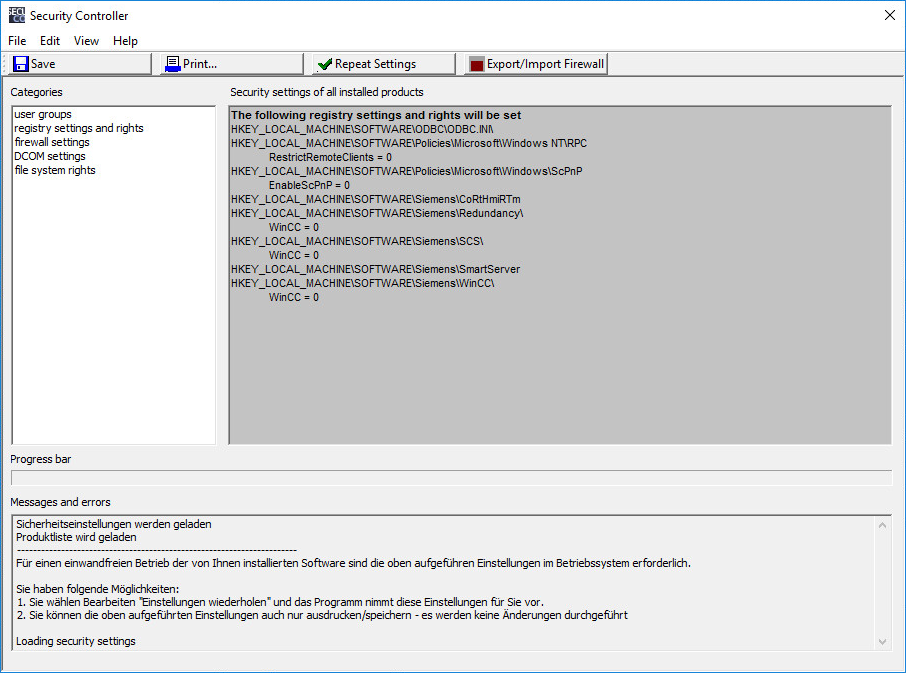
1.Start the "Security Controller" program via
Start -> All Programs -> Siemens Automation -> Security Controller.
Result
The "Security Controller" dialog window opens as in Fig. 1.
2.
In the "Security Controller" dialog window you click "Repeat Settings".
Result
The local security settings are reset.
Note
If no category is selected, the settings of all categories are reset.
Remain logged on to the WinCC computer and do not restart the WinCC computer so that the settings just set are not automatically overwritten again by the domain's group policy.
After you have applied the domain's group policy settings or the SeCon software settings, you activate the WinCC Runtime. Then check the proper function of WinCC.
If WinCC is now working properly, the problematic settings of the domain's group policy are to be found in the categories of the SeCon software that have just been applied.
Narrow down further the range of problematic settings of the domain's group policy. Apply the settings of the domain's group policy again and this time select less or other categories in the SeCon software (table, step 2). Repeat this process until no further restriction via the categories is possible.
Detailed analysis
For detailed analysis, save the settings of the affected categories of the SeCon software in a file or print them out. Contact your domain administrator and compare the settings of the SeCon software with the GPOs of the domain.
Customize the domain's group policy together with your domain administrator if required. |
|
| Back to top |
|
 |
|
|
You cannot post new topics in this forum
You cannot reply to topics in this forum
You cannot edit your posts in this forum
You cannot delete your posts in this forum
You cannot vote in polls in this forum
|
Powered by phpBB © 2001, 2005 phpBB Group
Fa-ti si tu propriul forum GRATUIT, pe www.myforum.ro |
 FAQ
FAQ Search
 Memberlist
 Usergroups
 Register
 Profile
 Log in to check your private messages
 Log in


