| View previous topic :: View next topic |
| Author |
Message |
maersk
Member 3


Joined: 17 Aug 2014
Posts: 891
|
 Posted: 12/04/2018 18:19 Post subject: Export of WinCC/CAS archive data with a separate application Posted: 12/04/2018 18:19 Post subject: Export of WinCC/CAS archive data with a separate application |
 |
|
Export of WinCC/CAS archive data with a separate application
https://support.industry.siemens.com/cs/document/35840700/
The application example shows how to access the compressed and binary-coded WinCC archive data with the aid of your own C# application. The data are then available in a format suitable for further processing.
The WinCC Runtime database is segmented for WinCC V6.0 and higher. This means that the data is stored in several archive segments (several databases), partly in compressed, binary form.
Both WinCC and the WinCC “WinCC Connectivity Pack” option provide the WinCC OLE DB Provider. It enables direct reading of the Tag Logging and Alarm Logging Runtime data. The WinCC OLE DB Provider provides the data from the respective archive segments in decompressed, decrypted form. Thus the user does not have to worry about the segmentation of the archives and their encryption when accessing the Tag Logging and Alarm Logging data.

Reading the archive of the tag and alarm logging files using an external application which uses the WinCC OLE DB Provider and then exports the data in a compus suitable for further processing (e.g. *.csv).
To read out the archives and export them for further processing, the C# application “WinCCcopack.exe” was created.
This application covers the following key points:
| Code: | Independent application
Establishing a connection with the OLE DB Provider
Reading out the data from the WinCC Runtime database of an OS server or a CAS (Central Archive Server)
Accessing the archives by logging on as a database user with password
Additional option to read out user archives
Using the time filter
Option to export the read out data as *.csv or using CrystalReports |

Validity:
Created with: Visual Studio 2005 Professional and Crystal Report 2008
Tested with: SIMATIC WinCC V6.2 or V7.0.
Documentation C# application
https://support.industry.siemens.com/cs/attachments/35840700/35840700_wincc_copackcsharp_de.pdf
C# application (including C# project)
https://support.industry.siemens.com/cs/attachments/35840700/wincccopack.zip |
|
| Back to top |
|
 |
stromboli
Junior

Joined: 30 May 2015
Posts: 15
|
| Posted: 26/06/2019 11:31 Post subject: Export archive data using SIMATIC WinCC/Connectivity Pack |
|
|
Export of archive data using the SIMATIC WinCC/Connectivity Pack (OLE DB Provider)
https://support.industry.siemens.com/cs/document/38132261/export-of-archive-data-using-the-simatic-wincc-connectivity-pack- (ole-db-provider)
The application example shows a reverse osmosis plant. The plant has a motor and several valves to control the flows within the plant. The mapping of the analog measuring points, the states of valves and motors, as well as the states of the system, is carried out via VB script. The procedures for the state and analog measurement loop simulation are called via triggered actions. Thus a complete simulation of the reverse osmosis plant is guaranteed. The values of the analog measuring points are stored via a process value archive and the status messages via a alarm archive.
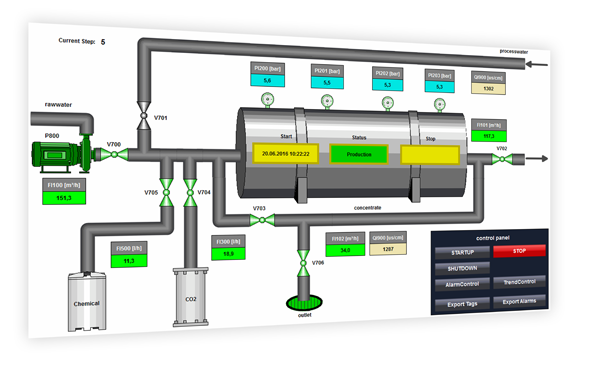
Various solutions are conceivable
Export via VB-Script from the WinCC Runtime
Export via MS SQL Management Studio
Export via Excel client
For the export the option SIMATIC WinCC\Connectivity Pack was used in the application example. The WinCC OLE DB provider is used to access the compressed and binary-coded WinCC archive data. The application example shows three solutions for exporting archive data, which are also described in the documentation for the application example.
Export via VB-Script from the WinCC Runtime
With the WinCC project engineering for this application example, the export of the WinCC archive data into a CSV file is realized. The corresponding procedures were created with VB script.
Export via MS SQL Management Studio
You can view the WinCC database archives directly via MS SQL Management Studio. In addition to visualization, this offers the possibility to export SQL databases in various formats. The application example describes the export of the WinCC archive data into a CSV file.
Export via Excel client
In this application example we provide you with two Excel clients for download:
• The "Osmosis" client has a similar representation as the WinCC project of the application example and is also optimized for it.
• The "Universal" client can be used independently of the respective WinCC project.
The Excel clients for this application example are used to export the WinCC archive data to Excel. The corresponding procedures were created with Excel macros (VBA) and contain the following functions depending on the client:
- Automatic readout of most of the information required to establish the connection
- Establishing a Connection using the OLE DB Provider
- Reading the data from the WinCC runtime database of an OS server
- Individual compilation of process value and alarm information
- Possibility of interpolation in case of missing values (process values)
- Access to the archives of different languages (alarms)
- Use of filters such as time span and message type (alarms)
Documentation and example project
Documentation of reverse osmosis plant:
https://support.industry.siemens.com/cs/attachments/38132261/38132261__Application_Reverse_Osmosis_DOC_en.pdf
Example project WinCC V7.4 SP1:
https://support.industry.siemens.com/cs/attachments/38132261/38132261_Application_Reverse_Osmosis_PROJ.zip
Excel clients
https://support.industry.siemens.com/cs/attachments/38132261/38132261_Application_Reverse_Osmosis_XLS.zip
Further information
Application example “Export of WinCC/CAS archive data with a separate application”
https://support.industry.siemens.com/cs/document/35840700/export-of-wincc-cas-archive-data-with-a-separate-application
Application example “WinCC/IndustrialDataBridge: Writing data from SIMATIC WinCC or from SIMATIC controllers in MS Office files”
https://support.industry.siemens.com/cs/document/109483465/wincc-industrialdatabridge%3a-writing-data-from-simatic-wincc-or-from-simatic-controllers-in-ms-office-files
Application example "OPC UA ExcelClient for WinCC V7.4 SP1"
https://support.industry.siemens.com/cs/document/109752976/opc-ua-excel-client-for-wincc-v7.4-sp1 |
|
| Back to top |
|
|
maersk
Member 3
Joined: 17 Aug 2014
Posts: 891
|
| Posted: 06/08/2020 17:42 Post subject: |
|
|
https://anonfiles.com/f6XcN7K6o1/38132261_Application_Reverse_Osmosis_XLS_zip
https://anonfiles.com/n8X4N1K7o5/38132261_Application_Reverse_Osmosis_DOC_en_pdf
https://anonfiles.com/93X4N6K6o5/38132261_Application_Reverse_Osmosis_PROJ_zip |
|
| Back to top |
|
|
maersk
Member 3
Joined: 17 Aug 2014
Posts: 891
|
| Posted: 06/08/2020 17:43 Post subject: Re: Export of WinCC/CAS archive data with a separate applica |
|
|
| maersk wrote: | Export of WinCC/CAS archive data with a separate application
https://support.industry.siemens.com/cs/document/35840700/
The application example shows how to access the compressed and binary-coded WinCC archive data with the aid of your own C# application. The data are then available in a format suitable for further processing.
The WinCC Runtime database is segmented for WinCC V6.0 and higher. This means that the data is stored in several archive segments (several databases), partly in compressed, binary form.
Both WinCC and the WinCC “WinCC Connectivity Pack” option provide the WinCC OLE DB Provider. It enables direct reading of the Tag Logging and Alarm Logging Runtime data. The WinCC OLE DB Provider provides the data from the respective archive segments in decompressed, decrypted form. Thus the user does not have to worry about the segmentation of the archives and their encryption when accessing the Tag Logging and Alarm Logging data.
Reading the archive of the tag and alarm logging files using an external application which uses the WinCC OLE DB Provider and then exports the data in a format suitable for further processing (e.g. *.csv).
To read out the archives and export them for further processing, the C# application “WinCCcopack.exe” was created.
This application covers the following key points:
| Code: | Independent application
Establishing a connection with the OLE DB Provider
Reading out the data from the WinCC Runtime database of an OS server or a CAS (Central Archive Server)
Accessing the archives by logging on as a database user with password
Additional option to read out user archives
Using the time filter
Option to export the read out data as *.csv or using CrystalReports |
Validity:
Created with: Visual Studio 2005 Professional and Crystal Report 2008
Tested with: SIMATIC WinCC V6.2 or V7.0.
Documentation C# application
https://support.industry.siemens.com/cs/attachments/35840700/35840700_wincc_copackcsharp_de.pdf
C# application (including C# project)
https://support.industry.siemens.com/cs/attachments/35840700/wincccopack.zip |
https://anonfiles.com/T1YaN4Kbo5/wincccopack_zip
https://anonfiles.com/V8Y4N7K0o0/35840700_wincc_copackcsharp_en_pdf |
|
| Back to top |
|
|
|

 FAQ
FAQ Search
 Memberlist
 Usergroups
 Register
 Profile
 Log in to check your private messages
 Log in


