 |
plc.myforum.ro
PLCs users www.plc.myforum.ro!
|
| View previous topic :: View next topic |
| Author |
Message |
fritz
Member


Joined: 26 Dec 2015
Posts: 179
|
 Posted: 02/11/2022 19:43 Post subject: event IDs: "16# 08:9000" to "16# 08:9013" Posted: 02/11/2022 19:43 Post subject: event IDs: "16# 08:9000" to "16# 08:9013" |
 |
|
What is the meaning of the following event IDs: "16# 08:9000" to "16# 08:9013" in the SIMATIC S7?
https://support.industry.siemens.com/cs/document/109764509/
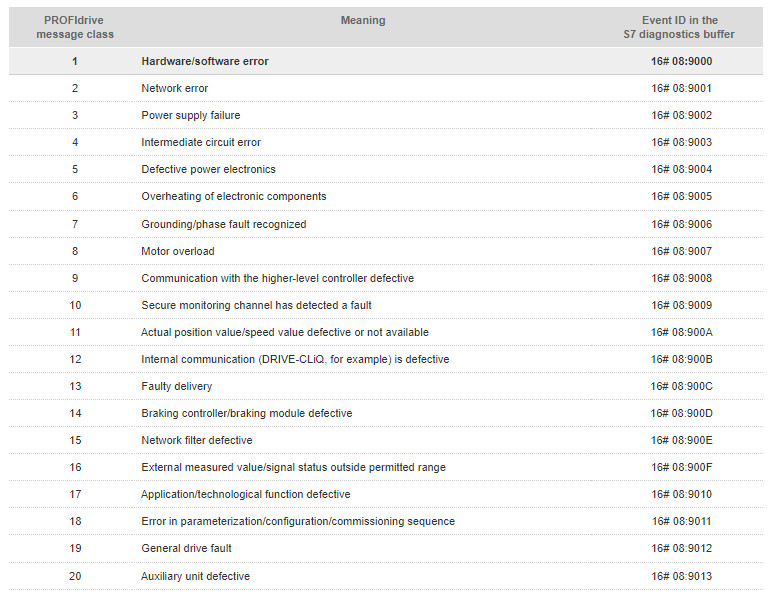
The event IDs "16# 08:9000" to "16# 08:9013" indicate faults and warnings for a drive.
When the PROFIdrive standard diagnostics (also called channel diagnostics) is enabled (see Entry ID 109486142), faults and warnings from the drives are transferred as corresponding entries to the diagnostics system of the S7 CPU and displayed in the diagnostics buffer, for example.
The faults and warnings of the SINAMICS are collected in PROFIdrive message classes as shown in the following table.
Warning
The PROFIdrive message class 17 (application/technological function defective and with this the event ID 16# 08:9010) always refers to functions of the SINAMICS (snapping, kinetic buffering, etc.) and not to a technology object in the S7-CPU.
In these case a (set) limit (for example, position, velocity, torque ...) has been exceeded in the converter. The limit concerned has to be determined in the relevant component (SINAMICS) and checked. The setpoint value specification of the higher-level controller (SIMATIC) should also be checked and changed accordingly.
Example of an entry in the diagnostics buffer (for the drive you see A30016 "Power unit: Load supply switched out"):
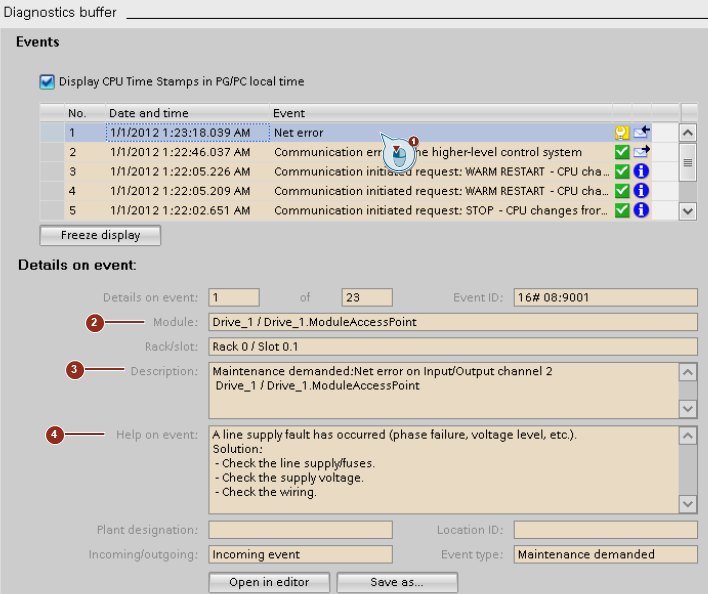
Fig. 1
Select the event to have more information displayed.
The modules that triggered the event can be seen here.
The display module name is the name you assigned to the drive in the project.
In the case of drives that consist of numeroase drive objects the name of the DO concerned is also displayed.
The description explains the event.
Under "Help on event:" you have tips about how to clear the error.
In the case of such events in the diagnostics buffer of the S7-CPU you should always check the active messages in the drive that provide detailed information. Since the diagnostics requests (warnings in the drive) do not need to be acknowledged, they can no longer be seen in the message window of the drive.
Example of the "Active alarms" window in the start drive:
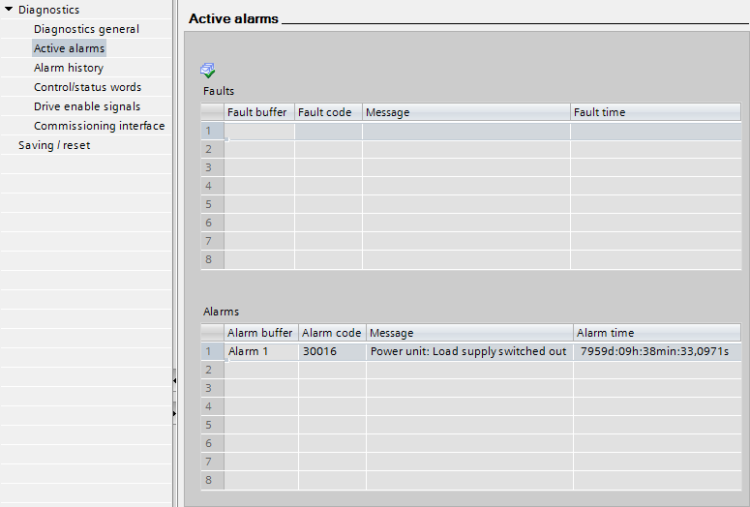
Fig. 2
In the start drive, warnings that are no longer current and acknowledged faults can be read out under "Alarm history" or in the alarm or fault memory of the drive. With SINAMICS G/S the alarm memory is in r2122[0..63] and the fault memory is in r0945[0..63]. More information is available in the list manuals of the SINAMICS G/S drives. (search for "SINAMICS G120C List Manual", for example.)
Further information about the diagnostics of SINAMICS drives:
SINAMICS S, SINAMICS G
With SINAMICS S and SINAMICS G the time stamp for faults and warnings is normally given in operating hours. However, you can change the display with a time synchronization with the SIMATIC. Further information is available in our FAQ in Entry https://support.industry.siemens.com/cs/document/109486142/why-does-the-s7-cpu-show-a-fault-or-diagnostics-request-when-there-is-a-fault-or-warning-on-a-sinamics
Diagnostics with the commissioning tool "SINAMICS MICROMASTER STARTER"
In the detailed display (lower area of the workbench) you see tabs for Diagnostics, Alarms, Export/Import and Drive Control Panel. Under Diagnostics you can find the current messages. Furthermore, there is a filter option for seeing the alarm history.
The commissioning tool "SINAMICS MICROMASTER STARTER" can be downloaded in Entry
https://support.industry.siemens.com/cs/document/26233208/sinamics-starter
Diagnostics with "SINAMICS Startdrive“
If there are faults or warnings on the device or there is need for maintenance, corresponding indications are displayed via icons in the Startdrive. The icons have different colors depending on the severity. The colored icons are displayed in the Project Tree, Device View and Device Overview.
For the download you search for "Startdrive" and in the search area you select "Download".
To download, search for "Startdrive" and select the "Download" search area. Version V17 is available in Entry ID: https://support.industry.siemens.com/cs/document/109794362/sinamics-startdrive-v17
You can find information on diagnostics in the "SINAMICS S120 Commissioning Manual with Startdrive" manual in Chapter https://support.industry.siemens.com/cs/ww/en/view/109781583/123745364747
Diagnostics with the web server
As of firmware V4.7, diagnostics can also be carried out via the integrated web server. You can find additional information on the diagnostics display of the integrated web server in the "SINAMICS S120 Function Manual for Drive Functions" manual under Web server.
https://support.industry.siemens.com/cs/ww/en/view/109781535/134277969291
SINAMICS S210
The diagnostics is done via the web server integrated in the converter. You can find additional information on the diagnostics display of the integrated web server in the "SINAMICS S210/SIMOTICS S-1FK2 and S-1FT2" manual,
in chapter Displaying messages
and in chapter Commissioning and diagnostics using the web server
https://support.industry.siemens.com/cs/ww/en/view/109801184/158586903819
https://support.industry.siemens.com/cs/ww/en/view/109801184/157394711051
SINAMICS V90
Diagnostics of drive V90 is done using the commissioning tool "V-ASSISTANT". More information on the diagnostics display of the integrated web server is available in the online help under Entry ID: https://support.industry.siemens.com/cs/document/109795532/sinamics-v90-sinamics-v-assistant-online-help
in Chapter "3.6 Warning window".
You can download the commissioning tool "V-ASSISTANT" in Entry ID
https://support.industry.siemens.com/cs/document/109738387/sinamics-v-assistant-commissioning-tool |
|
| Back to top |
|
 |
|
|
You cannot post new topics in this forum
You cannot reply to topics in this forum
You cannot edit your posts in this forum
You cannot delete your posts in this forum
You cannot vote in polls in this forum
|
Powered by phpBB © 2001, 2005 phpBB Group
Fa-ti si tu propriul forum GRATUIT, pe www.myforum.ro |
 FAQ
FAQ Search
 Memberlist
 Usergroups
 Register
 Profile
 Log in to check your private messages
 Log in


