 |
plc.myforum.ro
PLCs users www.plc.myforum.ro!
|
| View previous topic :: View next topic |
| Author |
Message |
gamax
Member

Joined: 15 Jul 2016
Posts: 131
|
 Posted: 03/01/2018 15:36 Post subject: Evaluate the "RUN / STOP" mode of the CPU via an H Posted: 03/01/2018 15:36 Post subject: Evaluate the "RUN / STOP" mode of the CPU via an H |
 |
|
How do you evaluate the "RUN / STOP" mode of the CPU via an HMI operator panel?
https://support.industry.siemens.com/cs/document/109481628/how-do-you-evaluate-the-run-stop-mode-of-the-cpu-via-an-hmi-operator-panel
Example 1
There are different ways of evaluating the "RUN / STOP" operating mode of a CPU.
System diagnostics is integrated by default in the firmware of the CPU S7-1500 and works independently of the cyclic user program.
https://support.industry.siemens.com/cs/document/68011497/system-diagnostics-with-s7-1500-and-tia-portal
System Diagnostics with S7-1500 and TIA Portal
In the automation technology, diagnostics of devices, modules and networks are gaining importance. Diagnostics over the whole system can minimize downtimes. The automation task consists of monitoring a PROFINET IO peripheral system with various network components. The possibility of an individual diagnosis of the components and a detailed diagnosis of the complete system should be guaranteed. The priority is on the collection and display of the diagnostic information.

The system diagnostics are integrated in the firmware of the CPU S7-1500 and work independently from cyclic user programs. Therefore it is also available in the CPU operating mode STOP. Any faults are detected immediately and reported to the higher-level HMI device, the web server, the display of the CPU S7-1500, the LED displays in the module concerned and in the TIA Portal even in the operating mode STOP. Therefore, the system diagnostics are always synchronous with the actual system status.

This application describes:
the various display possibilities of the System Diagnostics
how you can configure the System Diagnostics quickly and easily, using a few examples
the System Diagnostics with the user program.
https://support.industry.siemens.com/cs/attachments/68011497/68011497_S7-1500_Diagnose_DOKU_v10_en.pdf
https://support.industry.siemens.com/cs/attachments/68011497/68011497_S7-1500_Diagnose_CODE_v10.zip
Example 2
Evaluation via the system function "GetPLCMode".
Supported hardware
S7-1200 and S7-1500 controllers
Basic Panel, Comfort Panel, KTP Mobile Panel
The example below uses the system function "GetPLCMode" and the area pointer "Coordination" for evaluating the "RUN/STOP" mode of the CPU. No special knowledge is necessary.
Program sequence
The "RUN/STOP" mode of the PLC is queried via the HMI system function "GetPLCMode".
To have the querying run automatically the "life bit" of the panel is evaluated via the "Coordination" area pointer. The life bit toggles between "0" and "1" in the cycle of 1 second independently of the status of the PLC.
The system function "GetPLCMode" is called at the "Life bit" tag under "Properties > Change Value". The system function outputs an integer value as a result.
4 = PLC in STOP
8 = PLC in RUN
A text is output via a symbolic IO field as a function of the integer value.

https://support.industry.siemens.com/cs/attachments/109481628/109481628_PLC_Status_WinCC_TIA_Internet_en.pdf
TP1200 Comfort Panel and KTP1200 Basic Panel each in conjunction with a CPU 1516
https://support.industry.siemens.com/cs/attachments/109481628/109481628_CODE_Internet.zip
Last edited by gamax on 02/10/2018 16:39; edited 2 times in total |
|
| Back to top |
|
 |
gamax
Member
Joined: 15 Jul 2016
Posts: 131
|
| Posted: 03/01/2018 15:39 Post subject: Connection box to which the KTP Mobile Panel is connected? |
|
|
How do you use the control program to determine the connection box to which the KTP Mobile Panel is connected?
https://support.industry.siemens.com/cs/document/109479251/
ou can read out the connection box ID via an integrated function on the KTP Mobile.
For this you configure an internal tag in the editor "Runtime settings > General > Identification".
If the KTP Mobile Panel is connected to the a connection box, then the ID set (adjusted) in the connection box is written to this internal tag. The purpose is to evaluate the read value in the PLC.
The read value of the "Box ID" is transferred to a tag with controller connection via a clock memory and the system function "SetTag". The clock memory byte defined in the hardware configuration of the CPU is used as the clock memory.
A comparison of the preset "Box ID" and the read "Box ID" generates a signal.
The connection is monitored in the second step: If the KTP Mobile is disconnected from the connection box , the signal or the evaluation of the "Box ID" has to be reset.
https://support.industry.siemens.com/cs/attachments/109479251/109479251_ConnectionBoxEvaluation_DOC_en.pdf
https://support.industry.siemens.com/cs/attachments/109479251/109479251_ConnectionBoxIvaluation_Code.zip |
|
| Back to top |
|
|
gamax
Member
Joined: 15 Jul 2016
Posts: 131
|
| Posted: 02/10/2018 16:45 Post subject: evaluate the "RUN / STOP" mode of the CPU via an H |
|
|
How do you evaluate the "RUN / STOP" mode of the CPU via an HMI operator panel?
https://support.industry.siemens.com/cs/document/109481628/how-do-you-evaluate-the-run-stop-mode-of-the-cpu-via-an-hmi-operator-panel
Evaluating the RUN / STOP mode of the CPU via the system function "GetPLCMode".
There are different ways of evaluating the "RUN / STOP" operating mode of a CPU.
Example 1
System diagnostics with S7-1500 and TIA Portal, Entry ID: 68011497
System diagnostics is integrated by default in the firmware of the CPU S7-1500 and works independently of the cyclic user program.
Example 2
Evaluation via the system function "GetPLCMode".
Supported hardware
| Code: | S7-1200 and S7-1500 controllers
Basic Panel, Comfort Panel, KTP Mobile Panel |
The following example uses the system function "GetPLCMode" and the area pointer "Coordination" for evaluating the "RUN/STOP" mode of the CPU. No singular knowledge is necessary.
Program sequence
| Code: | The "RUN/STOP" mode of the PLC is queried via the HMI system function "GetPLCMode".
To have the querying run cyclically and automatically, the "life bit" of the panel is evaluated via the "Coordination" area pointer. The "life bit" toggles between "0" and "1" in the cycle of 1 second independently of the status of the PLC.
The system function "GetPLCMode" is called each time the value of the "life bit" tag changes. The system function outputs an
"integer value" as a result.
4 = PLC in STOP
8 = PLC in RUN
The PLC status is output via a text list depending on the result. |
Configured plant picture
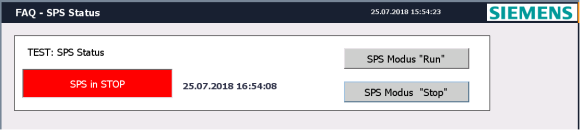
https://support.industry.siemens.com/cs/attachments/109481628/109481628_PLC_Status_WinCC_TIA_DOC_en.pdf
The ZIP file includes two sample projects
(Code 1: S7-1200 and KTP1200 Basic. Code 2: S7-1500 and TP1200 Comfort).
https://support.industry.siemens.com/cs/attachments/109481628/109481628_Code.zip |
|
| Back to top |
|
|
|
|
You cannot post new topics in this forum
You cannot reply to topics in this forum
You cannot edit your posts in this forum
You cannot delete your posts in this forum
You cannot vote in polls in this forum
|
Powered by phpBB © 2001, 2005 phpBB Group
Fa-ti si tu propriul forum GRATUIT, pe www.myforum.ro |
 FAQ
FAQ Search
 Memberlist
 Usergroups
 Register
 Profile
 Log in to check your private messages
 Log in


