 |
plc.myforum.ro
PLCs users www.plc.myforum.ro!
|
| View previous topic :: View next topic |
| Author |
Message |
csiki
Member junior

Joined: 21 Aug 2015
Posts: 62
Location: Hungary
|
 Posted: 08/11/2017 14:14 Post subject: EPLAN Electric P8 into TIA Portal Posted: 08/11/2017 14:14 Post subject: EPLAN Electric P8 into TIA Portal |
 |
|
Digitalization with TIA Portal Integration of planning data from EPLAN Electric P8 into TIA Portal
https://support.industry.siemens.com/cs/document/109748224/
EPLAN Electric P8 offers the possibility to export configurations (hardware configuration, network configuration, PLC tags) as “AutomationML” files. These AML files can be imported into projects by TIA Portal.
To commission automation devices, you need to configure and program them in TIA Portal. To do this, you need to repeat the configurations that you have already performed in EPLAN Electric P8.
With the release of TIA Portal V14 SP1, it is possible to import the AML files created by EPLAN Electric P8 into TIA Portal projects. Thus, it is no longer necessary to perform the hardware configuration twice in both programs. This replacement allows data consistency throughout the entire engineering process..
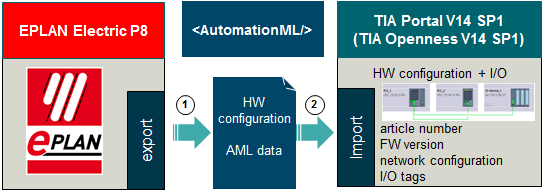
EPLAN Electric P8 can export AML files in the correct compus for TIA Portal.
TIA Portal ab V14 SP1 kann AML-Dateien importieren.
Requirement: TIA Portal Openness as of V14 SP1
The import function in TIA Portal is performed by TIA Openness.
TIA Portal Openness is a free part of every TIA Portal product (e.g. STEP 7). The installation needs to be done separately.
Documentation and project example
https://support.industry.siemens.com/cs/attachments/109748224/109748224_EPLAN_to_TIA_Portal_DOC_v10_en.pdf
https://support.industry.siemens.com/cs/attachments/109748224/109748224_EPLAN_to_TIA_Portal_PROJ_v10.zip
Last edited by csiki on 26/06/2019 11:07; edited 1 time in total |
|
| Back to top |
|
 |
csiki
Member junior
Joined: 21 Aug 2015
Posts: 62
Location: Hungary
|
| Posted: 08/11/2017 14:19 Post subject: TIA Portal or EPLAN Electric P8 |
|
|
Digitalization with TIA Portal: Integration of planning data from TIA Selection Tool to TIA Portal or EPLAN Electric P8
https://support.industry.siemens.com/cs/document/109748223/
IA Selection Tool (TST) offers the possibility to export configurations (hardware configuration, network configuration) as “AutomationML” files. These AML files can be imported into projects by TIA Portal and EPLAN Electric P8.
The free TIA Selection Tool (TST) is an intelligent product catalogue for industry products and features a broad range of functions for individually creating hardware and software configuration. TST can export configurations as AML file for TIA Portal and EPLAN Electric P8.

Figure 01
1. TST (or TST cloud) can import and export AML files.
2. TIA Portal up to V14 SP1 or higher can import and export AML files.
Requirement: TIA Portal Openness as of V14 SP1
The import and export functions in TIA Portal are executed on the basis of the TIA Portal Openness function.
TIAPortal Openness is a free part of every TIA Portal product (e.g. STEP 7). The installation is done separately.
3. EPLAN Electric P8 2.7 can import AML files from TST.
4. EPLAN Electric P8 2.7 can export AML files
Documentation and example project
https://support.industry.siemens.com/cs/attachments/109748223/109748223_TST_to_TIA_Portal_v10_en.pdf
https://support.industry.siemens.com/cs/attachments/109748223/109748223_TST_to_TIA_Portal_PROJ_v10.zip |
|
| Back to top |
|
|
csiki
Member junior
Joined: 21 Aug 2015
Posts: 62
Location: Hungary
|
| Posted: 26/06/2019 11:13 Post subject: Exchange of planning data TST EPLAN Electric P8 in TIA |
|
|
Digitalization with TIA Portal: Exchange of planning data from TIA Selection Tool via EPLAN Electric P8 in TIA Portal
https://support.industry.siemens.com/cs/document/109748224/digitalization-with-tia-portal%3A-exchange-of-planning-data-from-tia-selection-tool-via-eplan-electric-p8-in-tia-portal
TIA Selection Tool (TST) offers the possibility to export planning data (device configuration, network configuration) as “AutomationML” files. These AML files can be imported into EPLAN Electric P8. The planning data from EPLAN Electric P8 can also be exported to an AML file and imported into projects by TIA Portal.
The project planning data (device configuration, network configuration, PLC variables) of machines and systems are required by various tools. The open standard "Automation Markup Language" (AutomationML) has been developed so that project planning does not have to be recreated in each individual tool. AutomationML is an XML-based data compus (AML file) for storing and exchanging project planning data.
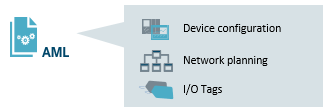
To create an order list for the required components, the automation hardware is configured with the TIA Selection Tool (TST). TST enables direct ordering at the Siemens Industry Mall. TST can also be used to request the product data (EPLAN macros, dimensional drawings, 3D models, manuals, certificates, ...) of the Siemens articles used via the CAx Download Manager.
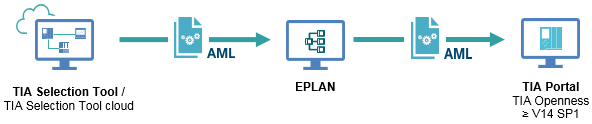
The configuration data generated in TST is exported to an AML file and imported into EPLAN Electric P8. The circuit diagrams are created in EPLAN Electric P8 using the imported data. For imported articles that are not available in the article management of EPLAN Electric P8, the EPLAN macros must be imported from the CAx Download Manager or macros from other manufacturers.
Once the circuit diagrams have been created, the data from EPLAN Electric P8 is exported to an AML file and imported into TIA Portal. The device configuration, the network configuration and the topology are adopted.
The following figure shows the workflow described in this application example.
Documentation and project example
https://support.industry.siemens.com/cs/attachments/109748224/109748224_TST_to_EPLAN_to_TIA_Portal_v20_en.pdf
https://support.industry.siemens.com/cs/attachments/109748224/109748224_TST_to_EPLAN_to_TIA_Portal_PROJ_V20.zip |
|
| Back to top |
|
|
|
|
You cannot post new topics in this forum
You cannot reply to topics in this forum
You cannot edit your posts in this forum
You cannot delete your posts in this forum
You cannot vote in polls in this forum
|
Powered by phpBB © 2001, 2005 phpBB Group
Fa-ti si tu propriul forum GRATUIT, pe www.myforum.ro |
 FAQ
FAQ Search
 Memberlist
 Usergroups
 Register
 Profile
 Log in to check your private messages
 Log in


