| View previous topic :: View next topic |
| Author |
Message |
Baba khan
Junior

Joined: 10 Jun 2020
Posts: 16
|
 Posted: 17/12/2021 15:26 Post subject: Download from ES to AS - PCS7 Posted: 17/12/2021 15:26 Post subject: Download from ES to AS - PCS7 |
 |
|
Hi every body
I am working on a project with pcs7 that includes one 414-5H and an engineering and operator station.
I am trying to set network and establish connection between ES and OS for download from ES to OS. But I couldn't succeed.
Please share useful and complete manuals.
Thanks
Br |
|
| Back to top |
|
 |
myfijkohn
Junior
Joined: 03 Oct 2021
Posts: 8
|
| Posted: 17/12/2021 15:47 Post subject: |
|
|
What version of PCS7?
Put a network picture |
|
| Back to top |
|
|
Baba khan
Junior
Joined: 10 Jun 2020
Posts: 16
|
| Posted: 17/12/2021 22:32 Post subject: |
|
|
Hello
PCS 7 version 9 sp1
One 414-5H
One operator station with 2 cp1623
One laptop as engineering station |
|
| Back to top |
|
|
myfijkohn
Junior
Joined: 03 Oct 2021
Posts: 8
|
| Posted: 19/12/2021 12:21 Post subject: |
|
|
| Baba khan wrote: | Hello
PCS 7 version 9 sp1
One 414-5H
One operator station with 2 cp1623
One laptop as engineering station |
Some hints
What should you watch out for when downloading from the WinCC/PCS 7 Engineering Station to the Operator Station (ES-OS download)?
https://support.industry.siemens.com/cs/document/59216666/what-should-you-watch-out-for-when-downloading-from-the-wincc-pcs-7-engineering-station-to-the-operator-station- (es-os-download)
This entry is intended to help you in the matter of which basic settings you should make before an ES-OS download and what options there are for support when downloading from WinCC/PCS 7 ES to WinCC/PCS 7 OS does not work.
Basic settings before an ES-OS download
Before you download the project make sure that the computer name of the ES is entered in the OS project.
WinCC V7.5: Working with WinCC
https://support.industry.siemens.com/cs/attachments/109760739/WinCC_Working_with_WinCC_en-US_en-US.pdf
Additional information about changing the computer name is available in the manual SIMATIC Process Control System PCS 7 Compendium Part A - Configuration Guidelines at the following links.
SIMATIC Process Control System PCS 7 Compendium Part A - Configuration Guidelines (V9.0)
https://support.industry.siemens.com/cs/attachments/109756485/pcs7_compendium_part_a_en-US_en-US.pdf?download=true
Make sure that the WinCC/PCS 7 requirements are fulfilled as specified in Entry ID
https://support.industry.siemens.com/cs/document/5708281/what-rules-are-there-for-assigning-a-computer-name-for-wincc
What should you pay attention to when using WinCC within a domain?
https://support.industry.siemens.com/cs/document/2008363/what-should-you-pay-attention-to-when-using-wincc-within-a-domain
Which settings should you check if OS loading fails with PCS 7 or the OS project cannot be activated?
https://support.industry.siemens.com/cs/document/33123686/which-settings-should-you-check-if-os-loading-fails-with-pcs-7-or-the-os-project-cannot-be-activated
If you get the "Download (310:88)" error message at the end of the download procedure, please refer to Entry
How can you clear the error message "Download (310:88)"?
https://support.industry.siemens.com/cs/document/22559072/how-can-you-clear-the-error-message-download- (310-88)
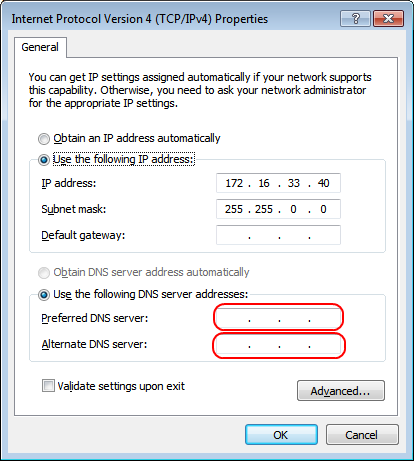
If the name resolution of the DNS server does not work as described in Point 7 above, assign your own IP address.
Make sure that no DNS server has been defined for the active network connection (terminal bus).
These settings are in the Properties of your network connection in Windows 7 under "Start > Control Panel > Network and Sharing Center > Change Adapter Settings > LAN Connection > Internet Protocol Version 4 (TCP/IPv4) > Properties".
 |
|
| Back to top |
|
|
myfijkohn
Junior
Joined: 03 Oct 2021
Posts: 8
|
| Posted: 19/12/2021 12:28 Post subject: |
|
|
Do not forget to update firmware
Operating system updates V6 CPU412-5H PN/DP, CPU414-5H PN/DP, CPU416-5H PN/DP, CPU417-5H PN/DP
https://support.industry.siemens.com/cs/document/109474550/operating-system-updates-v6-cpu412-5h-pn-dp-cpu414-5h-pn-dp-cpu416-5h-pn-dp-cpu417-5h-pn-dp
how to
https://support.industry.siemens.com/cs/attachments/24023824/24023824_PCS7_Mini_V90_en.pdf
You have an SIMATIC PCS 7 Overview
https://support.industry.siemens.com/cs/document/63481413/simatic-pcs-7-overview
https://new.siemens.com/global/en/products/automation/process-control/simatic-pcs-7/technical-documentation.html
A network picture can tell more than words |
|
| Back to top |
|
|
|

 FAQ
FAQ Search
 Memberlist
 Usergroups
 Register
 Profile
 Log in to check your private messages
 Log in


