 |
plc.myforum.ro
PLCs users www.plc.myforum.ro!
|
| View previous topic :: View next topic |
| Author |
Message |
Taiap86
Junior

Joined: 18 Oct 2018
Posts: 5
|
 Posted: 09/06/2020 18:54 Post subject: Downgrading Siemens PLC Projects From V15 to V14 SP1 Posted: 09/06/2020 18:54 Post subject: Downgrading Siemens PLC Projects From V15 to V14 SP1 |
 |
|
Downgrading Siemens PLC Projects From V15 to V14 SP1
https://www.dmcinfo.com/latest-thinking/blog/id/9692/downgrading-siemens-plc-projects-from-v15-to-v14-sp1 |
|
| Back to top |
|
 |
gert
Member 3


Joined: 02 Jan 2015
Posts: 645
|
| Posted: 15/06/2020 14:28 Post subject: global libraries in the TIA Portal |
|
|
How do you open, edit and upgrade global libraries in the TIA Portal?
https://support.industry.siemens.com/cs/document/37364723/
Description
There are global libraries in the TIA Portal in addition to the project library. The project library is opened, saved and closed in conjunction with the current TIA Portal project. You can develop global libraries centrally and use them in different projects. The libraries are compatible with each other so that you can copy and move library elements from one library to another. You recognize a library file by the file name extension ".al [version number]" and the fact that it can be opened with the TIA Portal.
Note on versions
In order to open a global library, the version of TIA Portal must correspond at least to the version of the library. If this is not the case, the TIA Portal proposes to upgrade the global library.
Opening global libraries in the TIA Portal
You cannot open global libraries with a double-click. Proceed as follows to open a global library in the TIA Portal:
Start the TIA Portal.
Open the "Libraries" task card and click "Global libraries" to open the palette.
Click the "Open global library" icon in the task bar or in the "Tools" menu you select the command "Global libraries> Open library".
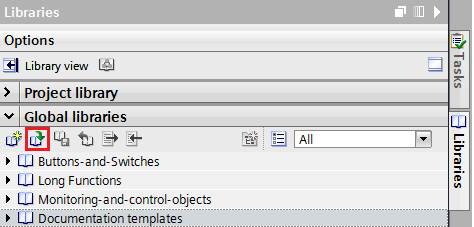
Fig. 1
Select the global library you want to open and mark the file with the file name extension ".al .."
Click the "Open" button (Fig. 2). The global library is displayed in the "Global libraries" palette.
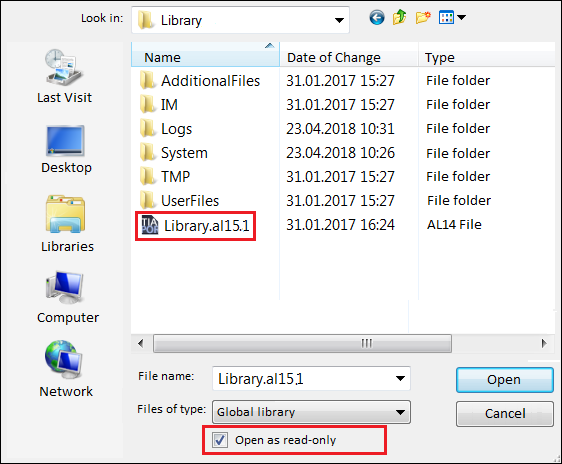
Fig. 2
Note
The global library is write-protected by default.
If you wish to change the global library, you have to disable the "Open as read-only" option.
If you open the global library as read-only, the library and all its subfolders are grayed.
Multiple users can open a global library at the same time from a central storage location as long as all the users have opened the global library as read-only. The read-only option must be enabled to upgrade a library.
Upgrading global libraries in the TIA Portal
TIA Portal V15.1
You can upgrade to TIA Portal V15.1 any global library created in earlier versions of the TIA Portal. It is necessary to upgrade the global library, otherwise you will not be able to open the library. During upgrading the TIA Portal creates a copy of the original global library and saves this in a current library version belonging to the TIA Portal. The autentic library is retained.
Proceed as follows to manually upgrade global libraries to the current library version of the TIA Portal:
Open the global library as described in the procedure above, Steps 1 to 5. The message "Project / Library is being upgraded" is displayed (Fig. 3).
Acknowledge the message with "OK". The global library is upgraded and then displayed in the "Global libraries" palette.
Note
After upgrading to V15.1 you can no longer open the global library with an earlier version of TIA Portal.
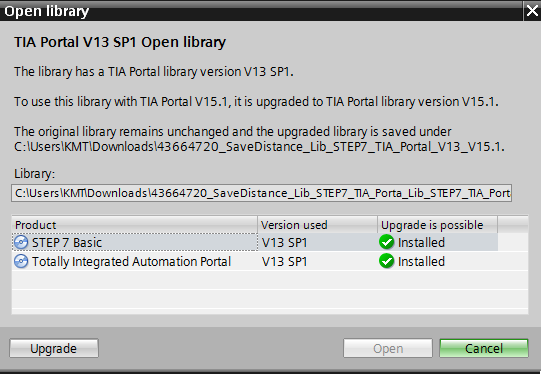
Fig. 3
Remove know-how protection for upgraded library types
If you want to upgrade a library with know-how protected blocks to a new version, you have to remove the know-how protection if you want to edit and compile the library type. Otherwise you receive the following message when you open the block:
"The block cannot be opened. (0604: 000926)"
"The block ... cannot be edited because the know-how protection was enabled with V13 SP1 of the TIA Portal. Remove the know-how protection in the current version of the TIA Portal and then set it again to be able to edit the block. "
Proceed as follows to remove the know-how protection in the current version:
If still open, close the block editor of the know-how-protected block.
In the "Program blocks" folder you right-click the know-how-protected block and in the pop-up menu you select "Properties ...".
Select the "General" tab and in the area navigation you then click "Protection".
Under "Know-how protection" you click the "Protection" button.
In the window that opens you can remove the know-how protection.

More information is available in the following table:
https://support.industry.siemens.com/cs/document/100451450/when-starting-tia-portal-v13-and-higher-how-do-you-get-a-global-library-to-open-automatically-and-use-it-as-corporate-library-for-example
https://support.industry.siemens.com/cs/document/109475822/in-step-7- (tia-portal)-for-s7-1500-how-do-you-store-a-sequence-of-modules-in-a-library-in-order-to-be-able-to-use-the-same-arrangement-for-other-projects
https://support.industry.siemens.com/cs/document/78529894/automation-tasks-in-10-minutes-or-less-tia-portal%3A-time-savers-global-libraries
https://support.industry.siemens.com/cs/document/109476781/library-with-program-examples-for-tia-portal-instructions
SIMATIC STEP 7 Basic / Professional V16 and SIMATIC WinCC V16
https://support.industry.siemens.com/cs/attachments/109773506/STEP_7_WinCC_V16_enUS_en-US.pdf?download=true
SIMATIC S7-1500 S7-1500T Motion Control V4.0 in TIA Portal V15
https://support.industry.siemens.com/cs/attachments/109749263/s71500t_motion_control_function_manual_en-US_en-US.pdf
https://support.industry.siemens.com/cs/attachments/109749262/s71500_motion_control_function_manual_en-US_en-US.pdf
Download
https://ulozto.net/tamhle/bGqRFV7gGhMi
https://bayfiles.com/Zd0cm8A4o0/109476781_Sample_Library_for_Instructions-V13_DOKU_v1_01_en_pdf
https://bayfiles.com/b316m1A5o0/109476781_Sample_Library_for_Instructions-V14_DOKU_v1_02_en_pdf
https://bayfiles.com/d510mbA5oc/109476781_Sample_Library_for_Instructions-V13_CODE_v1_01_zip
https://bayfiles.com/n112m5A4oa/109476781_Sample_Library_for_Instructions-V14_CODE_v1_02_zip
https://bayfiles.com/xb1em8A3od/109476781_Sample_Library_for_Instructions-V14SP1_CODE_v1_03_S7Prof_zip
https://bayfiles.com/1a19maAbo3/109476781_Sample_Library_for_Instructions-V14SP1_CODE_v1_03_S7Bas_zip
https://bayfiles.com/5716m4Afo9/109476781_Sample_Library_for_Instructions-V15_1_DOKU_v1_04_en_pdf
https://bayfiles.com/Bb11m1Abof/109476781_Sample_Library_for_Instructions-V14SP1_DOKU_v1_03_en_pdf
https://bayfiles.com/Ha12mdA7o4/s71500_motion_control_function_manual_en-US_en-US_pdf
https://bayfiles.com/Jd1em7A3o4/109476781_Sample_Library_for_Instructions-V15_1_CODE_v1_04_S7BasProf_zip
https://bayfiles.com/L816m3Adoc/s71500t_motion_control_function_manual_en-US_en-US_pdf
https://bayfiles.com/Pf6dm9A6of/STEP_7_WinCC_V16_enUS_en-US_pdf |
|
| Back to top |
|
|
rizwan4
Junior
Joined: 31 Aug 2018
Posts: 15
|
| Posted: 15/06/2020 14:37 Post subject: STEP 7 (TIA Portal) Interplay global and project libraries |
|
|
Demonstration system: STEP 7 (TIA Portal) Interplay - SIMATIC S7 webcast on the topic of global and project libraries
https://support.industry.siemens.com/cs/document/60456792/demonstration-system%3A-step-7- (tia-portal)-interplay-simatic-s7-webcast-on-the-topic-of-global-and-project-libraries?dti=0&lc=en-ZA
https://support.industry.siemens.com/cs/document/60456406/demonstration-system%3A-step-7- (tia-portal)-interplay-simatic-s7-webcast-on-the-topic-of-introduction-into-programming?dti=0&lc=en-ZA
https://support.industry.siemens.com/cs/document/60456471/demonstration-system%3A-step-7-v11-interplay-simatic-s7-webcast-on-the-topic-of-project-navigation?dti=0&lc=en-ZA
https://support.industry.siemens.com/cs/document/60456185/demonstration-system%3A-step-7-v11-interplay-simatic-s7-webcast-on-the-topic-of-device-and-network-editor?dti=0&lc=en-ZA
https://support.industry.siemens.com/cs/document/60456627/demonstration-system%3A-step-7-v11-interplay-simatic-s7-webcast-on-the-topic-of-interaction-of-the-editors?dti=0&lc=en-ZA
https://support.industry.siemens.com/cs/document/60456789/demonstration-system%3A-step-7-v11-interplay-simatic-s7-webcast-on-the-topic-of-device-configuration?dti=0&lc=en-ZA
https://support.industry.siemens.com/cs/document/60456477/demonstration-system%3A-step-7- (tia-portal)-interplay-simatic-s7-webcast-on-the-topic-of-process-visualization-with-the-integrated-wincc?dti=0&lc=en-ZA
https://support.industry.siemens.com/cs/document/60456294/demonstration-system%3A-step-7- (tia-portal)-interplay-simatic-s7-webcast-on-the-topic-of-operator-panel-wizard?dti=0&lc=en-ZA
https://support.industry.siemens.com/cs/document/60456477/demonstration-system%3A-step-7- (tia-portal)-interplay-simatic-s7-webcast-on-the-topic-of-process-visualization-with-the-integrated-wincc?dti=0&lc=en-ZA |
|
| Back to top |
|
|
|
|
You cannot post new topics in this forum
You cannot reply to topics in this forum
You cannot edit your posts in this forum
You cannot delete your posts in this forum
You cannot vote in polls in this forum
|
Powered by phpBB © 2001, 2005 phpBB Group
Fa-ti si tu propriul forum GRATUIT, pe www.myforum.ro |
 FAQ
FAQ Search
 Memberlist
 Usergroups
 Register
 Profile
 Log in to check your private messages
 Log in


