 |
plc.myforum.ro
PLCs users www.plc.myforum.ro!
|
| View previous topic :: View next topic |
| Author |
Message |
grig100
Member 3


Joined: 01 Jan 2015
Posts: 752
|
 Posted: 01/10/2018 13:32 Post subject: Diagnostics Overview for SIMATIC S7-1200 and S7-1500 Posted: 01/10/2018 13:32 Post subject: Diagnostics Overview for SIMATIC S7-1200 and S7-1500 |
 |
|
Diagnostics Overview for SIMATIC S7-1200 and S7-1500
https://support.industry.siemens.com/cs/document/109752283/
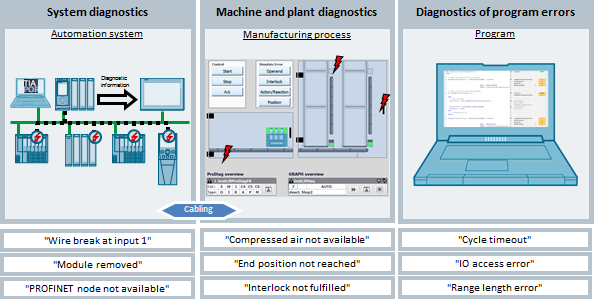
Diagnostics reduces downtimes and thus increases the productivity of the machine. Diagnostics supports the entire lifecycle of a machine, from planning to operation and maintenance. Diagnostics essentially involves the diagnosis of all system components, the monitoring of process sequences and the diagnosis of program errors.
System diagnostics
In the SIMATIC environment, the term "system diagnostics" is used to describe the diagnostics of devices and modules. The faults can be displayed in plain text. This enables maintenance to locate and rectify the error more quickly.
Faulty devices and modules can be diagnosed with the user program. Thus responses to diagnostic messages can also be programmed in the user program and, as a result, undesired machine behavior can be prevented.
Machine and system diagnostics.
Many faults are operating in a process of mechanical or electrical components.
With an efficient plant-specific diagnosis of faults and information on the location of the fault, the cause of the fault and troubleshooting information, faults can be identified and rectified.
The error bits of the machine and system diagnostics can be queried in the user program, in order to stop the machine in the event of certain faults, for example.
Diagnostics of program errors
Programming errors occur during commissioning, but also during operation.
The possibilities for the analysis programs, errors in the program can be quickly localized and eliminated.
https://support.industry.siemens.com/cs/attachments/109752283/109752283_Diagnostic_Overview_DOC_V10_en.pdf
Further Information
https://support.industry.siemens.com/cs/document/68011497/system-diagnostics-with-s7-1500-and-tia-portal
https://support.industry.siemens.com/cs/document/98210758/diagnostics-in-user-program-with-s7-1500
https://support.industry.siemens.com/cs/document/109740151/machine-and-plahttps://support.industry.siemens.com/cs/document/21566216/overview%3a-diagnostic-tools-at-simatic-and-scalance?lc=en-usnt-diagnostics-with-prodiag
https://support.industry.siemens.com/cs/document/21566216/overview%3a-diagnostic-tools-at-simatic-and-scalance
https://support.industry.siemens.com/cs/document/59192926/simatic-s7-1500-et-200mp-et-200sp-et-200al-et-200pro-diagnostics
https://support.industry.siemens.com/cs/document/106656707/the-tia-portal-tutorial-center |
|
| Back to top |
|
 |
grig100
Member 3
Joined: 01 Jan 2015
Posts: 752
|
| Posted: 20/08/2019 21:20 Post subject: Diagnostics in User Program with S7-1500 |
|
|
Diagnostics in User Program with S7-1500
https://support.industry.siemens.com/cs/document/98210758/diagnostics-in-user-program-with-s7-1500
The diagnostics of devices, modules and networks play an ever-increasing role in automation technology.
By diagnosing with a user program, faulty modules can be detected. This enables you to also program responses to diagnostic messages.
All SIMATIC products have integrated diagnostic functions that allow you to detect and clear faults. The components automatically report a fault during operation and provide additional detailed information. Plant-wide diagnostics can minimize unscheduled downtimes.
This application example describes how to monitor a PROFINET IO system and a PROFIBUS DP master system with different devices in the user program. The devices are connected to an S7-1500 controller via PROFINET IO / PROFIBUS DP. The devices detect faults on their modules and send the diagnostic data to the assigned controller. The controller evaluates this diagnostic information with the diagnostic instructions in the user program and saves it to a global data block. The operator panel graphically displays the evaluated diagnostic information in one view per IO system or in a device view.
It considers the following states:
| Code: | State OK
State FAULTY
State LOST CONNECTION
State DEACTIVATED
State PROBLEM / MAINTENANCE
State WAS FAULTY
State HAD LOST CONNECTION
State WAS DEACTIVATED
State WAS PROBLEM / MAINTENANCE |
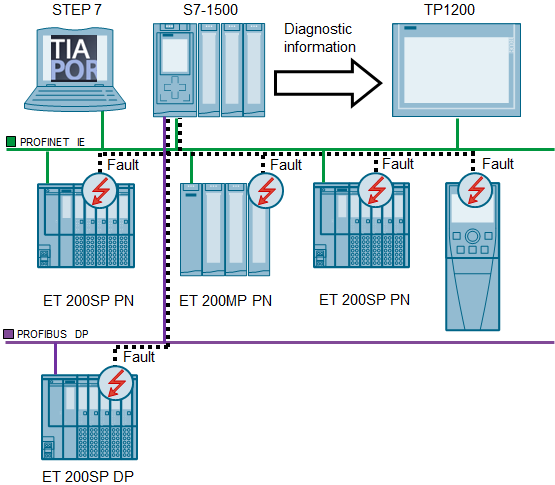
Documentation and example project for diagnostics in the user program
This example shows the diagnosis of a PROFINET IO and a PROFIBUS DP system in the user program with up to 128 devices. The visualization of the diagnostic information is displayed on an operator panel.
https://support.industry.siemens.com/cs/attachments/98210758/98210758_User_defined_diagnostics_DOC_V33_en.pdf
https://support.industry.siemens.com/cs/attachments/98210758/98210758_Diag1500_TIAV15.1_Adv_PROJ_V33.zip
https://support.industry.siemens.com/cs/attachments/98210758/98210758_Diag1500_TIAV15.1_Prof_PROJ_V33.zip
Documentation and example project for use of alarm instructions in the TIA Portal
This example shows the use of the alarm instructions "Program_Alarm, Get_AlarmState, Gen_UsrMsg" in the user program.
https://support.industry.siemens.com/cs/attachments/98210758/98210758_user_defined_diagnostics_doku_v11_en.pdf
https://support.industry.siemens.com/cs/attachments/98210758/98210758_user_defined_diagnostics_code_v11.zip
Further Information
https://support.industry.siemens.com/cs/document/109483251/diagnostics-in-user-program-with-s7-1200
https://support.industry.siemens.com/cs/document/68011497/system-diagnostics-with-s7-1500-and-tia-portal
https://support.industry.siemens.com/cs/document/62121503/configuration-of-messages-and-alarms-in-wincc- (tia-portal)
https://support.industry.siemens.com/cs/document/68011496/creating-and-using-user-defined-web-pages-on-s7-1200-s7-1500 |
|
| Back to top |
|
|
grig100
Member 3
Joined: 01 Jan 2015
Posts: 752
|
| Posted: 15/09/2020 16:12 Post subject: System Diagnostics with S7-1500 and TIA Portal |
|
|
System Diagnostics with S7-1500 and TIA Portal
https://support.industry.siemens.com/cs/document/68011497/
When a system error occurs, hardware components and devices of other manufacturers can trigger a system reaction. The hardware components provide information on the system error that has occurred. For S7-1500 PLCs, the system diagnostics provides a convenient way to evaluate this diagnostic information and display it in the form of alarms.
The system diagnostics are integrated in the firmware of the CPU S7-1500 and work independently from cyclic user programs. Therefore it is also available in the CPU operating mode STOP. Any faults are detected immediately and reported to the higher-level HMI device, the web server, the display of the CPU S7-1500, the LED displays in the module concerned and in the TIA Portal even in the operating mode STOP. Therefore, the system diagnostics are always synchronous with the actual system status.
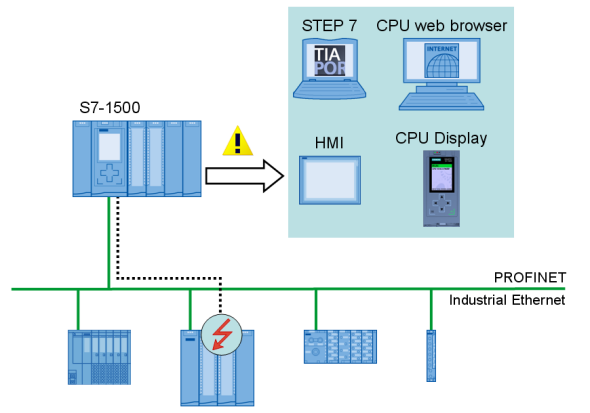
This application describes:
the various display possibilities of the System Diagnostics
how you can configure the System Diagnostics quickly and easily, using a few examples
the System Diagnostics with the user program.
The following picture shows the most important components of the solution with an S7-1500.
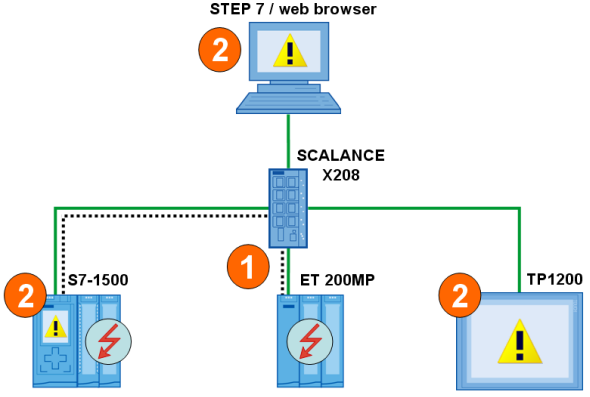
The device detects a fault and sends diagnostic data to the assigned CPU.
The CPU informs the connected display media. The display of the system diagnostics is refreshed.
Advantages
Integrated System Diagnostics
The integrated System Diagnostics ensure full transparency of the system status. The system diagnostics are generated automatically.
Uniform display concept
The system diagnostics information is displayed as a uniform clear text information in the CPU display, TIA Portal, HMI and the web server itself for messages of the drives.
Channel granular display concept
In case of failure, the respective channel can be detected and classified quickly.
Documentation and Project
https://support.industry.siemens.com/cs/attachments/68011497/68011497_S7-1500_Diagnose_DOKU_v20_en.pdf
https://support.industry.siemens.com/cs/attachments/68011497/68011497_S7-1500_Diagnose_CODE_v20.zip
https://anonfiles.com/XcEbwaVbob/68011497_S7-1500_Diagnose_DOKU_v20_en_pdf
https://anonfiles.com/f6F2w0V3o2/68011497_S7-1500_Diagnose_CODE_v20_zip |
|
| Back to top |
|
|
grig100
Member 3
Joined: 01 Jan 2015
Posts: 752
|
| Posted: 15/09/2020 16:14 Post subject: Diagnostics in User Program with S7-1500 |
|
|
Diagnostics in User Program with S7-1500
https://support.industry.siemens.com/cs/document/98210758/
This application example describes how to monitor a PROFINET IO system and a PROFIBUS DP master system with different devices in the user program. The devices are connected to an S7-1500 controller via PROFINET IO / PROFIBUS DP. The devices detect faults on their modules and send the diagnostic data to the assigned controller. The controller evaluates this diagnostic information with the diagnostic instructions in the user program and saves it to a global data block. The operator panel graphically displays the evaluated diagnostic information in one view per IO system or in a device view.
It considers the following states:
State OK
State FAULTY
State LOST CONNECTION
State DEACTIVATED
State PROBLEM / MAINTENANCE
State WAS FAULTY
State HAD LOST CONNECTION
State WAS DEACTIVATED
State WAS PROBLEM / MAINTENANCE
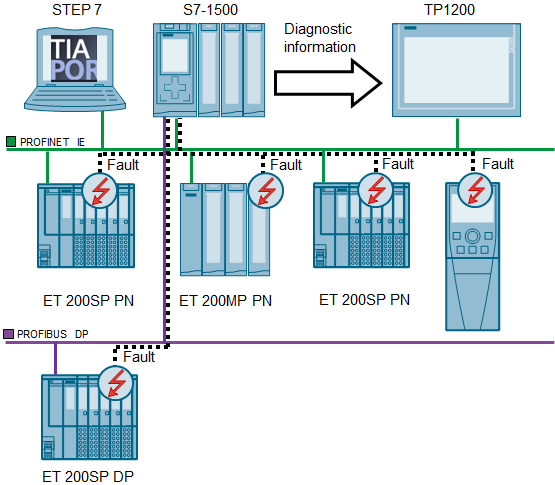
Documentation and example project for diagnostics in the user program
This example shows the diagnosis of a PROFINET IO and a PROFIBUS DP system in the user program with up to 128 devices. The visualization of the diagnostic information is displayed on an operator panel
https://support.industry.siemens.com/cs/attachments/98210758/98210758_User_defined_diagnostics_DOC_V34_en.pdf
https://support.industry.siemens.com/cs/attachments/98210758/98210758_Diag1500_TIAV15.1_Adv_PROJ_V34.zip
https://support.industry.siemens.com/cs/attachments/98210758/98210758_Diag1500_TIAV15.1_Prof_PROJ_V34.zip
Documentation and example project for use of alarm instructions in the TIA Portal
This example shows the use of the alarm instructions "Program_Alarm, Get_AlarmState, Gen_UsrMsg" in the user program.
https://support.industry.siemens.com/cs/attachments/98210758/98210758_user_defined_diagnostics_doku_v11_en.pdf
https://support.industry.siemens.com/cs/attachments/98210758/98210758_user_defined_diagnostics_code_v11.zip
https://anonfiles.com/37F3wfV4o4/98210758_User_defined_diagnostics_DOC_V34_en_pdf
https://anonfiles.com/51F5w1Veo3/98210758_User_defined_diagnostics_DOKU_v11_en_pdf
https://anonfiles.com/99F4w8V0ob/98210758_Diag1500_TIAV15.1_Adv_PROJ_V34_zip
https://anonfiles.com/BfF2wdVcod/98210758_Diag1500_TIAV15.1_Prof_PROJ_V34_zip
https://anonfiles.com/D0F7w4Vao2/98210758_User_defined_diagnostics_CODE_v11_zip |
|
| Back to top |
|
|
|
|
You cannot post new topics in this forum
You cannot reply to topics in this forum
You cannot edit your posts in this forum
You cannot delete your posts in this forum
You cannot vote in polls in this forum
|
Powered by phpBB © 2001, 2005 phpBB Group
Fa-ti si tu propriul forum GRATUIT, pe www.myforum.ro |
 FAQ
FAQ Search
 Memberlist
 Usergroups
 Register
 Profile
 Log in to check your private messages
 Log in


