| View previous topic :: View next topic |
| Author |
Message |
maersk
Member 3


Joined: 17 Aug 2014
Posts: 891
|
 Posted: 04/11/2015 21:36 Post subject: Diagnostics of SIMATIC IPCs Posted: 04/11/2015 21:36 Post subject: Diagnostics of SIMATIC IPCs |
 |
|
Diagnostics of SIMATIC IPCs (with DiagBase, IPC DiagMonitor, WinCC (TIA Portal) or WinCC V7)
https://support.industry.siemens.com/cs/document/109478242/diagnostics-of-simatic-ipcs-%28with-diagbase-ipc-diagmonitor-wincc-%28tia-portal%29-or-wincc-v7%29
The application describes which software and settings are necessary to implement the following automation tasks.
Locally output diagnostics data on the respective IPC.
Output the diagnostics data of all networked SIMATIC IPCs via one IPC.
Output the diagnostics data using WinCC Runtime Advanced, of a Comfort Panel.
Output the diagnostics data with WinCC V7.
Output the diagnostics data via a text message on a cell phone.
https://support.industry.siemens.com/cs/attachments/109478242/109478242_Diagnostic_IPC_WinCC_en.pdf
https://support.industry.siemens.com/cs/attachments/109478242/109478242_Diagnostic_IPC_WinCC_V13_CODE.zip
https://support.industry.siemens.com/cs/attachments/109478242/109478242_Diagnostic_IPC_WinCC_V73SE_CODE.zip
Last edited by maersk on 17/10/2018 11:40; edited 1 time in total |
|
| Back to top |
|
 |
maersk
Member 3
Joined: 17 Aug 2014
Posts: 891
|
| Posted: 24/05/2016 17:09 Post subject: |
|
|
WinCC Professional, Advanced V13 SP1 examples
https://support.industry.siemens.com/cs/attachments/109478242/109478242_Diagnostic_IPC_WinCC_en.pdf
https://support.industry.siemens.com/cs/attachments/109478242/109478242_Diagnostic_IPC_WinCC_Adv_V13_CODE.zip
https://support.industry.siemens.com/cs/attachments/109478242/109478242_Diagnostic_IPC_WinCC_Prof_V13_CODE.zip
https://support.industry.siemens.com/cs/attachments/109478242/109478242_Diagnostic_IPC_WinCC_V73SE_CODE.zip |
|
| Back to top |
|
|
maersk
Member 3
Joined: 17 Aug 2014
Posts: 891
|
| Posted: 15/06/2016 18:29 Post subject: SIMATIC IPC Device Drivers for Windows 10 |
|
|
SIMATIC IPC Device Drivers for Windows 10
https://support.industry.siemens.com/cs/document/109482615/simatic-ipc-device-drivers-for-windows-10
https://support.industry.siemens.com/cs/attachments/109482615/Liesmich.txt
https://support.industry.siemens.com/dl/files/615/109482615/att_867625/v1/IPC_Win10_Drivers_V1.0_A5E36802948_Mu6_DL_1-1.zip |
|
| Back to top |
|
|
maersk
Member 3
Joined: 17 Aug 2014
Posts: 891
|
| Posted: 30/06/2017 14:10 Post subject: Diagnostic of SIMATIC IPCs IPC DiagBase, IPC DiagMonitor |
|
|
Diagnostic of SIMATIC IPCs (with IPC DiagBase, IPC DiagMonitor, WinCC (TIA Portal) or WinCC V7)
Documentation and example projects for WinCC V13 SP1
https://support.industry.siemens.com/cs/attachments/109478242/109478242_Diagnostic_IPC_WinCC_en.pdf
https://support.industry.siemens.com/cs/attachments/109478242/109478242_Diagnostic_IPC_WinCC_Adv_V13_CODE.zip
https://support.industry.siemens.com/cs/attachments/109478242/109478242_Diagnostic_IPC_WinCC_Prof_V13_CODE.zip
https://support.industry.siemens.com/cs/attachments/109478242/109478242_Diagnostic_IPC_WinCC_V73SE_CODE.zip
Documentation and example projects for WinCC V14
https://support.industry.siemens.com/cs/attachments/109478242/109478242_Diagnostic_IPC_WinCCV14_DOC_en.pdf
https://support.industry.siemens.com/cs/attachments/109478242/109478242_Diagnostic_IPC_WinCCV14.zip |
|
| Back to top |
|
|
maersk
Member 3
Joined: 17 Aug 2014
Posts: 891
|
| Posted: 05/07/2017 17:02 Post subject: Intel Management Engine BIOS ExtensionSIMATIC IPCs PGs |
|
|
Updating the Intel Management Engine BIOS Extension for SIMATIC IPCs and SIMATIC Field PGs
Must be updated for security reasons
https://support.industry.siemens.com/cs/document/109747626
List of updates for SIMATIC IPCs, SIMATIC Field PGs, PCS 7 systems, SINUMERIK and SIMOTION (troubleshooting for the security advisory INTEL-SA-00075)
In the "Intel Product Security Advisory" of 01.05.2017 (Intel IDINTEL-SA-00075) attention is brought to the vulnerability of systems with specific Intel processors with the "Active Management Technology" (AMT) function enabled.
https://security-center.intel.com/advisory.aspx?intelid=INTEL-SA-00075&languageid=en-fr
Intel AMT is also available with corresponding processors for SIMATIC IPCs and SIMATIC Field PGs, but has to be enabled specifically. Normally, Intel AMT is disabled when the relevant SIMATIC products are delivered.
Detailed technical information is available on the Siemens ProductCERT website: ProductCERT Security Advisories
https://www.siemens.com/cert/pool/cert/siemens_security_advisory_ssa-874235.pdf
Products affected
Potentially affected are devices with the product designations, article numbers and BIOS or Management Engine (ME) versions from the following tables.
An update is necessary if a device with one of the listed article numbers uses a BIOS or ME version as list in the corresponding table.
Updating a system
SIMATIC IPC / SIMATIC Field PG / SIMATIC PCS 7 systems
For the systems affected, step-by-step updates of the Intel Management Engine BIOS Extension are provided. If a BIOS update is necessary, the corresponding link to the latest BIOS version is provided.
Determining the device type and article number
The rating plate gives the device type and article number of your SIMATIC product. For example, the figure below shows you the rating plate of a SIMATIC IPC427E with article number 6AG4141-XXXXX-XXXX.

Determining the BIOS version number
The BIOS version number can be found:
In the BIOS setup in the menu item "Main", which can be obtained by pressing the ESC key when starting the device.
In the software "SIMATIC IPC DiagBase" in the BIOS information.
In the software "SIMATIC IPC DiagMonitor" in the BIOS information.
In the Windows system information, which can be obtained via "Start -> Run -> msinfo32 -> System Overview".
Determining the ME version number
The ME version number can be found:
In the boot menu via the "MEBx" button (Intel Management Engine BIOS Extension), which can be obtained via the ESC when starting the device. The version number is in the menu header.
In the advanced Windows system information, which can be obtained via "Start -> Intel -> Intel Management Engine Components -> Intel Management and Security Status -> Advanced -> Button 'Advanced system details...' -> Intel ME Information -> Components Information".


Download and updates:
[URL=https://userscloud.com/5ooxfu6gt0po]FieldPG-M4_V180106.zip - 5.4 MB[/URL]
[URL=https://userscloud.com/2y5n83ttz0x5]FieldPG-M5_V220103.zip - 7.6 MB[/URL]
[URL=https://userscloud.com/jlyl4bacelea]ME_Upd_627C_827C_677C.zip - 4.5 MB[/URL]
[URL=https://userscloud.com/id25m4t4zw19]ME_Upd_FieldPG-M3.zip - 4.5 MB[/URL]
[URL=https://userscloud.com/sstft29e0meq]ME_Upd_IPC6x7D_IPC8x7D.zip - 6.3 MB[/URL]
[URL=https://userscloud.com/rc6y66ismndt]ME_Update_547D.zip - 3.6 MB[/URL]
[URL=https://userscloud.com/juooat3inpnh]ME_Update_547E.zip - 11.3 MB[/URL]
[URL=https://userscloud.com/kga7d8i5woea]ME_Update_647C_847C.zip - 4.5 MB[/URL]
Last edited by maersk on 17/10/2018 11:41; edited 1 time in total |
|
| Back to top |
|
|
maersk
Member 3
Joined: 17 Aug 2014
Posts: 891
|
| Posted: 07/07/2017 13:58 Post subject: SIMATIC IPC DiagBase |
|
|
SIMATIC IPC DiagBase
https://support.industry.siemens.com/cs/document/29316343/
SIMATIC IPC DiagBase enables the following diagnostics functions.
| Code: | Monitoring of IPC components
Hard disk
RAID
CF card
CFast card
SSD
Fan
Temperature
CMOS battery voltage
System status
Reporting of critical statuses
Call of individual applications in the case of alarm
Logging of all events
BIOS management |
https://support.industry.siemens.com/cs/attachments/29316343/DiagBase_02.00.00.00_01.03.00.01.zip
https://support.industry.siemens.com/cs/attachments/29316343/DiagBase_english_V02.00.00.00.pdf
older
https://support.industry.siemens.com/cs/attachments/29316343/29316343_DiagBase_V01050302.zip
https://support.industry.siemens.com/cs/attachments/29316343/DiagBase_English_V01.05.03.02.pdf
https://support.industry.siemens.com/cs/attachments/29316343/29316343_DiagBase_V01050300.zip
https://support.industry.siemens.com/cs/attachments/29316343/DiagBase_English_V01.05.03.00.pdf
https://support.industry.siemens.com/cs/attachments/29316343/29316343_DiagBase_V01050201.zip
https://support.industry.siemens.com/cs/attachments/29316343/DiagBase_English_V01.05.02.01.pdf
https://support.industry.siemens.com/cs/attachments/29316343/29316343_DiagBase_V01050200.zip
https://support.industry.siemens.com/cs/attachments/29316343/DiagBase_English_V01.05.02.00.pdf
https://support.industry.siemens.com/cs/attachments/29316343/29316343_DiagBase_V01050100.zip
https://support.industry.siemens.com/cs/attachments/29316343/DiagBase_English_V01.05.02.00.pdf
https://support.industry.siemens.com/cs/attachments/29316343/29316343_DiagBase_V010500.zip
https://support.industry.siemens.com/cs/attachments/29316343/DiagBase_English_V01.05.00.00.pdf
https://support.industry.siemens.com/cs/attachments/29316343/29316343_diagbase_v1440.zip
https://support.industry.siemens.com/cs/attachments/29316343/DiagBase_English_V01.04.04.00.pdf
https://support.industry.siemens.com/cs/attachments/29316343/29316343_diagbase_v1420_14.zip
https://support.industry.siemens.com/cs/attachments/29316343/DiagBase_English_V01.04.02.00_14.pdf
https://support.industry.siemens.com/cs/attachments/29316343/29316343_diagbase_v1420_13.zip
https://support.industry.siemens.com/cs/attachments/29316343/DiagBase_English_V01.04.02.00_13.pdf
https://support.industry.siemens.com/cs/attachments/29316343/29316343_diagbase_v1420_12.zip
https://support.industry.siemens.com/cs/attachments/29316343/DiagBase_English_V01.04.02.00_12.pdf |
|
| Back to top |
|
|
maersk
Member 3
Joined: 17 Aug 2014
Posts: 891
|
| Posted: 17/10/2018 11:45 Post subject: Diagnostics of WinCC V7 |
|
|
Diagnostics of WinCC V7
https://support.industry.siemens.com/cs/document/109757865/
How do you diagnose the application?
Where can you find useful information?
Which diagnostic tools are available to you?
https://support.industry.siemens.com/cs/attachments/109757865/109757865_WinCC_Diagnostics_en.pdf |
|
| Back to top |
|
|
maersk
Member 3
Joined: 17 Aug 2014
Posts: 891
|
| Posted: 17/10/2018 11:51 Post subject: SIMATIC IPC DiagBase |
|
|
SIMATIC IPC DiagBase
https://support.industry.siemens.com/cs/document/29316343/
DiagBase provides this diagnostics data only locally on the SIMATIC IPC. If you need diagnostics functions via SNMP in the network, you should use SIMATIC IPC DiagMonitor for diagnostics (section "SIMATIC IPC DiagMonitor").
https://support.industry.siemens.com/cs/attachments/29316343/DiagBase_english_V02.00.00.02.pdf
https://support.industry.siemens.com/cs/attachments/29316343/29316343_DiagBase_V02000002.zip |
|
| Back to top |
|
|
AnteSavilt
Member 2


Joined: 13 Feb 2018
Posts: 264
Location: Croatia
|
| Posted: 24/10/2019 21:23 Post subject: Diagnostic of SIMATIC IPCs IPC DiagBase, IPC DiagMonitor |
|
|
Diagnostic of SIMATIC IPCs (with IPC DiagBase, IPC DiagMonitor, WinCC (TIA Portal) or WinCC V7)
https://support.industry.siemens.com/cs/document/109478242/diagnostic-of-simatic-ipcs- (with-ipc-diagbase-ipc-diagmonitor-wincc-(tia-portal)-or-wincc-v7)
The application example shows you the diagnostics options for SIMATIC IPCs with WinCC (TIA Portal), or WinCC V7. The application of the tools SIMATIC IPC DiagBase and SIMATIC IPC DiagMonitor is shown individually and in interaction with WinCC.
The following diagnostic and signaling software tools are available for SIMATIC IPCs.
SIMATIC IPC DiagBase
SIMATIC IPC DiagMonitor
SIMATIC IPC Remote Manager*
*The description of the SIMATIC IPC Remote Manager is not an element of this entry.
Application example: Remote maintenance with SIMATIC IPC Remote Manager
https://support.industry.siemens.com/cs/document/52310936/simatic-ipc-with-intel%c2%ae-amt%3a-diagnostics-and-remote-maintenance-of-simatic-industrial-pcs
These tools are used to quickly detect and avoid potential system failures for SIMATIC IPCs.
The application describes which software and settings are necessary to implement the following automation tasks.
Locally output diagnostic data on the respective IPC.
Output the diagnostic data of all networked SIMATIC IPCs via one IPC.
Output the diagnostic data using WinCC Runtime Advanced or a Comfort Panel.
Output the diagnostic data with WinCC Runtime Professional.
Output the diagnostic data with WinCC V7.
Output the diagnostic data via a text message on a cell phone.
The screen displays, for example, which way the diagnostic data can be output directly on the IPC.
The configurations provided, illustrate how to output the diagnostic information with a
WinCC Advanced Runtime, WinCC Professional Runtime or with WinCC V7.
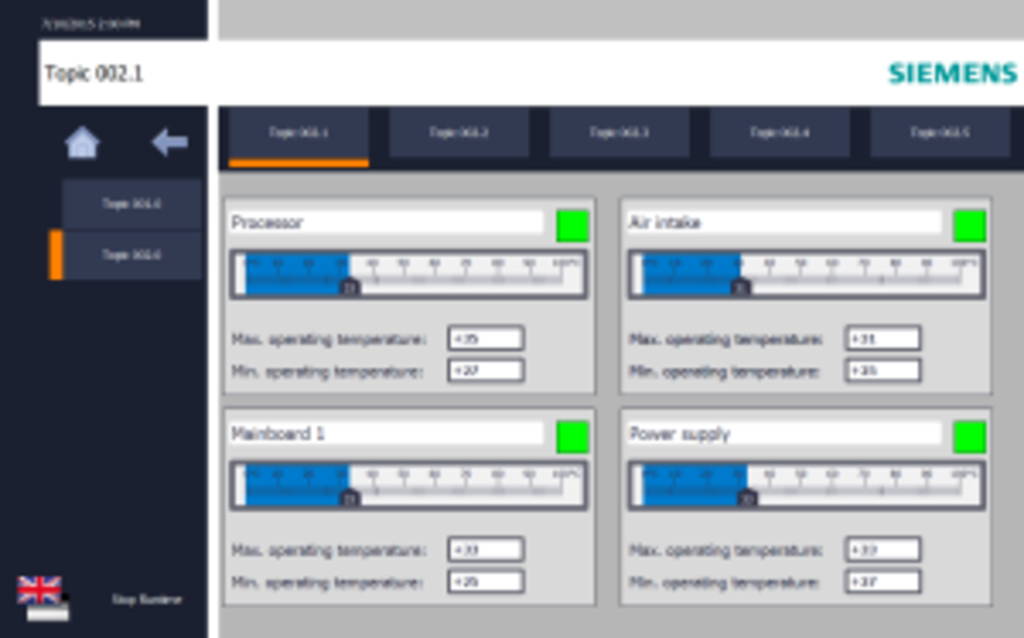
The figure below illustrates the temperature evaluation on the example of IPC.
Documentation and example projects for WinCC V13 SP1
https://support.industry.siemens.com/cs/attachments/109478242/109478242_Diagnostic_IPC_WinCC_en.pdf
https://support.industry.siemens.com/cs/attachments/109478242/109478242_Diagnostic_IPC_WinCC_Adv_V13_CODE.zip
https://support.industry.siemens.com/cs/attachments/109478242/109478242_Diagnostic_IPC_WinCC_Prof_V13_CODE.zip
https://support.industry.siemens.com/cs/attachments/109478242/109478242_Diagnostic_IPC_WinCC_V73SE_CODE.zip
Documentation and example projects for WinCC V14
https://support.industry.siemens.com/cs/attachments/109478242/109478242_Diagnostic_IPC_WinCCV14_DOC_en.pdf
https://support.industry.siemens.com/cs/attachments/109478242/109478242_Diagnostic_IPC_WinCCV14.zip
In the example project for WinCC Advanced V14, the Software DiagMonitor V5 is used. Operating as an OPC Server, DiagMonitor provides the diagnostics data of the SIMATIC IPCs. The diagnostics data are displayed on a WinCC Runtime of the SIMATIC IPC (OPC Client).
"Monitoring tasks from the Windows task planning using DiagMonitor"
https://support.industry.siemens.com/cs/document/109755236/monitoring-tasks-from-the-windows-task-planning-using-diagmonitor
https://ulozto.net/tam/_5ksdDhnQUc4t |
|
| Back to top |
|
|
|

 FAQ
FAQ Search
 Memberlist
 Usergroups
 Register
 Profile
 Log in to check your private messages
 Log in


