 |
plc.myforum.ro
PLCs users www.plc.myforum.ro!
|
| View previous topic :: View next topic |
| Author |
Message |
valz
Member 3


Joined: 26 Jul 2015
Posts: 771
|
 Posted: 09/12/2022 21:45 Post subject: Diagnose programming error WinCC alarm PCS 7 project Posted: 09/12/2022 21:45 Post subject: Diagnose programming error WinCC alarm PCS 7 project |
 |
|
How do you diagnose the cause of a programming error from the WinCC alarm line in the PCS 7 project?
https://support.industry.siemens.com/cs/document/109814837/
Programming errors in the AS can trigger corresponding alarms in WinCC Runtime. How to diagnose the cause is explained on the basis of programming error 58.
You get the following error message:

Fig. 01
Error message: Programming error 58: OB32 /8/4576/122
Source: AS04/@(1)/140AS04_1
The source is composed of "AS"/"CFC"/"Block instance". In the example, the instance "140AS04_1" called by the CFC "@(1)" in the "AS04" is the cause of the error.
Go to the CFC and check the block type. In the example it is an "OB_BEGIN_PN".
Call the Online Help with F1. Details are given under "Message texts and associated values ...".
In the example you can see that your message (message 7) is made up of parameters OB 121_BLK_TYP/OB 121_BLK_NUM/OB 121_PRG_ADDR/OB 121_FLT_REG/OB 121_RESERVED_1.
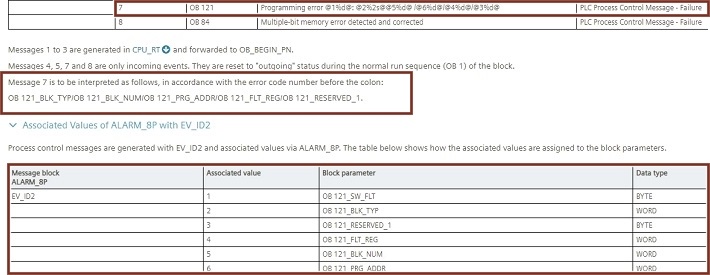
Fig. 02
Assign your values to the parameters.
In the example:
OB121_SW_FLT = 58
OB121_BLK_TYP = OB
OB121_BLK_NUM = 32
OB121_PRG_ADR = 8
OB121_FLT_REG = 4576
OB121_RESERVED_1 = 122
Call the Online Help of OB121. This explains what the respective parameter values mean. If necessary, beforehand you have to convert the values into hexadecimal numbers, for example, (marked with "B#16#" in the Online Help).
In the example:
OB121_SW_FLT = 58 = B#16#3A = Access to a DB that is not loaded; the DB number is within the permissible range.
OB121_BLK_TYP = OB = Type of block in which the error occurred.
OB121_PRG_ADR = 8 = Relative address of the MC7 command that caused the error.
OB121_FLT_REG = 4576 = In combination with OB121_SW_FLT = B#16#3A, the missing block is DB4576
OB121_RESERVED_1 = 122 = Range marked as reserved. Evaluation not useful.
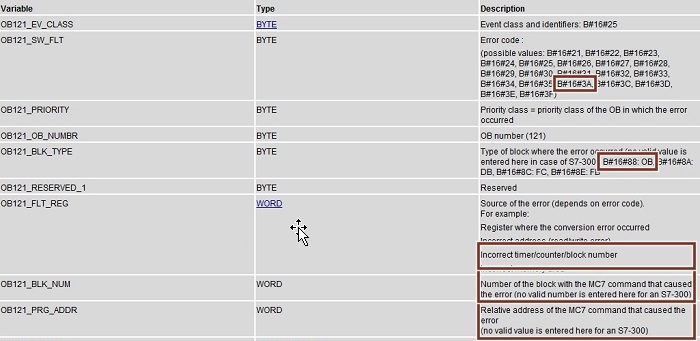
Fig. 03
Solution in the example: Copy the missing block into the AS. |
|
| Back to top |
|
 |
|
|
You cannot post new topics in this forum
You cannot reply to topics in this forum
You cannot edit your posts in this forum
You cannot delete your posts in this forum
You cannot vote in polls in this forum
|
Powered by phpBB © 2001, 2005 phpBB Group
Fa-ti si tu propriul forum GRATUIT, pe www.myforum.ro |
 FAQ
FAQ Search
 Memberlist
 Usergroups
 Register
 Profile
 Log in to check your private messages
 Log in


