| View previous topic :: View next topic |
| Author |
Message |
fuxx0
Junior

Joined: 18 Jan 2018
Posts: 9
|
 Posted: 07/02/2018 15:01 Post subject: Denso WINCAPS III Posted: 07/02/2018 15:01 Post subject: Denso WINCAPS III |
 |
|
Three months trial version for WINCAPS III

Trial License Key: WCJZ-427A-4SFU-5QMX
[url]http://densorobotics.com/products/off-line-software-wincaps[/url][/url]
hope it helps and it isn't a repost  [/img] [/img] |
|
| Back to top |
|
 |
fuxx0
Junior
Joined: 18 Jan 2018
Posts: 9
|
| Posted: 07/02/2018 15:07 Post subject: |
|
|
[url]https://www.thairobotics.com/2012/04/27/reset-denso-wincap-password/[/url]
how to reset password |
|
| Back to top |
|
|
Collinsd70
Member junior

Joined: 19 Apr 2017
Posts: 97
|
| Posted: 07/02/2019 15:24 Post subject: |
|
|
| can someone please upload? |
|
| Back to top |
|
|
cabecavil
Member

Joined: 15 Nov 2014
Posts: 139
|
| Posted: 08/02/2019 22:50 Post subject: Re: Denso WINCAPS III |
|
|
| fuxx0 wrote: | Three months trial version for WINCAPS III
Trial License Key: WCJZ-427A-4SFU-5QMX
[url]http://densorobotics.com/products/off-line-software-wincaps[/url][/url]
hope it helps and it isn't a repost [/img] |
 |
|
| Back to top |
|
|
ngocthanh03
Junior
Joined: 04 May 2015
Posts: 1
|
| Posted: 02/02/2020 12:09 Post subject: |
|
|
Hello,
Can someone share this software with google drive
Denso request user account! |
|
| Back to top |
|
|
teamworx
Junior
Joined: 28 Jan 2018
Posts: 1
|
| Posted: 03/02/2020 17:13 Post subject: Denso WINCAPS III and MEC PC Software |
|
|
| ngocthanh03 wrote: | Hello,
Can someone share this software with google drive
Denso request user account! |
Denso WINCAPS III and MEC PC Software
For the first installation:
Downloading and running the software will install the Trial edition WINCAPS III with limited functionality. (Only a program named "PRO1" can be created on the trial edition.)
Trial license key
WCDJ-32N7-MENR-FKK1
This archive:
-- denso_cobotta/
- apps/ .......... Applications
- driver/ .......... Linux driver modules.
- document/ ........ about COBOTTA OSS type.
- CHANGELOG.md ..... Update histry
- LICENSE
- README
For OSS type:
ROS Wiki
http://wiki.ros.org/denso_cobotta_ros
Package
https://github.com/DENSORobot/denso_cobotta_ros
Manual
https://densorobot.github.io/docs/denso_cobotta_ros/
If you use the standard type, colud you refer to the following link?
■For Standard type:
ROS Wiki
http://wiki.ros.org/denso_robot_ros
Package
https://github.com/DENSORobot/denso_robot_ros
dowbload
https://ulozto.net/tam/_RUCJsrNr2N2H
mirror
[URL=https://www.file-upload.net/download-13888066/SISTEMA_DENSO_Robot_Controller_RC8A_190422_rev_2_1_locked.slb.html]SISTEMA_DENSO_Robot_Controller_RC8A_190422_rev_2_1_locked.slb[/URL]
[URL=https://www.file-upload.net/download-13888067/DN_CmdSlave_V204_MP55.zip.html]DN_CmdSlave_V204_MP55.zip[/URL]
[URL=https://www.file-upload.net/download-13888065/DN_CmdSlave_V204_MP535.zip.html]DN_CmdSlave_V204_MP535.zip[/URL]
[URL=https://www.file-upload.net/download-13888068/DN_CmdSlv_V204_CODESYS.zip.html]DN_CmdSlv_V204_CODESYS.zip[/URL]
[URL=https://www.file-upload.net/download-13888069/DN_CmdSlv_V204_Rockwell.zip.html]DN_CmdSlv_V204_Rockwell.zip[/URL]
[URL=https://www.file-upload.net/download-13888070/Command-Slave_Application_Guide_CODESYS.zip.html]Command-Slave_Application_Guide_CODESYS.zip[/URL]
[URL=https://www.file-upload.net/download-13888073/Command-Slave_Reference_Guide_Rockwell.zip.html]Command-Slave_Reference_Guide_Rockwell.zip[/URL]
[URL=https://www.file-upload.net/download-13888072/Command-Slave_Application_Guide_Rockwell.zip.html]Command-Slave_Application_Guide_Rockwell.zip[/URL]
[URL=https://www.file-upload.net/download-13888071/Command-Slave_Reference_Guide_SIEMENS.zip.html]Command-Slave_Reference_Guide_SIEMENS.zip[/URL]
[URL=https://www.file-upload.net/download-13888074/Command-Slave_Application_Guide_SIEMENS.zip.html]Command-Slave_Application_Guide_SIEMENS.zip[/URL]
[URL=https://www.file-upload.net/download-13888078/DN_CmdSlv_V204_TIAV14.zip.html]DN_CmdSlv_V204_TIAV14.zip[/URL]
[URL=https://www.file-upload.net/download-13888080/COBOTTA_upgrademodule_ver.2.9.1.zip.html]COBOTTA_upgrademodule_ver.2.9.1.zip[/URL]
[URL=https://www.file-upload.net/download-13888077/denso_cobotta-1.2.0-20191025.tar.bz2.html]denso_cobotta-1.2.0-20191025.tar.bz2[/URL]
[URL=https://www.file-upload.net/download-13888082/Field_Network2.zip.html]Field_Network2.zip[/URL]
[URL=https://www.file-upload.net/download-13888081/Field_Network1.zip.html]Field_Network1.zip[/URL]
[URL=https://www.file-upload.net/download-13888083/Field_Network.zip.html]Field_Network.zip[/URL]
[URL=https://www.file-upload.net/download-13888085/LabVIEW_Library.zip.html]LabVIEW_Library.zip[/URL]
[URL=https://www.file-upload.net/download-13888084/Mobile_Tools.zip.html]Mobile_Tools.zip[/URL]
[URL=https://www.file-upload.net/download-13888086/RC7M_Manuals_EnglishJapanese_Ver.3.3-R4.zip.html]RC7M_Manuals_EnglishJapanese_Ver.3.3-R4.zip[/URL]
[URL=https://www.file-upload.net/download-13888087/LphUserManuals_1007_zh.zip.html]LphUserManuals_1007_zh.zip[/URL]
[URL=https://www.file-upload.net/download-13888093/VS-S2UserManuals_1007_en.zip.html]VS-S2UserManuals_1007_en.zip[/URL]
[URL=https://www.file-upload.net/download-13888092/COBOTTA_QuickSetupGuide_en.pdf.html]COBOTTA_QuickSetupGuide_en.pdf[/URL]
[URL=https://www.file-upload.net/download-13888094/COBOTTAUserManuals_2090_en.zip.html]COBOTTAUserManuals_2090_en.zip[/URL]
[URL=https://www.file-upload.net/download-13888101/RC8UserManuals_2090_en.zip.html]RC8UserManuals_2090_en.zip[/URL]
[URL=https://www.file-upload.net/download-13888096/WINCAPS_ll.zip.html]WINCAPS_ll.zip[/URL]
[URL=https://www.file-upload.net/download-13888106/RCVision_V132.zip.html]RCVision_V132.zip[/URL]
[URL=https://www.file-upload.net/download-13888108/RobotTools_V1221.zip.html]RobotTools_V1221.zip[/URL]
[URL=https://www.file-upload.net/download-13888107/ORiN2SDK_Ver2144.zip.html]ORiN2SDK_Ver2144.zip[/URL]
[URL=https://www.file-upload.net/download-13888109/MEC_PC-SOFTWAREME0248-7A.pdf.html]MEC_PC-SOFTWAREME0248-7A.pdf[/URL]
WINCAPSIII_V3582.zip 1.03 GB
https://mega.nz/# !YTpjHayR!iK5CUrwx8TE5l7lydxT-vkncy2IWKYh7nG9JNd5p20I
mirror
https://bayfiles.com/LenfgcU5n8/DN_CmdSlv_V204_CODESYS_zip
https://bayfiles.com/lbo9gdUan1/DN_CmdSlave_V204_MP535_zip
https://bayfiles.com/X3odgdU3n6/DN_CmdSlv_V204_Rockwell_zip
https://bayfiles.com/bdp1g9U1nf/SISTEMA_DENSO_Robot_Controller_RC8A_190422_rev_2_1_locked_slb
https://bayfiles.com/h7p9g3U8n5/DN_CmdSlave_V204_MP55_zip
https://bayfiles.com/V7s7geU5n9/Command-Slave_Reference_Guide_SIEMENS_zip
https://bayfiles.com/j1u3gbU1nd/Command-Slave_Application_Guide_SIEMENS_zip
https://bayfiles.com/Xeudg6Ufnd/Command-Slave_Application_Guide_Rockwell_zip
https://bayfiles.com/fevcgbU9n6/denso_cobotta-1.2.0-20191025.tar_bz2
https://bayfiles.com/hdvagcU8n0/Field_Network_2_zip
https://bayfiles.com/jav2g8U0n6/DN_CmdSlv_V204_TIAV14_zip
https://bayfiles.com/nbvegfU4nd/Field_Network_1_zip
https://bayfiles.com/p7v6gcU6n2/Field_Network_zip
https://bayfiles.com/lbw5g7Ubna/Mobile_Tools_zip
https://bayfiles.com/92w6g2U5nf/Command-Slave_Application_Guide_CODESYS_zip
https://bayfiles.com/r5yfgaUbn7/Command-Slave_Reference_Guide_Rockwell_zip
https://bayfiles.com/te3eg0U4n5/LphUserManuals_1007_zh_zip
https://bayfiles.com/rb5cg1Uena/COBOTTA_QuickSetupGuide_en_pdf
https://bayfiles.com/j78egdUbn0/VS-S2UserManuals_1007_en_zip
https://bayfiles.com/7fGcgcUbn2/LabVIEW_Library_zip
https://bayfiles.com/rbbdh6U3n5/WINCAPS_ll_zip
https://bayfiles.com/Jcf1h2U0nf/COBOTTAUserManuals_2090_en_zip
https://bayfiles.com/h3EdhfUdne/RC7M_Manuals_English_Japanese_Ver.3.3-R4_zip
https://bayfiles.com/J8Z3hcUfna/COBOTTA_upgrademodule_ver.2.9.1_zip
https://bayfiles.com/hbb2i5U1n6/RC8UserManuals_2090_en_zip
https://bayfiles.com/tdb8i4U6nc/MEC_PC-SOFTWARE_ME0248-7A_pdf
https://bayfiles.com/X8h2i5Ufn2/mec_v2.01.01.00_zip
https://bayfiles.com/11i8i5U6n0/Version_7.00.03_zip
https://bayfiles.com/vfx8i5Ubnb/RCVision_V132_zip
https://bayfiles.com/fdF0icUdnf/RobotTools_V1221_zip
https://bayfiles.com/F3H8i8U0nc/ORiN2SDK_Ver2144_zip
https://bayfiles.com/V7NcidUbna/WINCAPSIII_V3582_zip
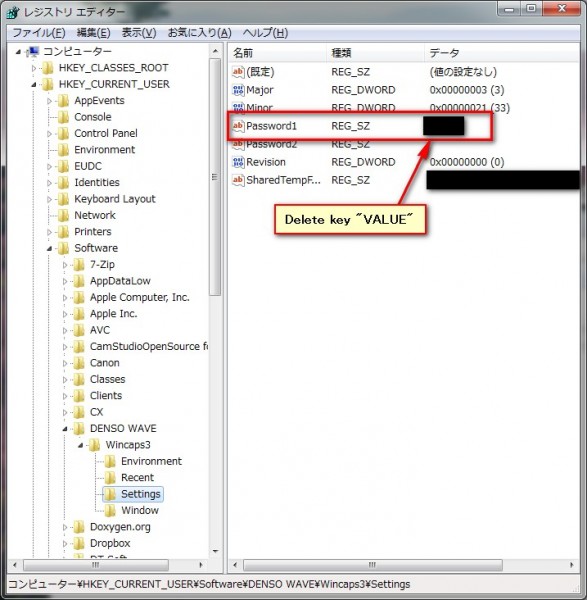
How to Reset Denso WINCAPS III Programmer Password
Posted on 2012/04/27 by Mahisorn
Close WINCAPS
Open regedit.exe
Navigate to \HKEY_CURRENT_USER\Software\DENSO WAVE\Wincaps3\Settings
Delete Password1 “VALUE” not the whole “KEY”
Open WINCAPS and set your new programmer password
 |
|
| Back to top |
|
|
gert
Member 3


Joined: 02 Jan 2015
Posts: 645
|
| Posted: 05/02/2020 09:11 Post subject: DENSO Industrial Robot Using a SIMATIC S7-1500 |
|
|
Programing a DENSO Industrial Robot Using a SIMATIC S7-1500
https://ulozto.net/tam/_UmoZ0kZ0XdLt |
|
| Back to top |
|
|
atomik
Member junior

Joined: 07 Jun 2017
Posts: 79
|
| Posted: 07/09/2020 18:46 Post subject: DENSO Robot Integrator in SIMATIC |
|
|
SIMATIC Robot Integrator for DENSO - Getting Started
https://support.industry.siemens.com/cs/document/109761432/
This application example contains the programming of a DENSO robot with a SIMATIC S7-1500 using the function block library "DENSO Command Slave". The corresponding documentation explains stepwise how to set up the DENSO robot with TIA Portal using said function block library.
Industrial robots are becoming more and more popular. Nowadays, they are increasingly used in machines and plants. Their standardized mechanical system is fully developed and highly flexible in terms of the possible motions so that a robot has become the preferred choice over expensive special mechanical equipment. This allows production from lot size one upward even without expensive modifications to machines and plants.
Unfortunately, however, the plant control system and the robot controller are typically two different systems. Communication between the two controllers takes place mostly only at the bit level and the robot’s motion programs are permanently stored on the robot controller and can only be called by the plant control system. Therefore, it is relatively difficult to implement a flexible response of the robot to particular plant events. Furthermore, the programming of the plant control system and the one of the robot mostly differ to a great extent so that both systems can generally not be supported by one person. Interface and coordination problems are therefore inevitable.
This application example shows how to use a SIMATIC S7-1500 controller to fully control and operate a DENSO industrial robot. To do this, the function block library "DENSO Command Slave" is used in TIA Portal, which provides all the necessary function blocks.
Communication between the SIMATIC S7-1500 controller and the DENSO industrial robot takes place via a PROFINET connection. All commands and status information between the SIMATIC controller and the robot are exchanged via this connection.
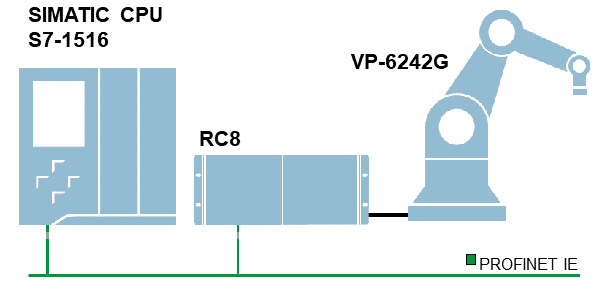
Fig. 1
Using the function block library "DENSO Command Slave", the SIMATIC controller takes full control of the DENSO industrial robot. The DENSO industrial robot consists of the DENSO robot controller RC8 or RC8A and the robot’s mechanical system, the actual robot. The interpreter for the commands of the function block library "DENSO Command Slave" is installed on the robot controller. The interpreter receives the commands from the SIMATIC controller and executes them on the robot’s mechanical system, including kinematic transformation.
Downloads
https://support.industry.siemens.com/cs/attachments/109761432/109761432_GettingStartedSRIDenso_DOC_V13_en.pdf
https://support.industry.siemens.com/cs/attachments/109761432/109761432_GettingStartedSRIDenso_PROJ_CSV204_TIAV15.1.zip
https://anonfiles.com/7674C6S6ob/109761432_GettingStartedSRIDenso_DOC_V13_en_pdf
https://anonfiles.com/B972CfS4oc/109761432_GettingStartedSRIDenso_PROJ_CSV204_TIAV15.1_zip |
|
| Back to top |
|
|
atomik
Member junior
Joined: 07 Jun 2017
Posts: 79
|
| Posted: 07/09/2020 18:54 Post subject: DENSO robot with a SIMATIC controller How do you control |
|
|
How do you control a DENSO robot with a SIMATIC controller?
https://support.industry.siemens.com/cs/document/109749978/
The "Command Slave" function package provided by DENSO Robotics Europe enables users to use a SIMATIC controller to control a DENSO robot with RC8-A control at an elementary basic and movement command level.
The robot or robot controller is incorporated as remote IO in the hardware configuration of the SIMATIC controller via PROFINET by means of a GSDML file. This permits you to use all the advantages of the PROFINET standard for data exchange between robot and SIMATIC controller.
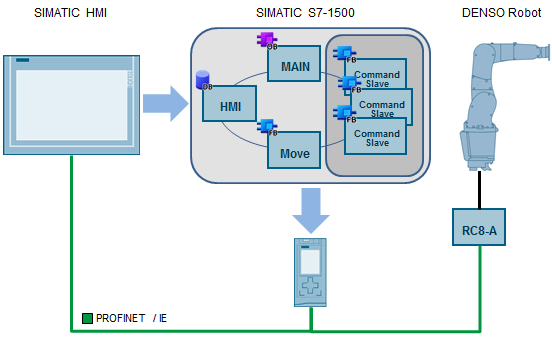
Fig. 01
The robot is controlled in the PLC program through function blocks which are provided as a block library along with the "Command Slave" function package. The function blocks are similar in behavior to the generally applied PLCopen standard, which is also found in the motion functions integrated in the SIMATIC CPU. The robot can be switched on and monitored via the function blocks of the block library and elementary motion commands, like point-to-point movements and linear or circular movements, can be transmitted to the robot.
For the robot controller which handles the control of the robot kinematics, the "Command Slave" function package includes a command interpreter which is installed on the robot controller and forwards the robot commands from the PLC program to the path planning of the robot. This therefore makes all the kinematic and safety-related functions of the RC8-A robot controllers available and the robot executes its movements with the usual precision and independent of the load of the SIMATIC CPU.
The "Command Slave" function package can be used on all DENSO robots with an RC8-A controller.
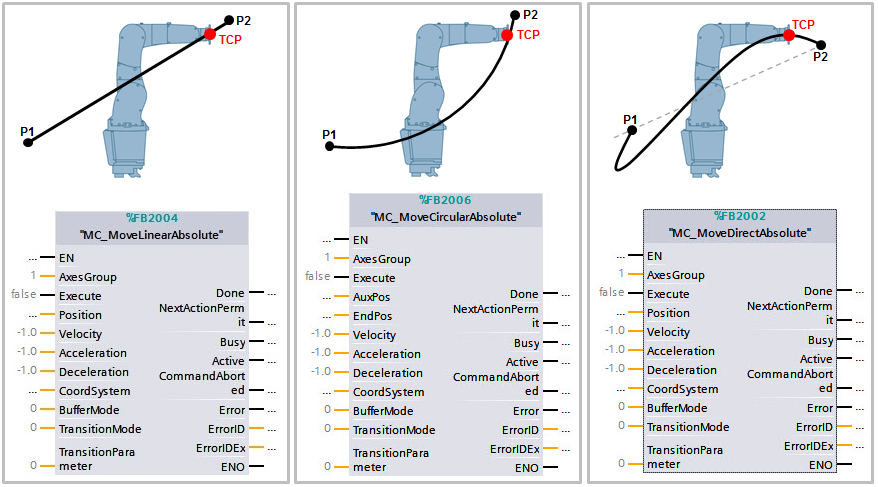
Fig. 02
The function package is particularly suitable for all kinds of handling applications and simple contouring when the robot movements are to be event-oriented and flexibly adapted to the task to be executed.
The user has the following advantages when using the function package:
Connection of all function components, like SIMATIC controllers and robot controllers, via PROFINET.
Integration of the robots in the TIA Portal environment.
Easy integration of the robots in plant standards including safety functions.
Flexible and fail-safe operation via just one HMI for all robots and the complete plant.
The function package is available with controller-specific block libraries for all SIMATIC S7-1500 controllers with STEP 7 (TIA Portal) from DENSO Robotics Europe . Here all the controllers of the different families can be used with one IO address area of at least 256 bytes per robot. |
|
| Back to top |
|
|
xarpe
Junior
Joined: 28 May 2019
Posts: 2
|
| Posted: 07/09/2020 19:03 Post subject: Re: Denso WINCAPS III and MEC PC Software |
|
|
| teamworx wrote: | | ngocthanh03 wrote: | Hello,
Can someone share this software with google drive
Denso request user account! |
Denso WINCAPS III and MEC PC Software
For the first installation:
Downloading and running the software will install the Trial edition WINCAPS III with limited functionality. (Only a program named "PRO1" can be created on the trial edition.)
Trial license key
WCDJ-32N7-MENR-FKK1
This archive:
-- denso_cobotta/
- apps/ .......... Applications
- driver/ .......... Linux driver modules.
- document/ ........ about COBOTTA OSS type.
- CHANGELOG.md ..... Update histry
- LICENSE
- README
For OSS type:
ROS Wiki
http://wiki.ros.org/denso_cobotta_ros
Package
https://github.com/DENSORobot/denso_cobotta_ros
Manual
https://densorobot.github.io/docs/denso_cobotta_ros/
If you use the standard type, colud you refer to the following link?
■For Standard type:
ROS Wiki
http://wiki.ros.org/denso_robot_ros
Package
https://github.com/DENSORobot/denso_robot_ros
dowbload
https://ulozto.net/tam/_RUCJsrNr2N2H
mirror
[URL=https://www.file-upload.net/download-13888066/SISTEMA_DENSO_Robot_Controller_RC8A_190422_rev_2_1_locked.slb.html]SISTEMA_DENSO_Robot_Controller_RC8A_190422_rev_2_1_locked.slb[/URL]
[URL=https://www.file-upload.net/download-13888067/DN_CmdSlave_V204_MP55.zip.html]DN_CmdSlave_V204_MP55.zip[/URL]
[URL=https://www.file-upload.net/download-13888065/DN_CmdSlave_V204_MP535.zip.html]DN_CmdSlave_V204_MP535.zip[/URL]
[URL=https://www.file-upload.net/download-13888068/DN_CmdSlv_V204_CODESYS.zip.html]DN_CmdSlv_V204_CODESYS.zip[/URL]
[URL=https://www.file-upload.net/download-13888069/DN_CmdSlv_V204_Rockwell.zip.html]DN_CmdSlv_V204_Rockwell.zip[/URL]
[URL=https://www.file-upload.net/download-13888070/Command-Slave_Application_Guide_CODESYS.zip.html]Command-Slave_Application_Guide_CODESYS.zip[/URL]
[URL=https://www.file-upload.net/download-13888073/Command-Slave_Reference_Guide_Rockwell.zip.html]Command-Slave_Reference_Guide_Rockwell.zip[/URL]
[URL=https://www.file-upload.net/download-13888072/Command-Slave_Application_Guide_Rockwell.zip.html]Command-Slave_Application_Guide_Rockwell.zip[/URL]
[URL=https://www.file-upload.net/download-13888071/Command-Slave_Reference_Guide_SIEMENS.zip.html]Command-Slave_Reference_Guide_SIEMENS.zip[/URL]
[URL=https://www.file-upload.net/download-13888074/Command-Slave_Application_Guide_SIEMENS.zip.html]Command-Slave_Application_Guide_SIEMENS.zip[/URL]
[URL=https://www.file-upload.net/download-13888078/DN_CmdSlv_V204_TIAV14.zip.html]DN_CmdSlv_V204_TIAV14.zip[/URL]
[URL=https://www.file-upload.net/download-13888080/COBOTTA_upgrademodule_ver.2.9.1.zip.html]COBOTTA_upgrademodule_ver.2.9.1.zip[/URL]
[URL=https://www.file-upload.net/download-13888077/denso_cobotta-1.2.0-20191025.tar.bz2.html]denso_cobotta-1.2.0-20191025.tar.bz2[/URL]
[URL=https://www.file-upload.net/download-13888082/Field_Network2.zip.html]Field_Network2.zip[/URL]
[URL=https://www.file-upload.net/download-13888081/Field_Network1.zip.html]Field_Network1.zip[/URL]
[URL=https://www.file-upload.net/download-13888083/Field_Network.zip.html]Field_Network.zip[/URL]
[URL=https://www.file-upload.net/download-13888085/LabVIEW_Library.zip.html]LabVIEW_Library.zip[/URL]
[URL=https://www.file-upload.net/download-13888084/Mobile_Tools.zip.html]Mobile_Tools.zip[/URL]
[URL=https://www.file-upload.net/download-13888086/RC7M_Manuals_EnglishJapanese_Ver.3.3-R4.zip.html]RC7M_Manuals_EnglishJapanese_Ver.3.3-R4.zip[/URL]
[URL=https://www.file-upload.net/download-13888087/LphUserManuals_1007_zh.zip.html]LphUserManuals_1007_zh.zip[/URL]
[URL=https://www.file-upload.net/download-13888093/VS-S2UserManuals_1007_en.zip.html]VS-S2UserManuals_1007_en.zip[/URL]
[URL=https://www.file-upload.net/download-13888092/COBOTTA_QuickSetupGuide_en.pdf.html]COBOTTA_QuickSetupGuide_en.pdf[/URL]
[URL=https://www.file-upload.net/download-13888094/COBOTTAUserManuals_2090_en.zip.html]COBOTTAUserManuals_2090_en.zip[/URL]
[URL=https://www.file-upload.net/download-13888101/RC8UserManuals_2090_en.zip.html]RC8UserManuals_2090_en.zip[/URL]
[URL=https://www.file-upload.net/download-13888096/WINCAPS_ll.zip.html]WINCAPS_ll.zip[/URL]
[URL=https://www.file-upload.net/download-13888106/RCVision_V132.zip.html]RCVision_V132.zip[/URL]
[URL=https://www.file-upload.net/download-13888108/RobotTools_V1221.zip.html]RobotTools_V1221.zip[/URL]
[URL=https://www.file-upload.net/download-13888107/ORiN2SDK_Ver2144.zip.html]ORiN2SDK_Ver2144.zip[/URL]
[URL=https://www.file-upload.net/download-13888109/MEC_PC-SOFTWAREME0248-7A.pdf.html]MEC_PC-SOFTWAREME0248-7A.pdf[/URL]
WINCAPSIII_V3582.zip 1.03 GB
https://mega.nz/# !YTpjHayR!iK5CUrwx8TE5l7lydxT-vkncy2IWKYh7nG9JNd5p20I
mirror
https://bayfiles.com/LenfgcU5n8/DN_CmdSlv_V204_CODESYS_zip
https://bayfiles.com/lbo9gdUan1/DN_CmdSlave_V204_MP535_zip
https://bayfiles.com/X3odgdU3n6/DN_CmdSlv_V204_Rockwell_zip
https://bayfiles.com/bdp1g9U1nf/SISTEMA_DENSO_Robot_Controller_RC8A_190422_rev_2_1_locked_slb
https://bayfiles.com/h7p9g3U8n5/DN_CmdSlave_V204_MP55_zip
https://bayfiles.com/V7s7geU5n9/Command-Slave_Reference_Guide_SIEMENS_zip
https://bayfiles.com/j1u3gbU1nd/Command-Slave_Application_Guide_SIEMENS_zip
https://bayfiles.com/Xeudg6Ufnd/Command-Slave_Application_Guide_Rockwell_zip
https://bayfiles.com/fevcgbU9n6/denso_cobotta-1.2.0-20191025.tar_bz2
https://bayfiles.com/hdvagcU8n0/Field_Network_2_zip
https://bayfiles.com/jav2g8U0n6/DN_CmdSlv_V204_TIAV14_zip
https://bayfiles.com/nbvegfU4nd/Field_Network_1_zip
https://bayfiles.com/p7v6gcU6n2/Field_Network_zip
https://bayfiles.com/lbw5g7Ubna/Mobile_Tools_zip
https://bayfiles.com/92w6g2U5nf/Command-Slave_Application_Guide_CODESYS_zip
https://bayfiles.com/r5yfgaUbn7/Command-Slave_Reference_Guide_Rockwell_zip
https://bayfiles.com/te3eg0U4n5/LphUserManuals_1007_zh_zip
https://bayfiles.com/rb5cg1Uena/COBOTTA_QuickSetupGuide_en_pdf
https://bayfiles.com/j78egdUbn0/VS-S2UserManuals_1007_en_zip
https://bayfiles.com/7fGcgcUbn2/LabVIEW_Library_zip
https://bayfiles.com/rbbdh6U3n5/WINCAPS_ll_zip
https://bayfiles.com/Jcf1h2U0nf/COBOTTAUserManuals_2090_en_zip
https://bayfiles.com/h3EdhfUdne/RC7M_Manuals_English_Japanese_Ver.3.3-R4_zip
https://bayfiles.com/J8Z3hcUfna/COBOTTA_upgrademodule_ver.2.9.1_zip
https://bayfiles.com/hbb2i5U1n6/RC8UserManuals_2090_en_zip
https://bayfiles.com/tdb8i4U6nc/MEC_PC-SOFTWARE_ME0248-7A_pdf
https://bayfiles.com/X8h2i5Ufn2/mec_v2.01.01.00_zip
https://bayfiles.com/11i8i5U6n0/Version_7.00.03_zip
https://bayfiles.com/vfx8i5Ubnb/RCVision_V132_zip
https://bayfiles.com/fdF0icUdnf/RobotTools_V1221_zip
https://bayfiles.com/F3H8i8U0nc/ORiN2SDK_Ver2144_zip
https://bayfiles.com/V7NcidUbna/WINCAPSIII_V3582_zip
How to Reset Denso WINCAPS III Programmer Password
Posted on 2012/04/27 by Mahisorn
Close WINCAPS
Open regedit.exe
Navigate to \HKEY_CURRENT_USER\Software\DENSO WAVE\Wincaps3\Settings
Delete Password1 “VALUE” not the whole “KEY”
Open WINCAPS and set your new programmer password
|
Thanks man!!!!!! |
|
| Back to top |
|
|
gplminhduc147
Junior
Joined: 22 Jun 2025
Posts: 11
|
| Posted: 22/10/2025 03:36 Post subject: Re: Denso WINCAPS III and MEC PC Software |
|
|
| teamworx wrote: | | ngocthanh03 wrote: | Hello,
Can someone share this software with google drive
Denso request user account! |
Denso WINCAPS III and MEC PC Software
For the first installation:
Downloading and running the software will install the Trial edition WINCAPS III with limited functionality. (Only a program named "PRO1" can be created on the trial edition.)
Trial license key
WCDJ-32N7-MENR-FKK1
This archive:
-- denso_cobotta/
- apps/ .......... Applications
- driver/ .......... Linux driver modules.
- document/ ........ about COBOTTA OSS type.
- CHANGELOG.md ..... Update histry
- LICENSE
- README
For OSS type:
ROS Wiki
http://wiki.ros.org/denso_cobotta_ros
Package
https://github.com/DENSORobot/denso_cobotta_ros
Manual
https://densorobot.github.io/docs/denso_cobotta_ros/
If you use the standard type, colud you refer to the following link?
■For Standard type:
ROS Wiki
http://wiki.ros.org/denso_robot_ros
Package
https://github.com/DENSORobot/denso_robot_ros
dowbload
https://ulozto.net/tam/_RUCJsrNr2N2H
mirror
[URL=https://www.file-upload.net/download-13888066/SISTEMA_DENSO_Robot_Controller_RC8A_190422_rev_2_1_locked.slb.html]SISTEMA_DENSO_Robot_Controller_RC8A_190422_rev_2_1_locked.slb[/URL]
[URL=https://www.file-upload.net/download-13888067/DN_CmdSlave_V204_MP55.zip.html]DN_CmdSlave_V204_MP55.zip[/URL]
[URL=https://www.file-upload.net/download-13888065/DN_CmdSlave_V204_MP535.zip.html]DN_CmdSlave_V204_MP535.zip[/URL]
[URL=https://www.file-upload.net/download-13888068/DN_CmdSlv_V204_CODESYS.zip.html]DN_CmdSlv_V204_CODESYS.zip[/URL]
[URL=https://www.file-upload.net/download-13888069/DN_CmdSlv_V204_Rockwell.zip.html]DN_CmdSlv_V204_Rockwell.zip[/URL]
[URL=https://www.file-upload.net/download-13888070/Command-Slave_Application_Guide_CODESYS.zip.html]Command-Slave_Application_Guide_CODESYS.zip[/URL]
[URL=https://www.file-upload.net/download-13888073/Command-Slave_Reference_Guide_Rockwell.zip.html]Command-Slave_Reference_Guide_Rockwell.zip[/URL]
[URL=https://www.file-upload.net/download-13888072/Command-Slave_Application_Guide_Rockwell.zip.html]Command-Slave_Application_Guide_Rockwell.zip[/URL]
[URL=https://www.file-upload.net/download-13888071/Command-Slave_Reference_Guide_SIEMENS.zip.html]Command-Slave_Reference_Guide_SIEMENS.zip[/URL]
[URL=https://www.file-upload.net/download-13888074/Command-Slave_Application_Guide_SIEMENS.zip.html]Command-Slave_Application_Guide_SIEMENS.zip[/URL]
[URL=https://www.file-upload.net/download-13888078/DN_CmdSlv_V204_TIAV14.zip.html]DN_CmdSlv_V204_TIAV14.zip[/URL]
[URL=https://www.file-upload.net/download-13888080/COBOTTA_upgrademodule_ver.2.9.1.zip.html]COBOTTA_upgrademodule_ver.2.9.1.zip[/URL]
[URL=https://www.file-upload.net/download-13888077/denso_cobotta-1.2.0-20191025.tar.bz2.html]denso_cobotta-1.2.0-20191025.tar.bz2[/URL]
[URL=https://www.file-upload.net/download-13888082/Field_Network2.zip.html]Field_Network2.zip[/URL]
[URL=https://www.file-upload.net/download-13888081/Field_Network1.zip.html]Field_Network1.zip[/URL]
[URL=https://www.file-upload.net/download-13888083/Field_Network.zip.html]Field_Network.zip[/URL]
[URL=https://www.file-upload.net/download-13888085/LabVIEW_Library.zip.html]LabVIEW_Library.zip[/URL]
[URL=https://www.file-upload.net/download-13888084/Mobile_Tools.zip.html]Mobile_Tools.zip[/URL]
[URL=https://www.file-upload.net/download-13888086/RC7M_Manuals_EnglishJapanese_Ver.3.3-R4.zip.html]RC7M_Manuals_EnglishJapanese_Ver.3.3-R4.zip[/URL]
[URL=https://www.file-upload.net/download-13888087/LphUserManuals_1007_zh.zip.html]LphUserManuals_1007_zh.zip[/URL]
[URL=https://www.file-upload.net/download-13888093/VS-S2UserManuals_1007_en.zip.html]VS-S2UserManuals_1007_en.zip[/URL]
[URL=https://www.file-upload.net/download-13888092/COBOTTA_QuickSetupGuide_en.pdf.html]COBOTTA_QuickSetupGuide_en.pdf[/URL]
[URL=https://www.file-upload.net/download-13888094/COBOTTAUserManuals_2090_en.zip.html]COBOTTAUserManuals_2090_en.zip[/URL]
[URL=https://www.file-upload.net/download-13888101/RC8UserManuals_2090_en.zip.html]RC8UserManuals_2090_en.zip[/URL]
[URL=https://www.file-upload.net/download-13888096/WINCAPS_ll.zip.html]WINCAPS_ll.zip[/URL]
[URL=https://www.file-upload.net/download-13888106/RCVision_V132.zip.html]RCVision_V132.zip[/URL]
[URL=https://www.file-upload.net/download-13888108/RobotTools_V1221.zip.html]RobotTools_V1221.zip[/URL]
[URL=https://www.file-upload.net/download-13888107/ORiN2SDK_Ver2144.zip.html]ORiN2SDK_Ver2144.zip[/URL]
[URL=https://www.file-upload.net/download-13888109/MEC_PC-SOFTWAREME0248-7A.pdf.html]MEC_PC-SOFTWAREME0248-7A.pdf[/URL]
WINCAPSIII_V3582.zip 1.03 GB
https://mega.nz/# !YTpjHayR!iK5CUrwx8TE5l7lydxT-vkncy2IWKYh7nG9JNd5p20I
mirror
https://bayfiles.com/LenfgcU5n8/DN_CmdSlv_V204_CODESYS_zip
https://bayfiles.com/lbo9gdUan1/DN_CmdSlave_V204_MP535_zip
https://bayfiles.com/X3odgdU3n6/DN_CmdSlv_V204_Rockwell_zip
https://bayfiles.com/bdp1g9U1nf/SISTEMA_DENSO_Robot_Controller_RC8A_190422_rev_2_1_locked_slb
https://bayfiles.com/h7p9g3U8n5/DN_CmdSlave_V204_MP55_zip
https://bayfiles.com/V7s7geU5n9/Command-Slave_Reference_Guide_SIEMENS_zip
https://bayfiles.com/j1u3gbU1nd/Command-Slave_Application_Guide_SIEMENS_zip
https://bayfiles.com/Xeudg6Ufnd/Command-Slave_Application_Guide_Rockwell_zip
https://bayfiles.com/fevcgbU9n6/denso_cobotta-1.2.0-20191025.tar_bz2
https://bayfiles.com/hdvagcU8n0/Field_Network_2_zip
https://bayfiles.com/jav2g8U0n6/DN_CmdSlv_V204_TIAV14_zip
https://bayfiles.com/nbvegfU4nd/Field_Network_1_zip
https://bayfiles.com/p7v6gcU6n2/Field_Network_zip
https://bayfiles.com/lbw5g7Ubna/Mobile_Tools_zip
https://bayfiles.com/92w6g2U5nf/Command-Slave_Application_Guide_CODESYS_zip
https://bayfiles.com/r5yfgaUbn7/Command-Slave_Reference_Guide_Rockwell_zip
https://bayfiles.com/te3eg0U4n5/LphUserManuals_1007_zh_zip
https://bayfiles.com/rb5cg1Uena/COBOTTA_QuickSetupGuide_en_pdf
https://bayfiles.com/j78egdUbn0/VS-S2UserManuals_1007_en_zip
https://bayfiles.com/7fGcgcUbn2/LabVIEW_Library_zip
https://bayfiles.com/rbbdh6U3n5/WINCAPS_ll_zip
https://bayfiles.com/Jcf1h2U0nf/COBOTTAUserManuals_2090_en_zip
https://bayfiles.com/h3EdhfUdne/RC7M_Manuals_English_Japanese_Ver.3.3-R4_zip
https://bayfiles.com/J8Z3hcUfna/COBOTTA_upgrademodule_ver.2.9.1_zip
https://bayfiles.com/hbb2i5U1n6/RC8UserManuals_2090_en_zip
https://bayfiles.com/tdb8i4U6nc/MEC_PC-SOFTWARE_ME0248-7A_pdf
https://bayfiles.com/X8h2i5Ufn2/mec_v2.01.01.00_zip
https://bayfiles.com/11i8i5U6n0/Version_7.00.03_zip
https://bayfiles.com/vfx8i5Ubnb/RCVision_V132_zip
https://bayfiles.com/fdF0icUdnf/RobotTools_V1221_zip
https://bayfiles.com/F3H8i8U0nc/ORiN2SDK_Ver2144_zip
https://bayfiles.com/V7NcidUbna/WINCAPSIII_V3582_zip
How to Reset Denso WINCAPS III Programmer Password
Posted on 2012/04/27 by Mahisorn
Close WINCAPS
Open regedit.exe
Navigate to \HKEY_CURRENT_USER\Software\DENSO WAVE\Wincaps3\Settings
Delete Password1 “VALUE” not the whole “KEY”
Open WINCAPS and set your new programmer password
|
The links are dead. Could someone pls update the new Denso Wincaps III with medicine pls ? |
|
| Back to top |
|
|
|

 FAQ
FAQ Search
 Memberlist
 Usergroups
 Register
 Profile
 Log in to check your private messages
 Log in


