 |
plc.myforum.ro
PLCs users www.plc.myforum.ro!
|
| View previous topic :: View next topic |
| Author |
Message |
bcs34
Junior

Joined: 07 Sep 2018
Posts: 1
|
 Posted: 07/09/2018 12:04 Post subject: Convert 32 bit floating point number into a 64 bit floating Posted: 07/09/2018 12:04 Post subject: Convert 32 bit floating point number into a 64 bit floating |
 |
|
| How can I convert a 32 bit floating point number into a 64 bit floating number and vice versa ? |
|
| Back to top |
|
 |
attys
Junior
Joined: 31 Jul 2018
Posts: 13
|
| Posted: 07/09/2018 15:04 Post subject: Tool collection for converting data types |
|
|
follow this..
Tool collection for converting data types
https://support.industry.siemens.com/cs/document/25629271/
Converter for floating point and fixed-point numbers
Converter for string data types
Converter for date/time and time operations
Converter for various conversion functions
Converter for floating point and fixed-point numbers
Converting a 32 bit floating point number into a 64 bit floating point number and vice versa
Using both functions FC21 "32TO64" and FC22 "64TO32" you convert the floating point numbers into the required 32 bit or 64 bit data format.
Converting floating point numbers between the S7 and S5 format
Since the S7 real format differs from the S5 floating point format, it is not possible without conversion to adopt the formats into the respective other controller. Functions "S7ToS5-Floating" and "S5ToS7-Floating" are available for the conversion into the respective format.
Converting a variable from data type DINT to INT
Function "DINT_TO_INT" enables you to convert a data double-word 32 bit integer into a data word 16 bit integer for the three programming languages LAD/FBD/STL. The conversion is checked for the limit values -32768 and 32767 and the result is displayed in a Boolean variable.
Converter for string data types
Converting an integer into ASCII characters
Function "INT_TO_ASCII" converts an integer into an ASCII character without programming the intermediate step via a string variable.
Converting string variables in ASCII text format
Function "PRGEN" converts a string variable entirely into ASCII text format. Here the first two bytes of the string (contain the maximum and actual length specification of the string) are replaced by the ASCII code for "line break" and "line feed". This is necessary for certain applications, for example, if the string variable is printed out directly on a printer.
Converter for date/time and time operations
Converting Time to DINT and vice versa
Function "TIME_TO_DINT" enables storing a variable of data type Time in five data double-words as integer. It is divided into the components "days, hours, minutes, seconds and milliseconds". Reconversion occurs with function "DINT_TO_TIME".
Converting DATE_AND_TIME to STRING and vice versa
Function "DT_TO_STRING" converts a DATE_AND_TIME variable to a string using a date and time character sequence. The character sequence in the string variable is stored in the following format: DD/MM/YY hh:mm:ss:ccc. The separators in the date representation can be selected at random. Reconversion occurs with function "STRING_TO_DT".
Note: During the conversion the information for the week day is not considered.
Converter for various conversion functions
Converting numbers in binary code to gray code and vice versa
Gray code is a symmetrical way of generating code where neighboring numbers differ in only one single dual number. Three functions respectively are available for converting binary code to gray code and vice versa. The only difference between the function groups is that the output variable is available in formats "byte, word and DWORD".
Temperature conversion from degree Celsius to degree Fahrenheit or from degree Celsius to degree Kelvin and vice versa
The following four functions are available for converting temperature values into different units:
- Converting degree Celsius to degree Fahrenheit using the function "Tmp_C_F" and
the reconversion with function "Tmp_F_C"
- Converting Kelvin to degree Celsius with function "Tmp_K_C" and
reconversion with function "Tmp_C_K"
https://support.industry.siemens.com/cs/attachments/25629271/25629271_Konverterbausteine_V10_e.pdf
https://support.industry.siemens.com/cs/attachments/25629271/25629271_ConverterV10.zip |
|
| Back to top |
|
|
attys
Junior
Joined: 31 Jul 2018
Posts: 13
|
| Posted: 07/09/2018 15:05 Post subject: Reading three length measurements (Strings) into the CP340 |
|
|
Reading three length measurements (Strings) into the CP340 via an ASCII protocol
https://support.industry.siemens.com/cs/document/8797119/
QUESTION:
How can I read three length measurements (length, breadth, depth) via RS232 into the CP340 in order to evaluate the values in the S7-300 and display them on an OP?
ANSWER:
With this sample program you can evaluate in your SIMATIC controller an ASCII string (e.g. with length specifications) that you receive on a CP340 via RS232. An external manufacturer, for example, makes the following dimensions available in an ASCII string:
"L2000,B701,D205" ( length = 2000mm, breadth = 701mm, depth = 205mm )
When received in the controller, the 3 values should be saved in the marker words MW80, MW82 and MW84.
Create a test file as follows for this sample program:

Connect the PC with the CP340 via a zero modem cable (6ES7901-1BF00-0XA0) and configure identical interface parameters (baud rate, parity, data bits, stop bits etc.) for the PC and the communications processor. Now switch online the variables table (VAT1) contained in the project.
The test file can be sent in two different ways to the CP340:
By HyperTerminal
To send you select the following menu item: "Transfer > Send text file"
By DOS surface
Execute a Copy command with COM1 or COM2 as target (e.g. copy data.txt com1).
Define the interface parameters with the DOS command "MODE".
You can view the Receive data now in the variables table (VAT1).
https://support.industry.siemens.com/cs/attachments/8797119/cp340lb.exe |
|
| Back to top |
|
|
attys
Junior
Joined: 31 Jul 2018
Posts: 13
|
| Posted: 07/09/2018 15:37 Post subject: IEC standard functions for converting and comparing string |
|
|
Which functions and IEC standard functions exist in STEP 7 for converting and comparing string variables?
https://support.industry.siemens.com/cs/document/10913338/
There is a series of functions and IEC standard functions available in STEP 7 for converting and comparing string variables. You can find the IEC standard functions in the block editor catalog under "Libraries / Standard Library / IEC Function Blocks", and the technical description of the functions and on how to parameterize the variables are available via the STEP 7 Online Help (F1 key).
IEC standard functions for converting and comparing string variables:
No. Description:
1 FC5 DI_STRNG: Conversion of a DINT-type variable into a STRING-type variabl
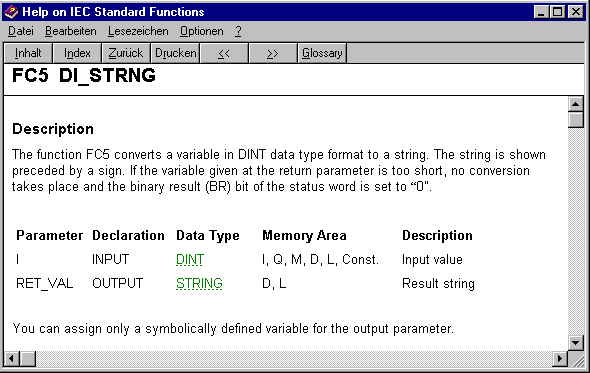
Fig. 01
2 FC10 EQ_STRNG: Compares the content of two STRING-type variables to see if they are "equal".

Fig. 02
3 FC13 GE_STRNG: Compares the content of two STRING-type variables to see if they are "greater than or equal to".
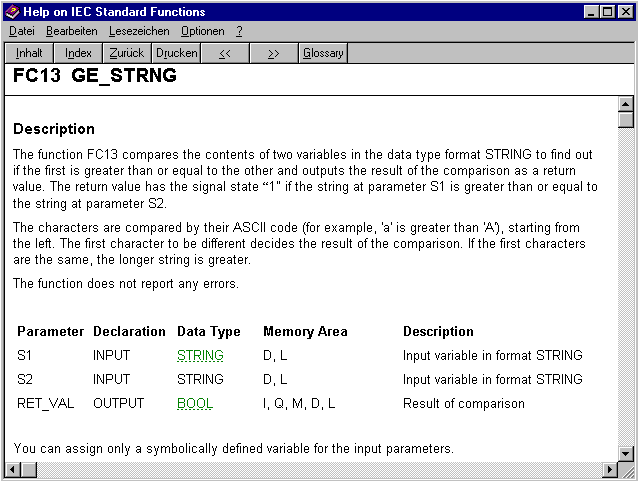
Fig. 03
4 FC15 GT_STRNG: Compares the content of two STRING-type variables to see if they are "greater than".
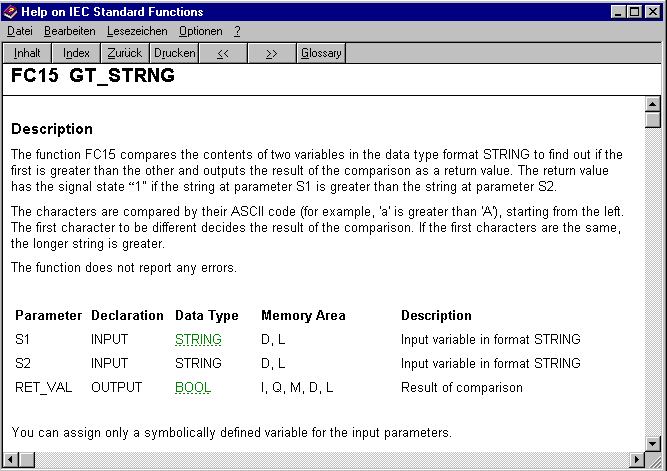
Fig. 04
5 FC16 I_STRNG: Conversion of an INT-type variable into a STRING-type variable.
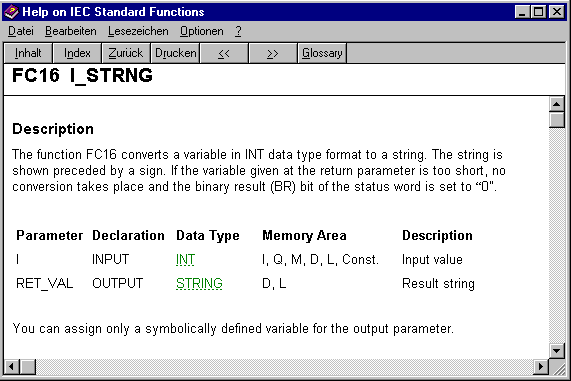
Fig. 05
6 FC19 LE_STRNG: Compares the content of two STRING-type variables to see if they are "less than or equal to".

Fig. 06
7 FC24 LT_STRNG: Compares the content of two STRING-type variables to see if they are "less than".

Fig. 07
8 FC29 NE_STRNG: Compares the content of two STRING-type variables to see if they are "not equal".
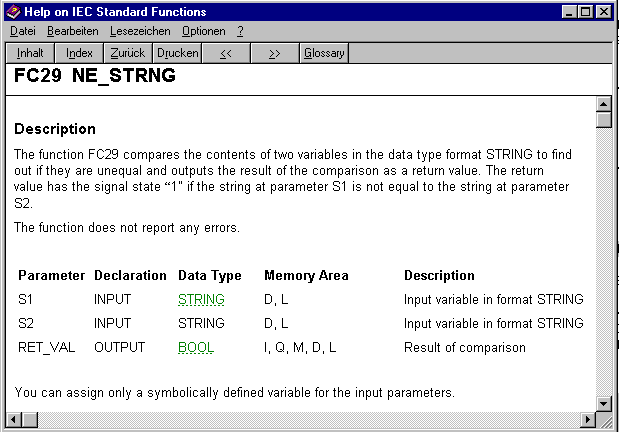
Fig. 08
9 FC30 R_STRNG: Conversion of a REAL-type variable into a STRING-type variable.

Fig. 09
10 FC37 STRNG_DI: Conversion of a STRING variable into a DINT-type variable.
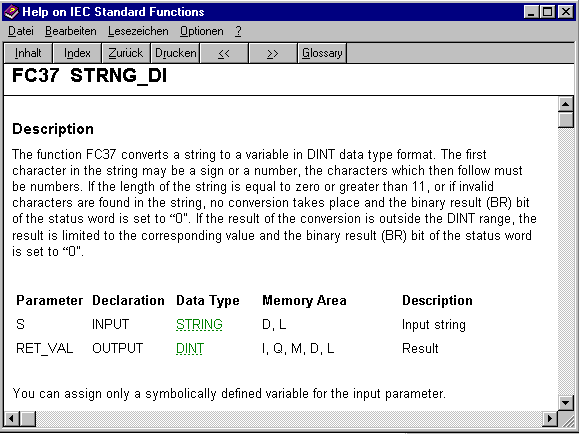
Fig. 10
11 FC38 STRNG_I: Conversion of a STRING variable into an INT-type variable.
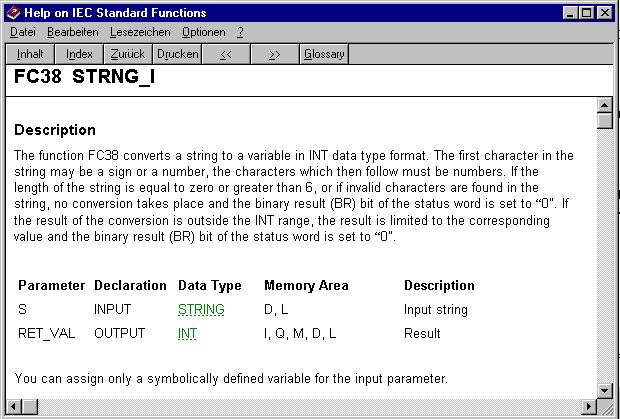
Fig. 11
12 FC39 STRNG_R: Conversion of a STRING variable into a REAL-type variable.
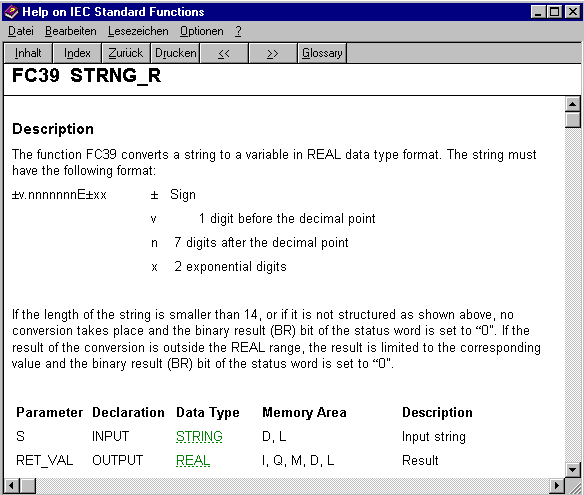
Fig. 1
IEC standard functions for editing string variables:
No. Description:
1
FC2 CONCAT: Concatenating STRINGs.

Fig. 13
2 FC4 DELETE: Deleting a STRING.
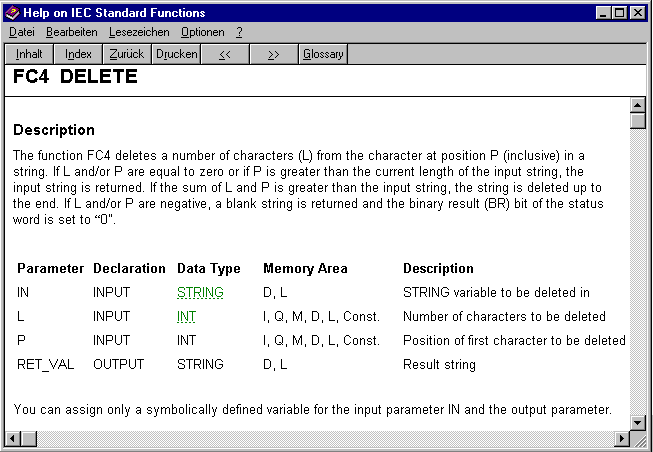
Fig. 14
3
FC17 INSERT: Inserting a STRING.
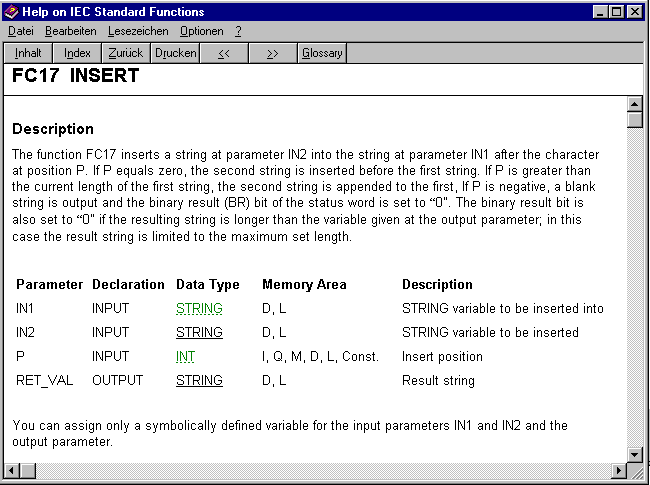
Fig. 15
4 FC20 LEFT: Left part of a STRING.

Fig. 16
5 FC21 LEN: Length of a STRING.

Fig. 17
6 FC26 MID: Middle part of a STRING

Fig. 18
7 FC31 REPLACE: Replacing a STRING.

Fig. 19
8 FC32 RIGHT: Right part of a string.

Fig. 20
Sample programs for converting string variables:
No. Description:
1 Conversion of a string variable into a floating point number
The download "String_R" contains FC104 for converting a string into a floating point number. In contrast to the IEC function FC39, the string can appear here in simplified format, e.g. '+''1''2''.''3''4' or '-''1''2''.''3''4'. In the case of calls in the OB1, for instance, the following input and output variables (Fig. 21) must be parameterized:

Fig. 21
The variables for the string are contained as a "CHAR" data type in the DB100 data block. The start of the string (here, from data byte 1) is defined by the parameter "Str_DBB_NO", and the length of the string (here, 5 bytes) is defined by the parameter "LEN".

Fig. 22
The parameter "ERROR" contains the value 'True' if the first byte of the string is not "+" or "-", if the values are outside the range 0 to 9 (Fig. 22), or if there is more than one point within the string.
https://support.industry.siemens.com/cs/attachments/10913338/String_R.zip |
|
| Back to top |
|
|
attys
Junior
Joined: 31 Jul 2018
Posts: 13
|
| Posted: 07/09/2018 15:49 Post subject: convert INT into a string types BCD and REAL |
|
|
How can you convert a number value of the data type INT into a string in S5TIME, or into the data types BCD and REAL?
https://support.industry.siemens.com/cs/document/1851190/
Using the conversion functions you convert the data type of the value in Accumulator 1. Depending on the function, either only the right word (bits 0 to 15) is affected or the complete content. The contents of the other accumulators are not changed. You can subject the contents of accumulator 1 to several consecutive conversion processes, thereby performing conversions in numeroase stages without having to save the converted values temporarily. Fig. 01 gives an overview of the data type conversions described in this entry.
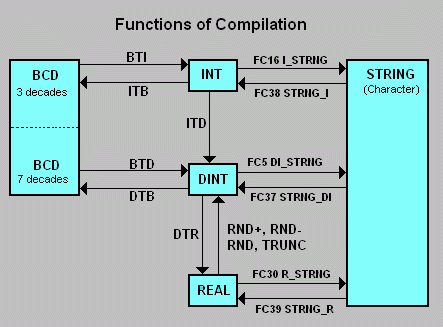
Fig. 01
The table below contains a number of examples for converting the data type of the value in Accu 1.
No. Examples for converting the data type of the value in Accu 1:
1 Converting INT, DINT, REAL and BCD numbers:
STEP 7 features the following functions for converting INT, DINT, REAL and BCD numbers.
Conversion of INT and DINT numbers:
ITD: data type conversion from INT to DINT
ITB: data type conversion from INT to BCD
DTB: data type conversion from DINT to BCD
DTR: data type conversion from DINT to REAL
Conversion of BCD numbers:
BTI: conversion from BCD to INT
BTD: conversion from BCD to DINT
Conversion of REAL numbers:
RND+: rounding up to the next whole number
RND-: rounding down to the next whole number
RND: rounding to the next whole number
TRUNC: no rounding.
Fig. 02 shows an example of data type conversion of a BCD-coded number to a REAL number. As already shown in Fig. 01 a BCD-coded number must first be converted into the INT or DINT compus before it can be converted into the REAL data type.

Fig. 02
Note:
More information on this is available in the manuals:
S7-300 Instruction List CPU Specifications CPUs 312 IFM to 318-2 DP (section: "Data Type Conversion Instructions") in
https://support.industry.siemens.com/cs/attachments/31977679/s7300_parameter_manual_en-US_en-US.pdf
S7-400 Instruction List CPU 412, 414, 416, 417 (section: "Data Type Conversion Instructions") in
https://support.industry.siemens.com/cs/attachments/23904435/OP-Liste_en.pdf
2 Converting the data types INT (INTEGER) and REAL into data type S5TIME:
The requirement here is that the value supplied is the time in milliseconds. Conversion can then be programmed in two steps:
The value specified is first converted into the DINT (double integer) format and stored temporarily in a variable of the data type TIME. The values of the INT type are converted into the DINT format with the instruction "ITD" and the values of the REAL type with the instruction "RND".
When you call and parameterize function FC40 (TIM_S5TI) from the STEP 7 IEC standard library, the TIME format is converted into the S5TIME data type.
Fig. 03 shows a sample program for converting the INT data type into the S5TIME data type.

Fig. 03
3 Converting an ASCII-coded number into a number of the INT (INTEGER) data type:
The STEP 7 "Char_Int" project contains the FC1 for converting a four-digit ASCII number into a number of the INT data type. As input parameters the block requires "CHAR" type ASCII characters with the following values:
IN variable: Char1 = units position,
IN variable: Char2 = tens position,
IN variable: Char3 = hundreds position,
IN variable: Char4 = thousands position.
The FC1 function is called in the OB1. The integer "result" appears as the output. You can monitor the result with the aid of the variables table "VAT_1".

Fig. 04
Note:
The output variable "Error" (error bit) is set by the FC1 to True if the ASCII characters do not contain any digits. In this case, "Result" is set to "0".
https://support.industry.siemens.com/cs/attachments/1851190/Char_Int.zip
Copy the "Char_Int.zip" file into a separate directory and then start the file with a double-click. The STEP 7 project is now unpacked with all the associated subdirectories. You can then use the SIMATIC Manager to open and process the extracted project.
4 Converting a decimal number into ASCII characters:
You can use the FC5 function, which can be found in the IEC library, to convert decimal digits into ASCII characters. The FC5 function performs the conversion. The block is configured with two transfer parameters:
Parameter "i":
number to be converted in double-word format
Parameter "RetVal":
Data type STRING into which the ASCII characters are written.
The FC5 function is called in the OB1, and the parameters are supplied accordingly. The result of the conversion appears in the DB1 from data block byte 2. You can monitor the result with the aid of a variables table.
https://support.industry.siemens.com/cs/attachments/1851190/S7iec.zip
Copy the "S7iec.exe" file into a separate directory and then start the file with a double-click. The STEP 7 project is now unpacked with all the associated subdirectories. You can then use the SIMATIC Manager to open and process the extracted project.
5 IEC standard function for the STRING variable:
Using the IEC standard functions FC5, FC16, FC30, FC37, FC38 and FC39 you can convert variables in the DINT format into a string and vice versa.
FC5 DI_STRNG: Conversion of a variable of the DINT type into a variable of the STRING type.
FC16 I_STRNG: Conversion of a variable of the INT type into a variable of the STRING type.
FC30 R_STRNG: Conversion of a variable of the REAL type into a variable of the STRING type.
FC37 STRNG_DI: Conversion of a STRING variable into a variable of the DINT type.
FC38 STRNG_I: Conversion of a STRING variable into a variable of the INT type.
FC39 STRNG_R: Conversion of a STRING variable into a variable of the REAL type.
More information is also available in our entry entitled "What standard STEP 7 functions are there for the conversion and comparison of string variables and ASCII characters?" in
https://support.industry.siemens.com/cs/document/10913338/which-functions-and-iec-standard-functions-exist-in-step-7-for-converting-and-comparing-string-variables |
|
| Back to top |
|
|
|
|
You cannot post new topics in this forum
You cannot reply to topics in this forum
You cannot edit your posts in this forum
You cannot delete your posts in this forum
You cannot vote in polls in this forum
|
Powered by phpBB © 2001, 2005 phpBB Group
Fa-ti si tu propriul forum GRATUIT, pe www.myforum.ro |
 FAQ
FAQ Search
 Memberlist
 Usergroups
 Register
 Profile
 Log in to check your private messages
 Log in


