| View previous topic :: View next topic |
| Author |
Message |
nguyenanhduc
Junior

Joined: 09 Sep 2018
Posts: 11
|
 Posted: 16/04/2020 11:50 Post subject: Communication S7-400 & S7-1200 via profinet/Ethernet IP Posted: 16/04/2020 11:50 Post subject: Communication S7-400 & S7-1200 via profinet/Ethernet IP |
 |
|
Hi everybody,
Today I created this topic and I hope everyone will discuss and help me as well as someone who is not clear and can solve the problem.
As the topic title, I encountered a problem that needs to connect S7-1200 to existing S7-400 system. However, I do not understand that S7-400 system yet. So I just wanted to change the program, not reconfigure the S7-400 hardware.
There are currently many documents from Siemens that guide the S7-300 and S7-1200 communication. That is the way to reconfigure the S7-300 hardware.
So does anyone know of a script that helps me not need to reconfigure the S7-400 hardware and be able to communicate with the S7-1200?
Thank you very much! |
|
| Back to top |
|
 |
mracyo
Junior
Joined: 19 Oct 2018
Posts: 8
|
| Posted: 16/04/2020 20:23 Post subject: TCP/IP-based Open User Communication (OUC) |
|
|
Use TCP/IP-based Open User Communication (OUC)
http://plc.myforum.ro/open-user-communication-ouc-vt10538.html |
|
| Back to top |
|
|
mracyo
Junior
Joined: 19 Oct 2018
Posts: 8
|
| Posted: 16/04/2020 20:52 Post subject: Communication Library LCom for Ethernet Communication |
|
|
SIMOTION, SIMATIC: Communication Library LCom for Ethernet Communication
https://support.industry.siemens.com/cs/document/48955385/
The LCom library implements a point-to-point connection in both directions (full duplex) between two devices.
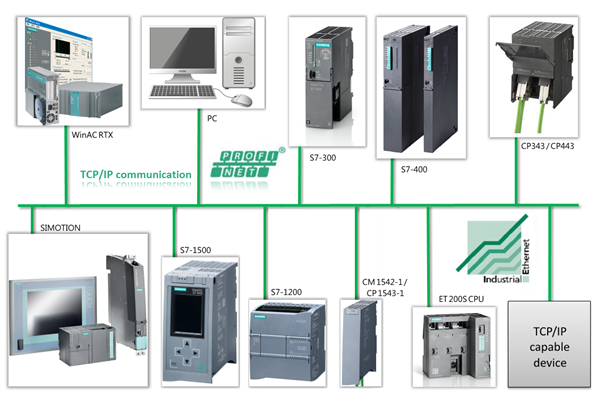
The function block can be used for standard TCP communication. The widespread deployment of the TCP standard allows data exchange to be implemented between two different devices.
All types of controllers and devices that have an Ethernet interface and support the TCP protocol can be connected, e.g. cameras, printers, scanners and PCs.
Since the functional scope of TCP is not sufficient for many applications, the LCom library defines a separate transport protocol (the LCom protocol). The LCom protocol can be activated if the communication partner supports the LCom protocol too. If not, the native TCP communication can be used. The following additional functions are supported by LCom protocol:
Data records with defined length up to 16 MB (with V1 up to 64 kB possible)
Different transmission modes. (cyclic, at data change or once)
Monitoring of the connection through cyclic transmission of a sign-of-life (faster response times on connection failure). In the case of a pure TCP communication, this is typically in the range of seconds.
Prevention of a full working memory on the system level through frequent sending of data via integrated flow control on the application level.
Feedback from receiver on successful data transmission on application level.
Simple time synchronization.
Data transport in both transmission directions can be started and stopped by both communication peers.
The function block can be instantiated and thereby used for several communication relationships (e.g. in a production line both to the upstream and to the downstream machine).
[URL=https://www.file-upload.net/download-14005175/s7communication_s7-1200_s7-300_en1.pdf.html]s7communication_s7-1200_s7-300_en1.pdf[/URL]
[URL=https://www.file-upload.net/download-14005173/LCom_Example_V2_0_0.zip.html]LCom_Example_V2_0_0.zip[/URL]
[URL=https://www.file-upload.net/download-14005174/LCom_SIMOTION_V2.0.2.zip.html]LCom_SIMOTION_V2.0.2.zip[/URL]
[URL=https://www.file-upload.net/download-14005176/48955385_LCom_Communication_Library_SIMOTION_V2_0_en_10_2019.pdf.html]48955385_LCom_Communication_Library_SIMOTION_V2_0_en_10_2019.pdf[/URL]
[URL=https://www.file-upload.net/download-14005178/LCom_Example_V2_0_4.zip.html]LCom_Example_V2_0_4.zip[/URL]
[URL=https://www.file-upload.net/download-14005177/LCom_V2_0_4.zip.html]LCom_V2_0_4.zip[/URL]
[URL=https://www.file-upload.net/download-14005181/48955385_LCom_V2_0_6.zip.html]48955385_LCom_V2_0_6.zip[/URL]
[URL=https://www.file-upload.net/download-14005180/LCom_Communication_Library_SIMATIC_V2_2.pdf.html]LCom_Communication_Library_SIMATIC_V2_2.pdf[/URL]
[URL=https://www.file-upload.net/download-14005179/48955385_LCom_SIMATIC_V1_2_8_TIA.zip.html]48955385_LCom_SIMATIC_V1_2_8_TIA.zip[/URL]
[URL=https://www.file-upload.net/download-14005182/LCom_SIMATIC_V1_2_8.zip.html]LCom_SIMATIC_V1_2_8.zip[/URL]
[URL=https://www.file-upload.net/download-14005183/ReleaseNotes_LCom_V1_2_7.pdf.html]ReleaseNotes_LCom_V1_2_7.pdf[/URL]
[URL=https://www.file-upload.net/download-14005185/lcom_communication_library_simatic_v1_2.pdf.html]lcom_communication_library_simatic_v1_2.pdf[/URL]
[URL=https://www.file-upload.net/download-14005184/s7communication_s7-1200_s7-300_en.pdf.html]s7communication_s7-1200_s7-300_en.pdf[/URL]
[URL=https://www.file-upload.net/download-14005186/S7-communication.zip.html]S7-communication.zip[/URL]
[URL=https://www.file-upload.net/download-14005187/S7-400HtoS7-1200S7Connections.pdf.html]S7-400HtoS7-1200S7Connections.pdf[/URL]
https://ulozto.net/tamhle/bDhN4CsBO82v
7-1200 & s7-300 connection, without changing PLC program
https://www.youtube.com/watch?v=U37iSMr6ZVc |
|
| Back to top |
|
|
nguyenanhduc
Junior
Joined: 09 Sep 2018
Posts: 11
|
| Posted: 17/04/2020 11:54 Post subject: Communication S7-400 & S7-1200 via profinet/Ethernet IP |
|
|
Yes. Thank you very much.
That is a great amount of knowledge.
I think with the initial problem, I need to reconfigure the hardware for S7-400 to be able to communicate TCP / IP with S7-1200. |
|
| Back to top |
|
|
nguyenanhduc
Junior
Joined: 09 Sep 2018
Posts: 11
|
| Posted: 17/04/2020 12:01 Post subject: Communication S7-400 & S7-1200 via profinet/Ethernet IP |
|
|
| LCOM is great, but it seems to only support newer devices (S7-1500, S7-1200). Meanwhile in my place, some old factories use S7-300, S7-400. When expanding and upgrading a small part of the system, we often use another S7-1200 PLC. Hardware reconfiguration S7-300, S7-400 seems to be inevitable if you want to communicate |
|
| Back to top |
|
|
electro
Junior 2

Joined: 26 Apr 2012
Posts: 21
|
| Posted: 17/04/2020 17:03 Post subject: |
|
|
I think you can use the ISO on tcp block on s7 400 and also on s7 1200 and you don't need to reconfigure the hardware.
With those blocks you can creare a client/server Communication (active/passive partner) just using the ISO on tcp sw blocks.
I have used once the ISO on tcp with s7 300 family and it woeked fine with no hardware configuration. |
|
| Back to top |
|
|
ilyia
Junior
Joined: 09 Jul 2019
Posts: 5
|
| Posted: 17/04/2020 19:21 Post subject: open communication S7-1200 S7-1200/ S7-300/ WinAC) |
|
|
Data synchronization over open communication between numeroase field devices (S7-1200) and a head PLC (S7-1200/ S7-300/ WinAC) (Set 17).
https://support.industry.siemens.com/cs/document/39040038/data-synchronization-over-open-communication-between-multiple-field-devices- (s7-1200)-and-a-head-plc-(s7-1200-s7-300-winac)-(set-17)
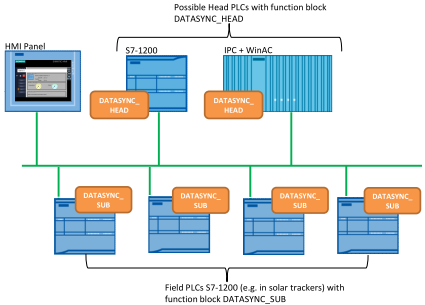
The application example demonstrates with a concrete example the data synchronization between one head PLC and several field PLCs.
For synchronization tasks and the exchange of control and status information between one head PLC and several field PLCs, a performant cyclic communication is needed.
The following points must be noted here:
Supply of all the field PLCs with the same or different sets of data from the head PLC (down sync).
Updating the sets of data from all the field PLCs in the head PLC (up sync).
For solving the task, the block DATASYNC_X has been developed, which automatically assumes the control of the data synchronization:
Function block DATASYNC_HEAD for the head PLC
Function block DATASYNC_SUB for the field PLC
The application example is demonstrated with a concrete example - the control of solar trackers. The expression solar tracker means solar energy systems which can be tracked according to the position of the sun to ensure the best possible energy yields.
For the field PLC, a CPU S7-1200 is used in this example. For the head PLC, this solution uses two types of devices:
An S7-1200 controller
An S7-300/400/ IPC with WinAC
The head PLC sequentially establishes an ISO-on-TCP communication connection with each field PLC and terminates it again. Data is sent to the field PLCs and data is received from them. After all field PLCs have been operated, the process is repeated.
The data communication among the PLCs is displayed in images by the HMI panel.
The realization of the data synchronisation with the DATASYNC_X function block has the following advantages for you:
simple and transparent integration of the DATASYNC_X blocks in your existing user program.
flexible modification of the quantity structure for the send and receive of the data.
number of field PLCs is variabel.
https://anonfile.com/Z8g9w4q7of/39040038_DATASYNC_DOKU_V31_en_pdf
https://anonfile.com/h3h9waq4o0/39040038_datasync_code_v22_zip
https://openload.cc/Fbh7wbq3o7/39040038_DATASYNC_DOKU_V31_en_pdf
https://openload.cc/P9hbweqdo6/39040038_datasync_code_v22_zip |
|
| Back to top |
|
|
|

 FAQ
FAQ Search
 Memberlist
 Usergroups
 Register
 Profile
 Log in to check your private messages
 Log in


