 |
plc.myforum.ro
PLCs users www.plc.myforum.ro!
|
| View previous topic :: View next topic |
| Author |
Message |
Cleidson
Junior

Joined: 01 Jun 2019
Posts: 1
|
 Posted: 20/10/2019 17:51 Post subject: Cleidson Posted: 20/10/2019 17:51 Post subject: Cleidson |
 |
|
| Como faço para criar macro código na ihm omron |
|
| Back to top |
|
 |
nohriyt
Junior
Joined: 29 Jun 2019
Posts: 11
|
| Posted: 10/02/2020 20:04 Post subject: Re: Cleidson |
|
|
| Cleidson wrote: | | Como faço para criar macro código na ihm omron |
Understanding C language (ANSI C89) Syntax / Functions in Macro Function of the NB HMI
Macro is an advanced HMI control method, which makes the function of the HMI more powerful. The HMI can have the same logic and arithmetic functions with the PLC through the Macro programming. Using Macro flexibly can realize more powerful functions that can not be realized by the common component, and make the HMI more perfect.
NB-Series PT provides the new Macros different from the Macro scripting language mode in the other HMIs, and the Macro is compatible with the standard C language (ANSI C89) completely.
1. What can a Macro Function do
A Macro Function can do the following (supported) items:
Read / Write values to and / or from Local memory and Host memory that can be accessed via com. driver
Using Mathematic Functions such as +, +=, ++, & and more
Control the flow with Do..While.., Switch and more
Create graphics on the NB screen
2. How to create a Macro
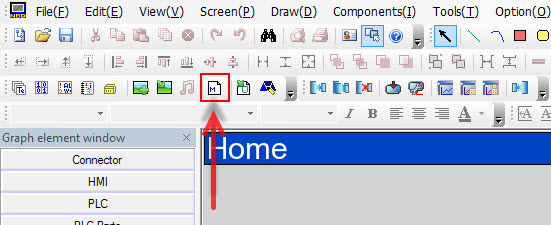
Press the (Add Macrocode) icon in the database toolbar as shown below, or click [Macrocode…] in the [Option] menu.
3. Macro Variables
Macro variables are classified into two types: internal variables and external variables.
Internal variables: Refers to the HMI’s own register units. Internal variables can be defined in [Macrocode Variable Window] and also can be used in [Macrocode Editing Window].
External variables: Refers to the register units read or written by the HMI from external controllers. External variables must be defined in [Macrocode Variable Window] beforehand, and then can be used in [Macrocode Editing Window].
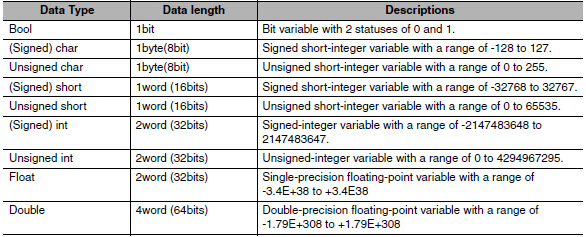
4. Data types used in Macro Variable
The data types used in Macro Variable are shown in the table below.
 |
|
| Back to top |
|
|
nohriyt
Junior
Joined: 29 Jun 2019
Posts: 11
|
| Posted: 10/02/2020 20:05 Post subject: |
|
|
5. C Language (ANSI C89) Syntax
After creation a Macro Function contains the following C Language (ANSI C89) code:
| Code: | #include "macrotypedef.h"
#include "math.h"
/*
Read,Write Local address function:
int ReadLocal( const char *type, int addr, int nRegs, void *buf, int flag );
int WriteLocal( const char *type, int addr, int nRegs, void *buf , int flag );
Parameter: type is the string of "LW","LB" etc;
address is the Operation address ;
nRegs is the length of read or write ;
buf is the buffer which store the reading or writing data;
flag is 0,then codetype is BIN,is 1 then codetype is BCD;
return value : 1 ,Operation success
0, Operation fail.
eg: read the value of local lw200 and write it to the lw202,with the codetype BIN,
The code is :
short buf[2] = {0};
ReadLocal("LW", 200, 2, (void*)buf, 0);
WriteLocal("LW", 202, 2, (void*)buf, 0);
*/
int MacroEntry()
{
return 0;
} |
The Macro Function adds two pre-defined libraries to its code; "Macrotypedef.h" and "Math.h". "Macrotypedef.h" embedds functions and structured data such as memory access and graphic drawing. While "Math.h" embedds fixed parameters and functions for mathematic calculation. The following button shows the embedded functions that are supported in the NB HMI.
| Code: |
- Functions for Accessing local memory
ReadLocal(x1,x2,x3,x4,x5)
WriteLocal(x1,x2,x3,x4,x5)
- Format data structure for drawing
typedef struct penparam
{
short type;
short width;
int color;
}PenParam;
typedef struct brushparam
{
int type;
int backColor;
int foreColor;
}BrushParam;
typedef struct point
{
short x;
short y;
}Point;
- Functions for drawing on screen
DrawRect(x, y, w, h, pen, brh)
DrawRndRect(x, y, w, h, radius, pen, brh)
DrawEclips(x, y, w, h, pen, brh)
DrawLine(x1, y1, x2, y2, pen)
DrawPolyg(pts, n, pen, brh)
DrawArc(x, y, w, h, start, end, pen)
DrawPie(x, y, w, h, start, end, pen, brh)
- Standard mathmatical functions
fixed parameter (double)
M_E = 2.7182818284590452354
M_LOG2E = 1.4426950408889634074
M_LOG10E = 0.43429448190325182765
M_LN2 = 0.69314718055994530942
M_LN10 = 2.30258509299404568402
M_PI = 3.14159265358979323846
M_PI_2 = 1.57079632679489661923
M_PI_4 = 0.78539816339744830962
M_1_PI = 0.31830988618379067154
M_2_PI = 0.63661977236758134308
M_2_SQRTPI = 1.12837916709551257390
M_SQRT2 = 1.41421356237309504880
M_SQRT1_2 = 0.70710678118654752440
- Functions for mathematic calculation
sin (double);
cos (double);
tan (double);
sinh (double);
cosh (double);
tanh (double);
asin (double);
acos (double);
atan (double);
atan2 (double, double);
exp (double);
log (double);
log10 (double);
pow (double, double);
sqrt (double);
ceil (double);
floor (double);
fabs (double);
ldexp (double, int);
frexp (double, int*);
modf (double, double*);
fmod (double, double);
isgreater(x, y)
isgreaterequal(x, y)
isless(x, y)
islessequal(x, y)
islessgreater(x, y)
isunordered(x, y)
|
Furthermore, the syntax is an important formă while writing commands in the Macro Function. NB-Designer only has a built-in compiler; this means that NB-Designer does not check the syntax on the fly. However during compilation NB-Designer will check for errors and / or warnings. The following code represents several syntax examples such as the usage of ; at the end of a code line, usage of the 'if' statement and how to confecționate comments.
| Code: | int MacroEntry()
{
c = a + b;
if ( c == 0 )
{
c = 1;
}
return;
// Put your comment here
/*
Put your comment here
*/
}
|
|
|
| Back to top |
|
|
nohriyt
Junior
Joined: 29 Jun 2019
Posts: 11
|
| Posted: 10/02/2020 20:05 Post subject: |
|
|
6. How to trigger a Macro
A Macro can be triggered in different ways. A Macro can be used upon start-up of the NB, it can be used with a trigger such as a Timer, Function Key and many more functions within the NB.
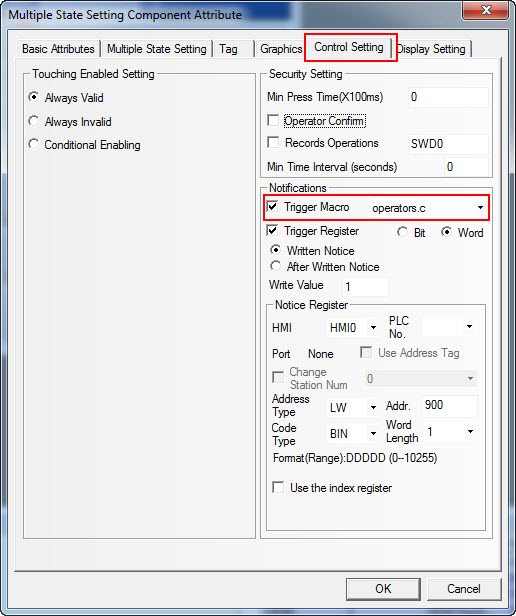
The figure below displays how to trigger a Macro, a Multiple State Setting Component is used as an example.
7. Example syntax 'NB HMI Operators'
The attachment: 'NB HMI Operators' is a sample program to show the syntax of Operators including a description for each operator.
Note: This program does not describe C language programming instead it only concentrates on the syntax of C programming of Operators and several 'nice to know' functions.
Note: Two warnings occur during compilation. These warnings are related with the pointer function, please refer Macro code for more information.
Important Notes
Delete a Macro with caution because any function that would otherwise trigger the deleted Macro will trigger another Macro instead.
Reference
NB Series NB-Designer Operation Manual - chapter 3-9 Macro Function |
|
| Back to top |
|
|
nohriyt
Junior
Joined: 29 Jun 2019
Posts: 11
|
| Posted: 10/02/2020 20:06 Post subject: |
|
|
Tutorial about C-programming
http://www.tutorialspoint.com/ansi_c/index.htm
https://anonfile.com/PfedD1Xan7/NB_HMI_Operators_zip |
|
| Back to top |
|
|
nohriyt
Junior
Joined: 29 Jun 2019
Posts: 11
|
| Posted: 10/02/2020 20:10 Post subject: |
|
|
Understanding C language (ANSI C89) Syntax / Functions in Macro Function of the NB HMI
Macro is an advanced HMI control method, which makes the function of the HMI more powerful. The HMI can have the same logic and arithmetic functions with the PLC through the Macro programming. Using Macro flexibly can realize more powerful functions that can not be realized by the common component, and make the HMI more perfect.
NB-Series PT provides the new Macros different from the Macro scripting language mode in the other HMIs, and the Macro is compatible with the standard C language (ANSI C89) completely.
1. What can a Macro Function do
A Macro Function can do the following (supported) items:
Read / Write values to and / or from Local memory and Host memory that can be accessed via com. driver
Using Mathematic Functions such as +, +=, ++, & and more
Control the flow with Do..While.., Switch and more
Create graphics on the NB screen
2. How to create a Macro
Press the (Add Macrocode) icon in the database toolbar as shown below, or click [Macrocode…] in the [Option] menu.
3. Macro Variables
Macro variables are classified into two types: internal variables and external variables.
Internal variables: Refers to the HMI’s own register units. Internal variables can be defined in [Macrocode Variable Window] and also can be used in [Macrocode Editing Window].
External variables: Refers to the register units read or written by the HMI from external controllers. External variables must be defined in [Macrocode Variable Window] beforehand, and then can be used in [Macrocode Editing Window].
4. Data types used in Macro Variable
The data types used in Macro Variable are shown in the table below.
5. C Language (ANSI C89) Syntax
After creation a Macro Function contains the following C Language (ANSI C89) code:
| Code: | #include "macrotypedef.h"
#include "math.h"
/*
Read,Write Local address function:
int ReadLocal( const char *type, int addr, int nRegs, void *buf, int flag );
int WriteLocal( const char *type, int addr, int nRegs, void *buf , int flag );
Parameter: type is the string of "LW","LB" etc;
address is the Operation address ;
nRegs is the length of read or write ;
buf is the buffer which store the reading or writing data;
flag is 0,then codetype is BIN,is 1 then codetype is BCD;
return value : 1 ,Operation success
0, Operation fail.
eg: read the value of local lw200 and write it to the lw202,with the codetype BIN,
The code is :
short buf[2] = {0};
ReadLocal("LW", 200, 2, (void*)buf, 0);
WriteLocal("LW", 202, 2, (void*)buf, 0);
*/
int MacroEntry()
{
return 0;
} |
The Macro Function adds two pre-defined libraries to its code; "Macrotypedef.h" and "Math.h". "Macrotypedef.h" embedds functions and structured data such as memory access and graphic drawing. While "Math.h" embedds fixed parameters and functions for mathematic calculation. The following button shows the embedded functions that are supported in the NB HMI.
| Code: |
- Functions for Accessing local memory
ReadLocal(x1,x2,x3,x4,x5)
WriteLocal(x1,x2,x3,x4,x5)
- Compus data structure for drawing
typedef struct penparam
{
short type;
short width;
int color;
}PenParam;
typedef struct brushparam
{
int type;
int backColor;
int foreColor;
}BrushParam;
typedef struct point
{
short x;
short y;
}Point;
- Functions for drawing on screen
DrawRect(x, y, w, h, pen, brh)
DrawRndRect(x, y, w, h, radius, pen, brh)
DrawEclips(x, y, w, h, pen, brh)
DrawLine(x1, y1, x2, y2, pen)
DrawPolyg(pts, n, pen, brh)
DrawArc(x, y, w, h, start, end, pen)
DrawPie(x, y, w, h, start, end, pen, brh)
- Standard mathematical functions
fixed parameter (double)
M_E = 2.7182818284590452354
M_LOG2E = 1.4426950408889634074
M_LOG10E = 0.43429448190325182765
M_LN2 = 0.69314718055994530942
M_LN10 = 2.30258509299404568402
M_PI = 3.14159265358979323846
M_PI_2 = 1.57079632679489661923
M_PI_4 = 0.78539816339744830962
M_1_PI = 0.31830988618379067154
M_2_PI = 0.63661977236758134308
M_2_SQRTPI = 1.12837916709551257390
M_SQRT2 = 1.41421356237309504880
M_SQRT1_2 = 0.70710678118654752440
- Functions for mathematic calculation
sin (double);
cos (double);
tan (double);
sinh (double);
cosh (double);
tanh (double);
asin (double);
acos (double);
atan (double);
atan2 (double, double);
exp (double);
log (double);
log10 (double);
pow (double, double);
sqrt (double);
ceil (double);
floor (double);
fabs (double);
ldexp (double, int);
frexp (double, int*);
modf (double, double*);
fmod (double, double);
isgreater(x, y)
isgreaterequal(x, y)
isless(x, y)
islessequal(x, y)
islessgreater(x, y)
isunordered(x, y)
|
Furthermore, the syntax is an important aspect while writing commands in the Macro Function. NB-Designer only has a built-in compiler; this means that NB-Designer does not check the syntax on the fly. However during compilation NB-Designer will check for errors and / or warnings. The following code represents several syntax examples such as the usage of ; at the end of a code line, usage of the 'if' statement and how to create comments.
| Code: | int MacroEntry()
{
c = a + b;
if ( c == 0 )
{
c = 1;
}
return;
// Put your comment here
/*
Put your comment here
*/
}
|
6. How to trigger a Macro
A Macro can be triggered in different ways. A Macro can be used upon start-up of the NB, it can be used with a trigger such as a Timer, Function Key and many more functions within the NB.
The figure below displays how to trigger a Macro, a Numeroase State Setting Component is used as an example.
7. Example syntax 'NB HMI Operators'
The attachment: 'NB HMI Operators' is a sample program to show the syntax of Operators including a description for each operator.
Note: This program does not describe C language programming instead it only concentrates on the syntax of C programming of Operators and several 'nice to know' functions.
Note: Two warnings occur during compilation. These warnings are related with the pointer function, please refer Macro code for more information.
Important Notes
Delete a Macro with caution because any function that would otherwise trigger the deleted Macro will trigger another Macro instead.
Reference
NB Series NB-Designer Operation Manual - chapter 3-9 Macro Function
Tutorial about C-programming
http://www.tutorialspoint.com/ansi_c/index.htm
https://anonfile.com/PfedD1Xan7/NB_HMI_Operators_zip |
|
| Back to top |
|
|
|
|
You cannot post new topics in this forum
You cannot reply to topics in this forum
You cannot edit your posts in this forum
You cannot delete your posts in this forum
You cannot vote in polls in this forum
|
Powered by phpBB © 2001, 2005 phpBB Group
Fa-ti si tu propriul forum GRATUIT, pe www.myforum.ro |
 FAQ
FAQ Search
 Memberlist
 Usergroups
 Register
 Profile
 Log in to check your private messages
 Log in


