 |
plc.myforum.ro
PLCs users www.plc.myforum.ro!
|
| View previous topic :: View next topic |
| Author |
Message |
valz
Member 3


Joined: 26 Jul 2015
Posts: 771
|
 Posted: 01/02/2022 18:07 Post subject: Central User Administration with SIMATIC Logon Posted: 01/02/2022 18:07 Post subject: Central User Administration with SIMATIC Logon |
 |
|
How do you configure the Central User Administration with SIMATIC Logon to log on local Windows users or users of an Active Directory (domain) to an HMI Panel / WinCC RT Advanced PC?
https://support.industry.siemens.com/cs/document/109802523/
Logon via SIMATIC Logon for Windows users or domain users to an HMI Panel or WinCC Runtime Advanced is performed via a logon server centrally installed in the network.
Notes on Installing the Logon Server
A SIMATIC HMI Panel or WinCC Advanced Runtime communicates with SIMATIC Logon exclusively via the "SIMATIC Logon Remote Access Service" during logon.
The logon server must be installed centrally on a computer in the network.
You can install the logon server in parallel to an installed WinCC Runtime Advanced.
When installing the SIMATIC Logon server, it must be noted that if it is a domain, the PC must first be added to the domain before the SIMATIC Logon server is installed.
Note
If the PC is added to the domain only after the logon server has been installed, you must uninstall and then reinstall the logon server.
Configuration of SIMATIC Logon in the HMI Project
1. Open the project in which you want to configure SIMATIC Logon in the TIA Portal.
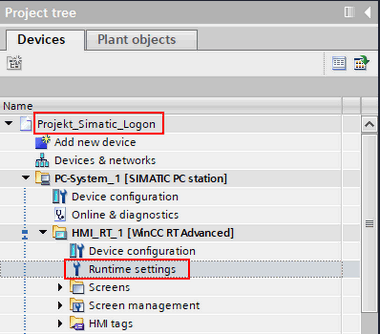
Fig. 01
2. Open the Runtime Settings.
Under User Administration you enable the use of SIMATIC Logon and select whether the logon is to be via a local Windows user or via a Windows domain. If the logon is to be made via a local Windows user, you must enter the IP address of the computer on which SIMATIC Logon is installed or the computer name in the "Server name" field.
Warning
If a central name resolution such as DNS/WINS is not set up on the SIMATIC Logon sever, you must enter the IP address in the "Server name" field.
Note
If SIMATIC Logon was installed in parallel to WinCC Runtime Advanced, you can enter "localhost" as an alternative to the computer name. The "SIMATIC Logon Remote Access Service" communicates with the HMI panels or WinCC Runtime Advanced via this port.
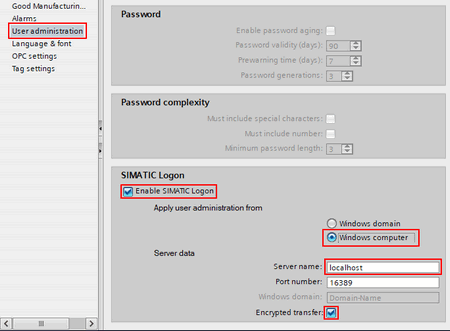
Fig. 02
If the logon is to be made via a Windows domain, you must also enter the name of the domain in the "Windows domain" field.
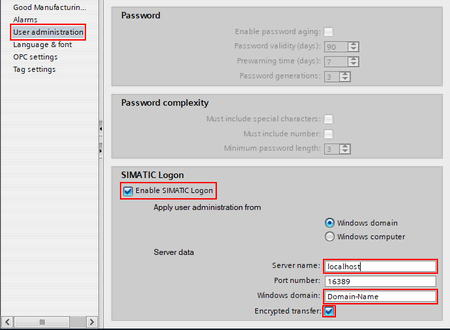
Fig. 03
Encrypted transfer
If encrypted transfer is used between SIMATIC Logon and HMI Panel / WinCC Runtime Advanced, the check mark for encrypted transfer must also be set in the configuration console of the SIMATIC Logon server.
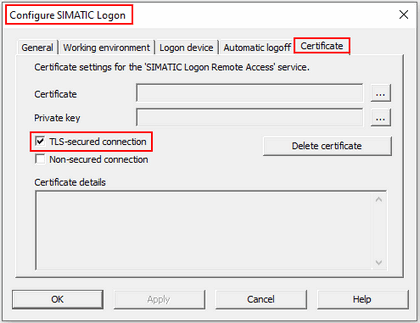
Fig. 04
Note
In the configuration console of the logon server, only one of the two options for secured connection may be selected at a time.
If both options are selected, the SIMATIC Logon server always requires an encrypted connection.
You must lucrate and include a certificate for an encrypted connection.
Detailed instructions are available in the following entry.
https://support.industry.siemens.com/cs/document/109480490/
https://support.industry.siemens.com/cs/attachments/109480490/109480490_SIMATIC_Logon_en.pdf |
|
| Back to top |
|
 |
|
|
You cannot post new topics in this forum
You cannot reply to topics in this forum
You cannot edit your posts in this forum
You cannot delete your posts in this forum
You cannot vote in polls in this forum
|
Powered by phpBB © 2001, 2005 phpBB Group
Fa-ti si tu propriul forum GRATUIT, pe www.myforum.ro |
 FAQ
FAQ Search
 Memberlist
 Usergroups
 Register
 Profile
 Log in to check your private messages
 Log in


