| View previous topic :: View next topic |
| Author |
Message |
baddream
Junior

Joined: 06 Nov 2018
Posts: 5
|
 Posted: 16/05/2019 04:24 Post subject: Can't setup wonderware, please help! Posted: 16/05/2019 04:24 Post subject: Can't setup wonderware, please help! |
 |
|
Hi!
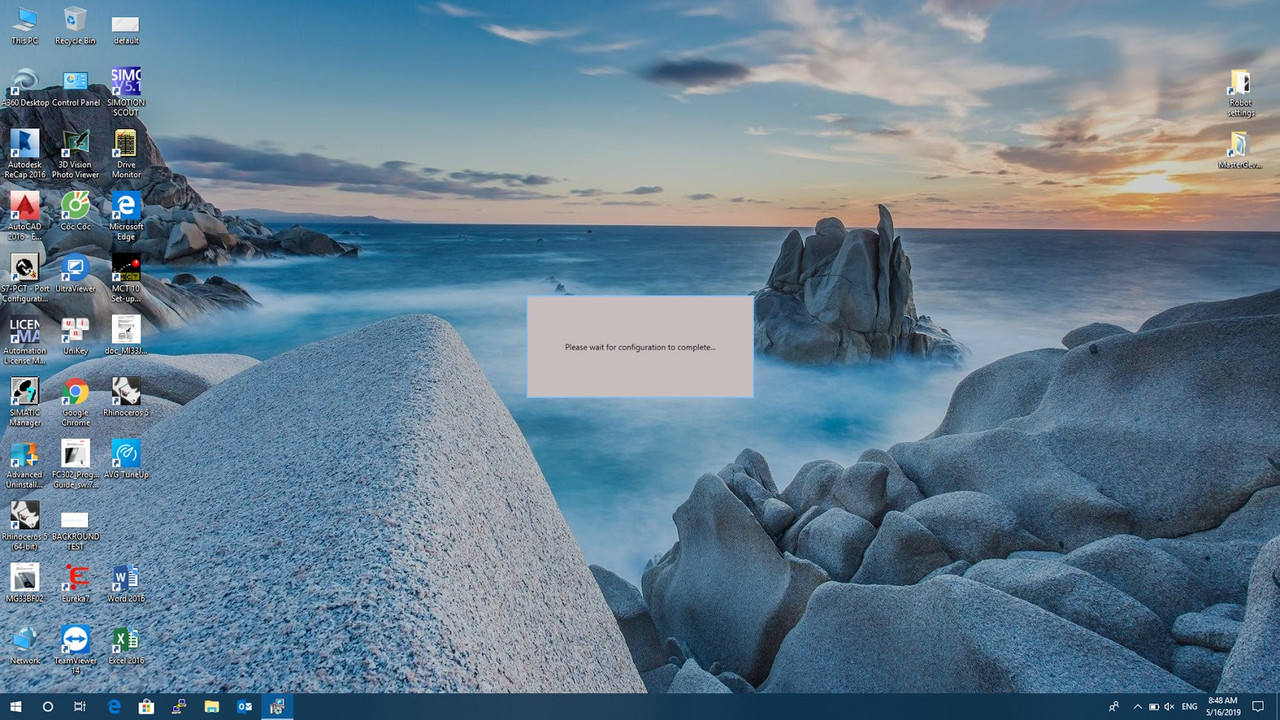
i have problem when install wonderware :
setup stay at please wait for configuration to complete....
please help!
[img]https://photos.app.goo.gl/kKk3GU7sx1ZEFooE6[/img] |
|
| Back to top |
|
 |
xvelel
Junior
Joined: 15 Apr 2019
Posts: 2
|
| Posted: 16/05/2019 08:04 Post subject: Re: Can't setup wonderware, please help! |
|
|
| baddream wrote: | Hi!
i have problem when install wonderware :
setup stay at please wait for configuration to complete....
please help!
 |
What version? What OS? |
|
| Back to top |
|
|
baddream
Junior
Joined: 06 Nov 2018
Posts: 5
|
| Posted: 16/05/2019 08:43 Post subject: Re: Can't setup wonderware, please help! |
|
|
| xvelel wrote: |
What version? What OS? |
im using windows 10 to install wonderware 2014 r2 sp1. |
|
| Back to top |
|
|
xvelel
Junior
Joined: 15 Apr 2019
Posts: 2
|
| Posted: 16/05/2019 09:29 Post subject: |
|
|
When preparing the Windows operating system for Wonderware, please remember:
1) so that it is not a system with a domain controller installed,
2) the computer name was not the name of the Wonderware software, eg InTouch, Historian, WIS, InSQL, Galaxy,
AppServer etc.
3) the computer name contained only letters and numbers or the dash character, i.e. "-",
4) the computer name did not contain an underscore, i.e. "_",
5) computer name was not longer than 15 characters.
Wonderware 2014 R2 does not require you to disable Account Control when installing
User Account Control in the Windows operating system.
Additionally, it is recommended to:
- setting for the private profile web interface
in case there is no configured DNS in the local network, configure the "hosts" file available in
location: C: \ Windows \ System32 \ drivers \ etc; the file configuration instructions are located directly in it
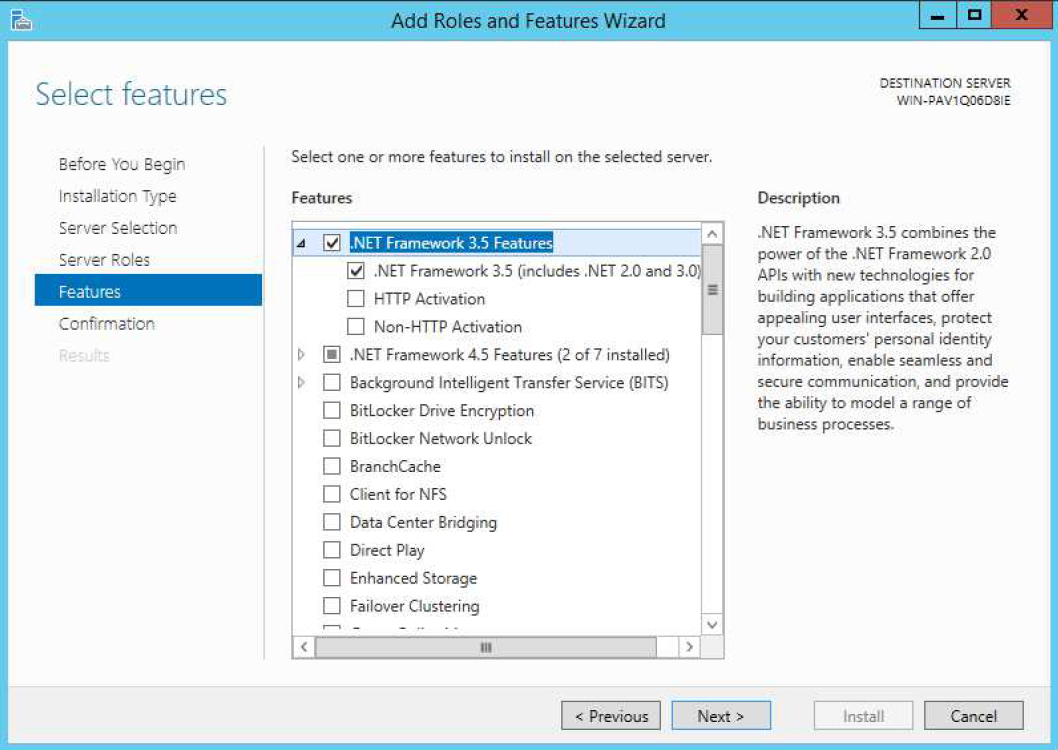
If you are using the Win10 , Windows Server 2012 operating system or Windows Server 2012 R2 before
installation of Wonderware from the list of Features installed in Windows,
you must install .NET Framework 3.5 - it is required to install and work with Microsoft SQL Server.
ATTENTION!
If you are installing the Galaxy Repository, Information Portal or Historian Server you should first:
1) install Microsoft SQL Server 2012 by Technical Bulletin No. 139: Recommended Microsoft installation
SQL Server 2012 Standard Edition for Wonderware,
2) configure Microsoft SQL Server according to Technical Catalog No. 149: Microsoft SQL configuration
Server for Wonderware.
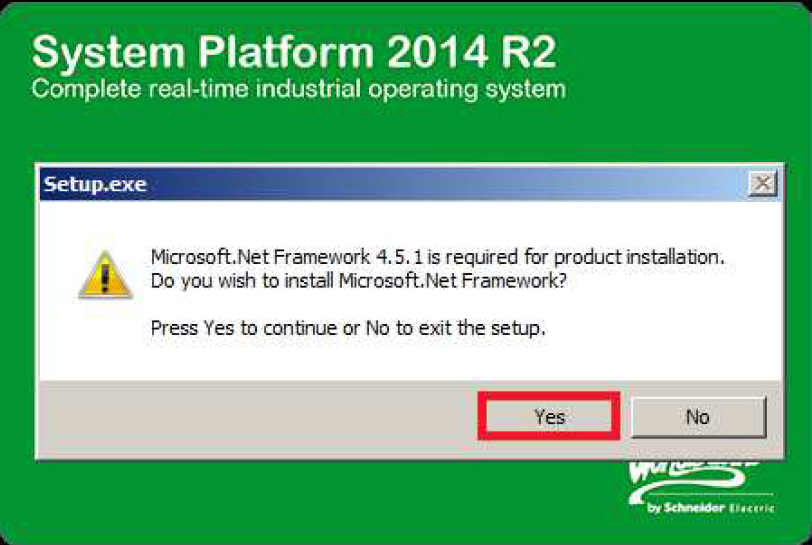
If Microsoft.NET 4.5 is not installed in the operating system, the installer will automatically ask for
confirmation of the start of the Microsoft .NET Framework 4.5.1 installation process; to continue the installation it should be
press the Yes button.
After installing Microsoft.NET Framework 4.5.1; the Prerequisites window will appear, in which you must uninstall
missing components by pressing the Install Prerequisites button.
After completing the Prerequisites installation, press the Next button to go to the next window.............
http://archestra.info/index.php/System_Platform_2014_R2_SP1 |
|
| Back to top |
|
|
baddream
Junior
Joined: 06 Nov 2018
Posts: 5
|
| Posted: 17/05/2019 05:44 Post subject: |
|
|
| xvelel wrote: | When preparing the Windows operating system for Wonderware, please remember:
1) so that it is not a system with a domain controller installed,
2) the computer name was not the name of the Wonderware software, eg InTouch, Historian, WIS, InSQL, Galaxy,
AppServer etc.
3) the computer name contained only letters and numbers or the dash character, i.e. "-",
4) the computer name did not contain an underscore, i.e. "_",
5) computer name was not longer than 15 characters.
Wonderware 2014 R2 does not require you to disable Account Control when installing |
Thanks, i check log file:
" Error: Error 1605 getting VersionString for {3A0973FC-E236-417B-97E6-D14122B946EA} "
how to fix this? |
|
| Back to top |
|
|
vandenberg
Junior
Joined: 04 Nov 2017
Posts: 3
|
| Posted: 17/05/2019 12:14 Post subject: |
|
|
Open a command prompt and type "regedit" and hit enter to open the registry editor.
go to Edit and click on File and type in the code you get..and search...something like tha but with your code...
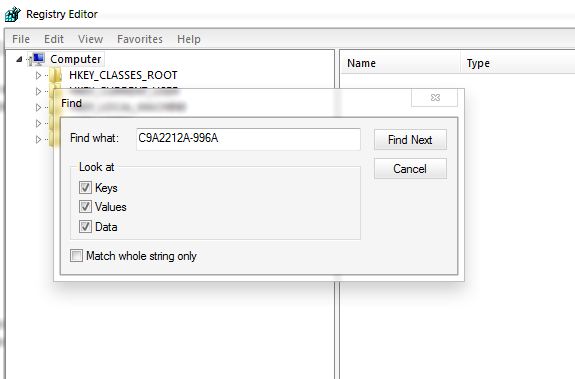
Once you find the key delete it.
Normally shoud be found on "HKEY_CLASSES_ROOT\Installer\Products\....find your code".
Once you found delete the key that contain your err code ex....."HKEY_CLASSES_ROOT\Installer\ your key...\...." registry key.
but before Right-click the above key and click "Export" and make a backup of the registry key just in case....
Or Run a Cleaner for Registry if you have...
Reboot ...
Rerun installer.. |
|
| Back to top |
|
|
baddream
Junior
Joined: 06 Nov 2018
Posts: 5
|
| Posted: 22/05/2019 13:55 Post subject: |
|
|
| vandenberg wrote: | Open a command prompt and type "regedit" and hit enter to open the registry editor.
go to Edit and click on File and type in the code you get..and search...something like tha but with your code...
Once you find the key delete it.
Normally shoud be found on "HKEY_CLASSES_ROOT\Installer\Products\....find your code".
Once you found delete the key that contain your err code ex....."HKEY_CLASSES_ROOT\Installer\ your key...\...." registry key.
but before Right-click the above key and click "Export" and make a backup of the registry key just in case....
Or Run a Cleaner for Registry if you have...
Reboot ...
Rerun installer.. |
I try but nothing change after del all key with my code... |
|
| Back to top |
|
|
coolshakir
Junior
Joined: 23 Dec 2020
Posts: 7
|
| Posted: 19/05/2021 21:01 Post subject: please wait for configuration to complete in wonderware |
|
|
| https://www.wmkit.com/archives/unable-to-install-products-from-wonderware-system-platform-2014-r2.html |
|
| Back to top |
|
|
Kotunis
Junior
Joined: 01 Dec 2018
Posts: 1
|
| Posted: 06/06/2021 10:57 Post subject: |
|
|
| Did someone solve this. |
|
| Back to top |
|
|
tamloh
Junior
Joined: 08 Nov 2018
Posts: 3
|
| Posted: 08/06/2021 11:08 Post subject: |
|
|
| no one can help? |
|
| Back to top |
|
|
|

 FAQ
FAQ Search
 Memberlist
 Usergroups
 Register
 Profile
 Log in to check your private messages
 Log in


