 |
plc.myforum.ro
PLCs users www.plc.myforum.ro!
|
| View previous topic :: View next topic |
| Author |
Message |
nguyen xuan khanh
Member

Joined: 16 May 2012
Posts: 170
|
 Posted: 04/12/2019 07:31 Post subject: Breakpoints in Tia portal V15.1 Posted: 04/12/2019 07:31 Post subject: Breakpoints in Tia portal V15.1 |
 |
|
Does anyone know how to debug in Tia portal V15.1 ?
I see SIEMENS make debug function very difficult to use compare with others like Codesys, Twincat...
I try to simulate with PLC CPU 1518-4 PN/DP (normal) and PLC CPU 1518F-4 PN/DP (safety). But I don't know how to activate these function:
-STEP INTO
-STEP OVER
-STEP OUT
-Other points: I see debug have in STL language but It doesn't display the results. So It is meaningless.
In SCL also the same, sometimes It doesn't display the results.
Thank you in advance!
[URL=https://fastpic.ru/view/111/2019/1204/9d79c13b3c215659ee098116e19e5b69.png.html] [/URL] [/URL]
[URL=https://fastpic.ru/view/111/2019/1204/b63cc1f7db3370fda3cdfaf353f93c86.png.html] [/URL] [/URL]
Last edited by nguyen xuan khanh on 05/12/2019 07:05; edited 2 times in total |
|
| Back to top |
|
 |
AnteSavilt
Member 2


Joined: 13 Feb 2018
Posts: 264
Location: Croatia
|
| Posted: 04/12/2019 15:34 Post subject: |
|
|
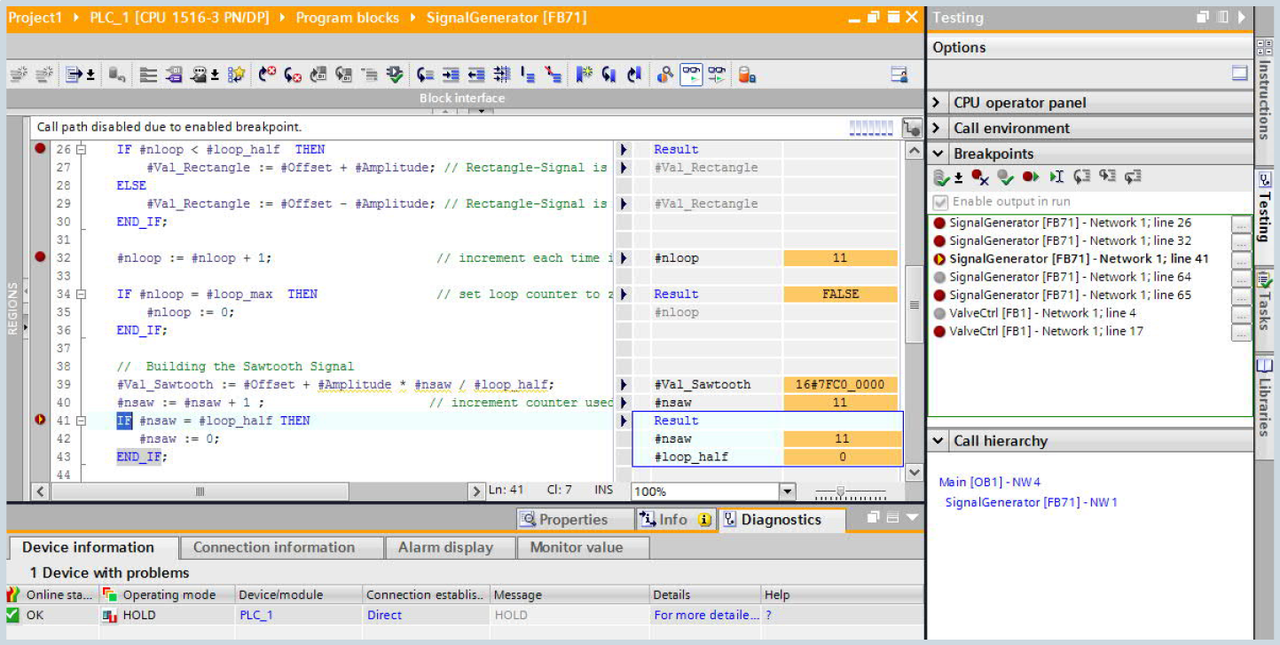
Install TIA Portal V15 incl. update3 and S7-1500 firmware 2.5.2 or up. FW2.5 and below do not support breakpoints.
Setting breakpoints in the standard user program will cause errors in the safety program.
Function
• Setting of breakpoints in SCL/STL programs
(also possible in mixed LAD/FBD blocks)
• Maximum number of active breakpoints per CPU:
• ≤CPU 1516/CPU 1515SP PC: 8
• ≥CPU 1517/CPU 1507S/S7-PLCSIM: 20
• From firmware version V2.5 of CPU S7-1500
https://indico.cern.ch/event/820481/contributions/3519070/attachments/1912245/3160181/News_TIA_Portal_V15_and_V15_1_en.pdf
https://ulozto.net/file/AnS1TdCYuMNq/tiaportalv15en-180107054238-pdf
Take a look at his block properties, if "Create Extended stauts information" are enabled.
You should go online but not monitore the block, go to testing tab, breakpoints, enable test mode and select the line and click in set/delete breakpoints.
Go to the dialog "Options > Settings" and navigate to "PLC programming > SCL (Structured > Control Language)".
Activate the following option "Create extended status information".
After that just compile the complete program and download this programm in the CPU.
Check also:
SIMATIC Haltepunkte: Logikfehler schrittweise eingrenzen im TIA Portal
https://www.youtube.com/watch?v=Ex4TWhtMNck
How can I debug a STEP 7 program using the Breakpoint function
https://www.youtube.com/watch?v=Ua7SXDyQVNw
SIMATIC Breakpoints: Localize logical errors stepwise with TIA Portal
https://www.youtube.com/watch?v=uZdjEiznGcI
Breakpoints in LAD
https://ulozto.net/file/lJ6E7hFxT3Vl/v15-3-zip
[url]https://www.upload.ee/files/10804250/S17-SCL.pdf.html[/url]
Last edited by AnteSavilt on 04/12/2019 16:04; edited 2 times in total |
|
| Back to top |
|
|
AnteSavilt
Member 2
Joined: 13 Feb 2018
Posts: 264
Location: Croatia
|
| Posted: 04/12/2019 15:36 Post subject: debug a STEP 7 program using the Breakpoint function |
|
|
How can I debug a STEP 7 program using the Breakpoint function?
https://support.industry.siemens.com/cs/document/21336333/how-can-i-debug-a-step-7-program-using-the-breakpoint-function
The breakpoint is comparable with the breakpoint that is available in other editors for debugging. In SIMATIC STEP 7's Test mode you have the option of setting a limited number of breakpoints. Using breakpoints you can stop program processing at a specific point in the user program. When the CPU reaches the breakpoint in the user program, it goes into the operating mode STOP. In the STOP operating mode you can use variables tables to check whether the program has achieved the desired effects up to the breakpoint (variables tables: under certain circumstance you must first run the "Update status values" function). Via "Debug/Control operand..." you can then also change the values of variables in the user program in order to manipulate the program for debugging purposes. From the breakpoint on you can then run program processing step by step, whereby you can recheck the effects of your program after each statement. In loops you can, for example, also follow the progress of the loop processing and analyze more precisely why a loop isn't left, for instance.
The following table describes how you can set breakpoints in STEP 7, in the "LAD/STL/FBD: program blocks" window.
No. Procedure
1 Check whether the block to be debugged has been saved and loaded into the CPU.
2 Switch the CPU operating mode switch first to "Run" or, if available on the CPU, to "RUN-P".
3 Open the block to be debugged in the block editor and switch to the Online view via Open Offline/Online Partner:
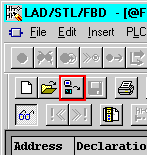
Fig. 01
Note:
Generally, breakpoints can only be set and used in the Online view of a block (read online from CPU) in STL- or in S7-SCL display mode. If you open a block offline, the breakpoint bar is grayed out completely and cannot be used.
After making changes in the Online window the breakpoint controller is disabled for the current session. The changes must be saved and loaded into the automation system. If you then open the block again in the Online view, you can once again control the breakpoints.
4 SIMATIC S7-400 CPU:
If you are using a SIMATIC S7-400 CPU or the CPU 318-2 DP, under the menu item Debug > Operation set the operating mode Test Operation:
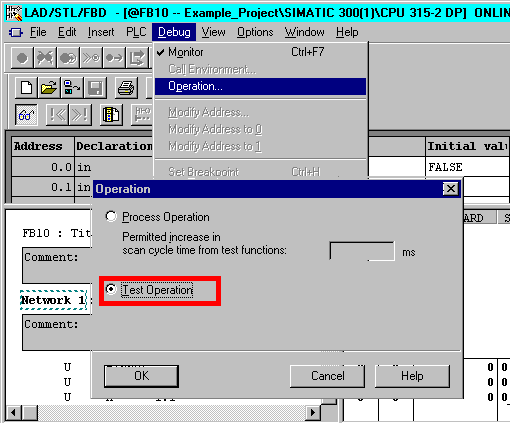
Fig. 02
SIMATIC S7-300 CPU:
If you are using a SIMATIC S7-300 CPU (but not a CPU 318-2 DP), this setting must have been set in the HW Config in the Properties of the CPU:
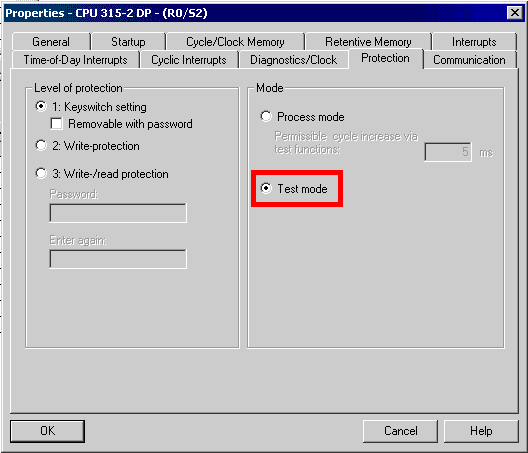
Fig. 03
Note:
The default setting for SIMATIC S7-300 CPUs is Test mode. Changes to this setting only become effective after recompiling and downloading the hardware configuration.
5 Switch the view to STL in the LAD/STL/FBD editor.
Note:
It is not possible to set breakpoints if the networks are in fact displayed in STL, but LAD or FBD view is selected in the menu and display in STL is only possible because the statements cannot be displayed in LAD/FBD. In this case change the view to display in STL via View > STL.
6 Enable the Breakpoint Bar under View > Breakpoint Bar.
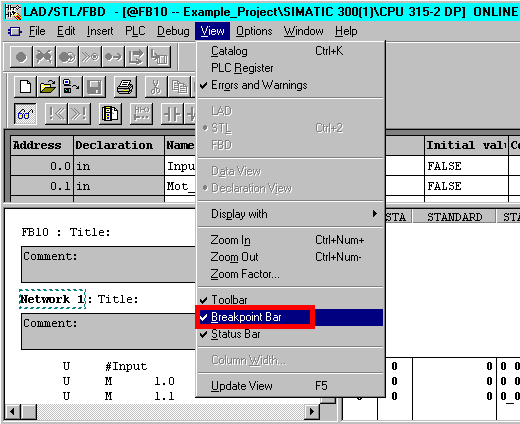
Fig. 04
7 Now place the cursor in the statement line where the breakpoint is to be set.
8 You set the breakpoint via the menu item Debug > Set breakpoint. This statement line is then ringed in red.
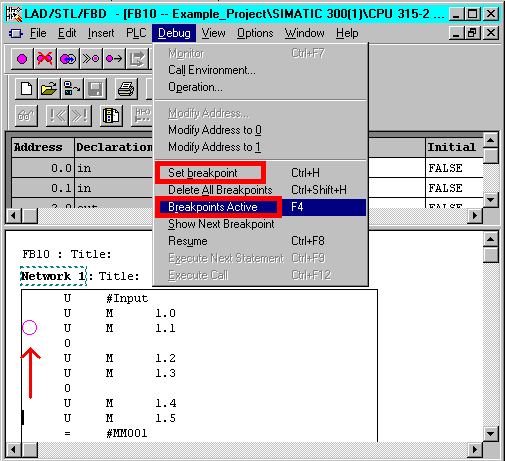
Fig. 05
9 Now activate the breakpoint via the menu item Debug > Breakpoints Active.
Now when the program meets this breakpoint the PLC goes into the operating mode STOP.
Note:
Please make sure that you are aware of the risks involved for your plant if you change variables, especially when controlling outputs!
More information is available in the manual "Programming with STEP 7 V5.5" in
https://support.industry.siemens.com/cs/attachments/45531107/S7pr___b.pdf |
|
| Back to top |
|
|
nguyen xuan khanh
Member
Joined: 16 May 2012
Posts: 170
|
| Posted: 04/12/2019 16:57 Post subject: debug a STEP 7 program using the Breakpoint function |
|
|
Hi AnteSavilt, thank you for quick responding and being nice!,
I understood your points, but I have just taken a look at the help of
TIA PORTAL, and it said: STEP INTO, STEP OVER, STEP OUT ONLY SUPPORT FOR S7-300/S7-400.
The problem is:
- If we write a structure programing, and have multi-layers calling (Main >>Function Block 1 > Function Block 2 > Function 3 > Function 4...etc.)
And we don't know (Difficult) what actually happening inside the function block or function (Step by step).
- SIEMENS developed a lot of new function blocks, new function, new data types for the S7-1500 controller,
not suitable for S7-300/S7-400 CPU. So that we can't copy the program run on S7-1500 to S7-300/s7-400 CPU.
[URL=https://fastpic.ru/view/111/2019/1204/51c9dace6e8596a2c60d2b4fb066b21c.png.html] [/URL] [/URL]
Last edited by nguyen xuan khanh on 05/12/2019 03:33; edited 1 time in total |
|
| Back to top |
|
|
AnteSavilt
Member 2
Joined: 13 Feb 2018
Posts: 264
Location: Croatia
|
| Posted: 04/12/2019 17:55 Post subject: |
|
|
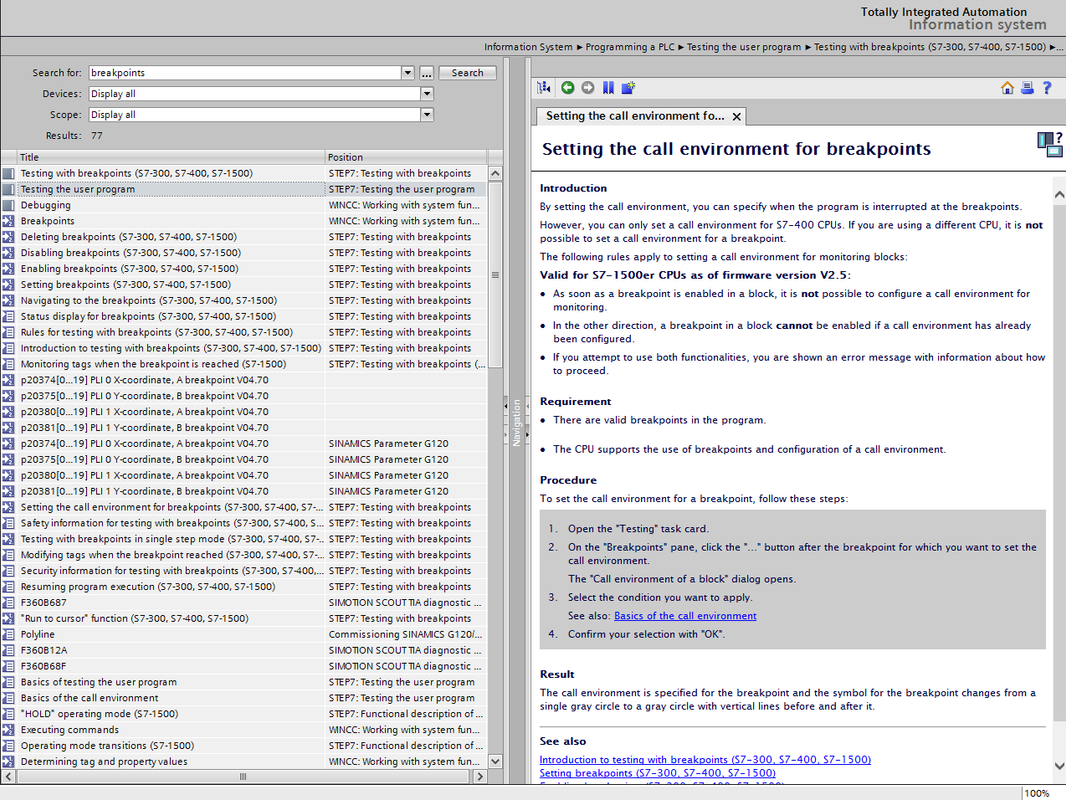
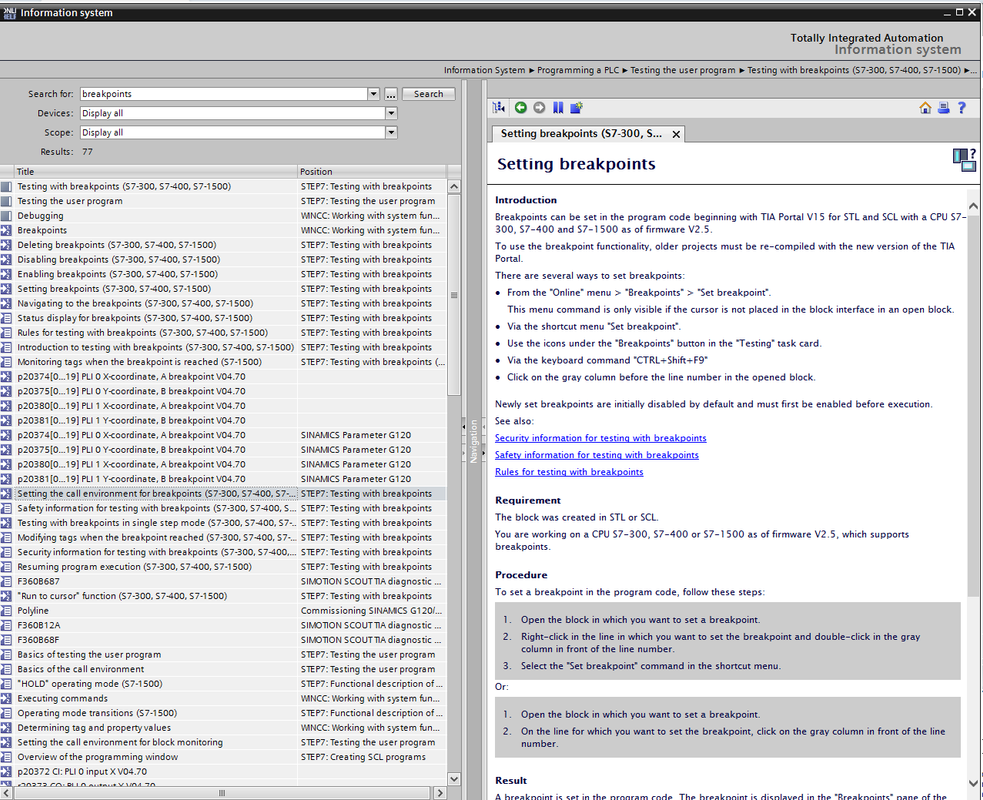
check this ...they forgotten to update Help..
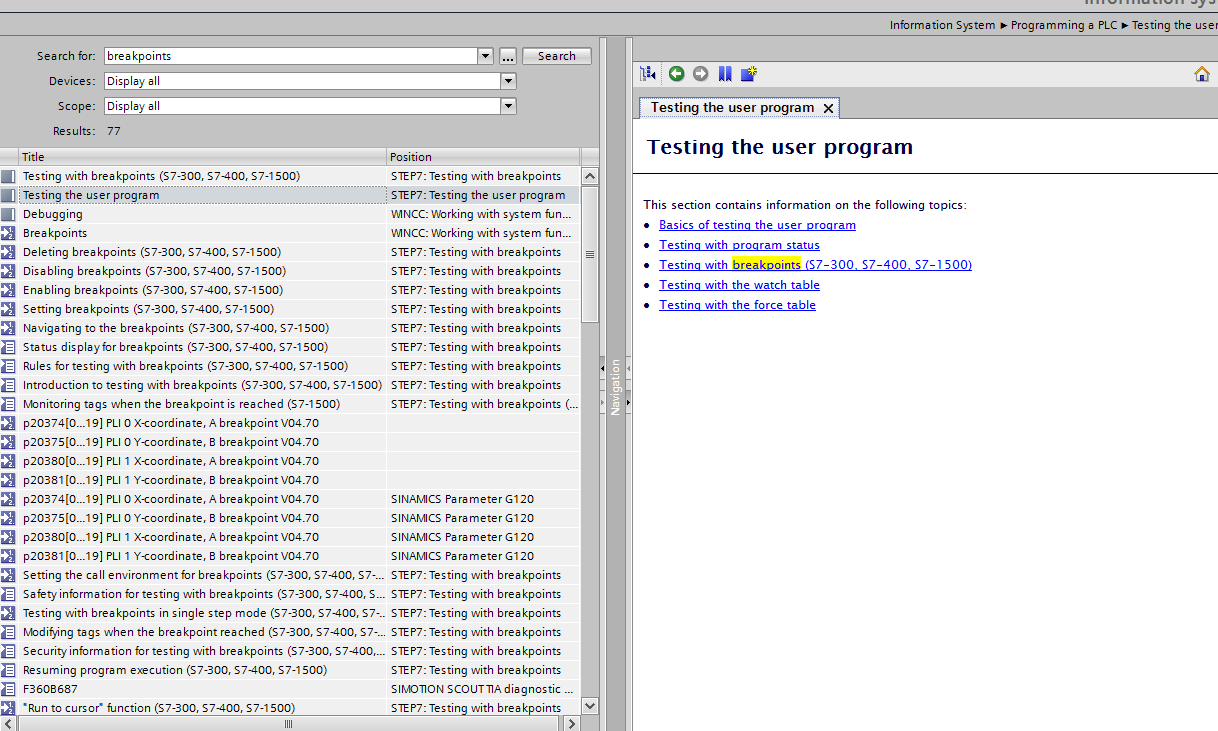
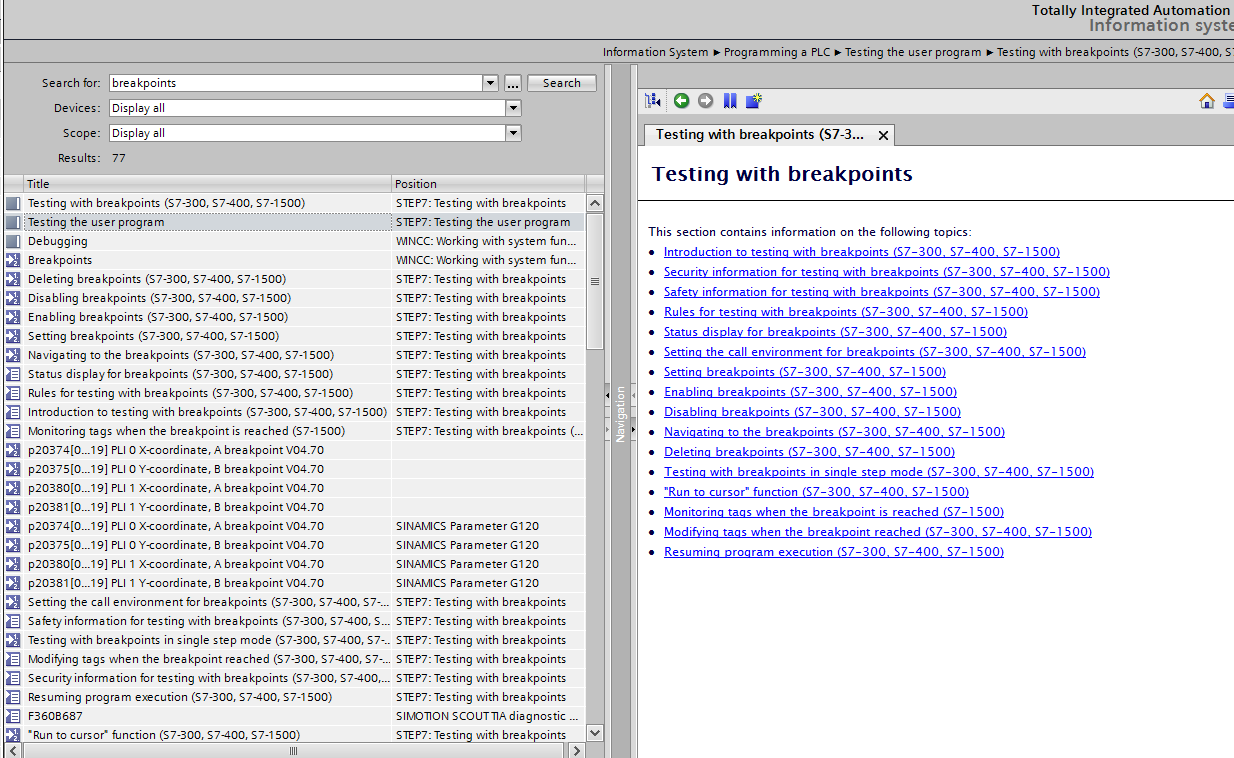
 |
|
| Back to top |
|
|
nguyen xuan khanh
Member
Joined: 16 May 2012
Posts: 170
|
| Posted: 05/12/2019 03:30 Post subject: Breakpoints in Tia portal V15.1 |
|
|
Dear AnteSavilt,
The help picture I posted here is from TIA PORTAL V15.1.
but excuse me, I don't understand your pictures,
What do you mean? |
|
| Back to top |
|
|
|
|
You cannot post new topics in this forum
You cannot reply to topics in this forum
You cannot edit your posts in this forum
You cannot delete your posts in this forum
You cannot vote in polls in this forum
|
Powered by phpBB © 2001, 2005 phpBB Group
Fa-ti si tu propriul forum GRATUIT, pe www.myforum.ro |
 FAQ
FAQ Search
 Memberlist
 Usergroups
 Register
 Profile
 Log in to check your private messages
 Log in


