| View previous topic :: View next topic |
| Author |
Message |
varella
Member junior

Joined: 25 Oct 2016
Posts: 86
|
 Posted: 08/08/2017 09:58 Post subject: Braumat 6.0 SP2 ; 7.0 SP1 ; 7.1 Posted: 08/08/2017 09:58 Post subject: Braumat 6.0 SP2 ; 7.0 SP1 ; 7.1 |
 |
|
Braumat 6.0 SP2 ; 7.0 SP1 ; 7.1
| Code: | BRAUMATClassic V6.0+SP2 is compatible with the following operating systems:
Microsoft Windows XP Professional SP3
Microsoft Windows Server 2003 R2 SP2;
workstation computer also Microsoft Windows Server 2003 SP2
Microsoft Windows 7 Ultimate SP1 (32/64 Bit)
Microsoft Windows Server 2008 SP2 (32 Bit)
Microsoft Windows Server 2008 R2 SP1 (64 Bit) |
[URL=https://userscloud.com/x5nn012pguxt]Braumat_6.0_SP2.rar - 33.0 MB[/URL]
| Code: | BRAUMAT V7.0 is compatible with the following operating systems:
Microsoft Windows 7 Ultimate/Enterprise SP1 (32/64 Bit)
Microsoft Windows Server 2008 R2 SP1 Standard Edition (64 Bit) |
[URL=https://userscloud.com/sfm1y7svwrjr]Braumat_7.0_SP1.rar - 357.6 MB[/URL]
| Code: | BRAUMAT V7.1 is compatible with the following operating systems:
Microsoft Windows 7 SP1 Ultimate/Enterprise (32-/64-bit)
Microsoft Windows 10 Enterprise 2015 LTSB (64-bit)
Microsoft Windows Server 2008 R2 SP1 Standard Edition (64-bit)
Microsoft Windows Server 2012 R2 Standard Edition (64-bit) |
[URL=https://userscloud.com/ouaqj2jtz45l]Braumat_7.1.rar - 362.2 MB[/URL] |
|
| Back to top |
|
 |
Saheed
Junior

Joined: 23 May 2017
Posts: 1
|
| Posted: 06/11/2017 17:04 Post subject: |
|
|
| Anyone with Braumat V6 and V7 licenses |
|
| Back to top |
|
|
varella
Member junior
Joined: 25 Oct 2016
Posts: 86
|
| Posted: 19/11/2019 19:14 Post subject: BRAUMAT |
|
|
BRAUMAT V5.3 SP3
https://ulozto.net/file/pRZtecj7bTiP/braumat-v5-3-sp3-iso
[URL=https://www.file-upload.net/download-13793006/BRAUMATV5.3SP3.iso.html]BRAUMATV5.3SP3.iso[/URL]
Braumat/Sistar v 5.3 SP1 SP3
https://mega.co.nz/#F !eQEBFBJR!XwJgeI3gHb7jWA7MIAHSkw
https://ulozto.net/tam/_YFEKoR2fX73I
[URL=https://www.file-upload.net/download-13793032/BRAUMATV5.3SP3.iso.html]BRAUMATV5.3SP3.iso[/URL]
[URL=https://www.file-upload.net/download-13793031/BRAUMATV5.3SP1.iso.html]BRAUMATV5.3SP1.iso[/URL]
Braumat V6.2 SP2
https://ulozto.net/file/shMn17Tj0PHt/braumat-6sp2-iso
[URL=https://www.file-upload.net/download-13793045/braumat_6sp2.iso.html]braumat_6sp2.iso[/URL]
Braumat V7.1
https://mega.nz/#F !BPpUVYpI!8dZ5WPRhmK6UhT1QnXSn2Q
https://ulozto.net/file/kapw0hnvskHG/braumatv7sp1-iso
[URL=https://www.file-upload.net/download-13793038/BRAUMATV7SP1.iso.html]BRAUMATV7SP1.iso[/URL]
BRAUMAT / SISTAR V8.0 TRIAL Download
https://support.industry.siemens.com/cs/document/109773148/braumat-sistar-v8-0-trial-download
Additional Software for S7 PLC engineering
For the engineering of the S7 PLC the Software STEP 7 is required. Which variant of STEP 7 you need depends on the desired CPU type.
https://support.industry.siemens.com/cs/document/109761045/simatic-step-7-and-wincc-v15-1-trial-download
https://support.industry.siemens.com/cs/document/109761679/step-7-v5-6-sp1-step-7-professional-2017-sr1-trial-download
Download SIMATIC BRAUMAT & SISTAR V8.0
BRAUMAT V8.0
https://support.industry.siemens.com/cs/attachments/109773148/BRAUMAT_V80.exe
SISTAR V8.0
https://support.industry.siemens.com/cs/attachments/109773148/SISTAR_V80.exe
https://support.industry.siemens.com/cs/attachments/109773153/BraumatSistar_Manual_b_en-US.pdf
https://ulozto.net/file/0pYftceoCSdU/braumat-v80-exe
https://ulozto.net/file/UCPTBhhSWZ00/sistar-v80-exe
[URL=https://www.file-upload.net/download-13792964/BRAUMAT_V80.exe.html]BRAUMAT_V80.exe[/URL]
[URL=https://www.file-upload.net/download-13792972/SISTAR_V80.exe.html]SISTAR_V80.exe[/URL]
https://support.industry.siemens.com/cs/attachments/109773152/SQL_DBHostb_en-US.pdf
SIMATIC BRAUMAT / SISTAR V7.5 TRIAL Download
https://support.industry.siemens.com/cs/document/109761435/simatic-braumat-sistar-v7-5-trial-download
https://support.industry.siemens.com/cs/attachments/109761435/BRAUMAT_V75.exe
https://support.industry.siemens.com/cs/attachments/109761435/SISTAR_V75.exe
https://ulozto.net/file/L0DmhNUKEPNA/braumat-v75-exe
[URL=https://www.file-upload.net/download-13793061/BRAUMAT_V75.exe.html]BRAUMAT_V75.exe[/URL]
[URL=https://www.file-upload.net/download-13793064/SISTAR_V75.exe.html]SISTAR_V75.exe[/URL]
https://ulozto.net/file/WqrLjiggEqcO/sistar-v75-exe
Update 1 for BRAUMAT & SISTAR V7.5:
https://support.industry.siemens.com/cs/attachments/109764843/BM_V07050001_01020001.zip
[URL=https://www.file-upload.net/download-13793068/BM_V07050001_01020001.zip.html]BM_V07050001_01020001.zip[/URL]
https://ulozto.net/file/yPJE0WKi6RT6/bm-v07050001-01020001-zip
Use http://winimage.com/ for write image IMA to floppy
Use License_Inst_Unist.exe for Install full or trial keys to hard disk
Braumat_IOS01.IMA and IOS01.IMA with full keys
Some image file have only trial keys
https://ulozto.net/file/dW2526cUa7qk/sim-ekb-2006-11-14a-rar |
|
| Back to top |
|
|
ox2v
Junior
Joined: 15 Sep 2018
Posts: 17
|
| Posted: 19/03/2020 19:38 Post subject: connection between S7-1500 and S7-400 controllers in BRAUMAT |
|
|
How do you configure a connection between S7-1500 and S7-400 controllers in BRAUMAT/SISTAR?
https://support.industry.siemens.com/cs/document/109778362/
Configuration steps for establishing the communication connection between S7-1500 and S7-400.
The two controllers are in two different projects.
STEP 7 (TIA Portal)
STEP 7 V5 (SIMATIC Manager)
An unspecified connection is used for communication.
Configuration in the TIA Portal
Network settings
Assign your IP address and subnet mask for the connection from S7-1500 to S7-400.
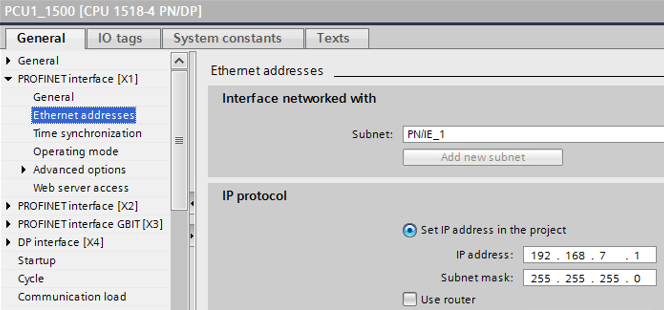
Fig. 01
Enable the PUT/GET communication in the security settings of the controller.
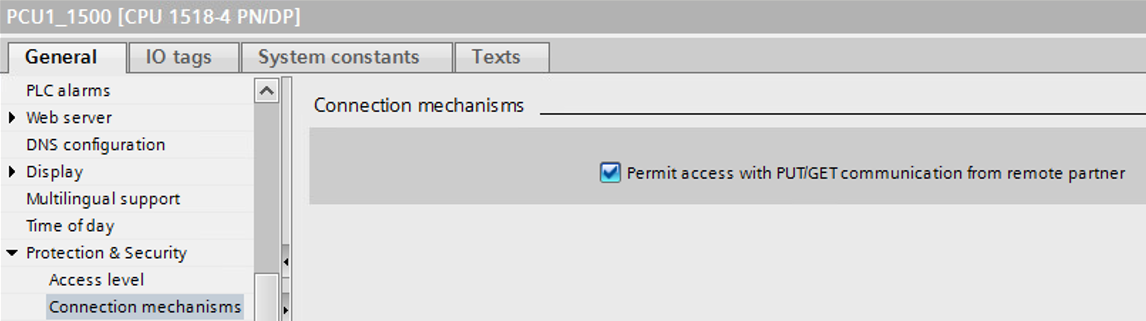
Fig. 02
Establish connection
Switch to the TIA Portal Network view and arrange your working area.
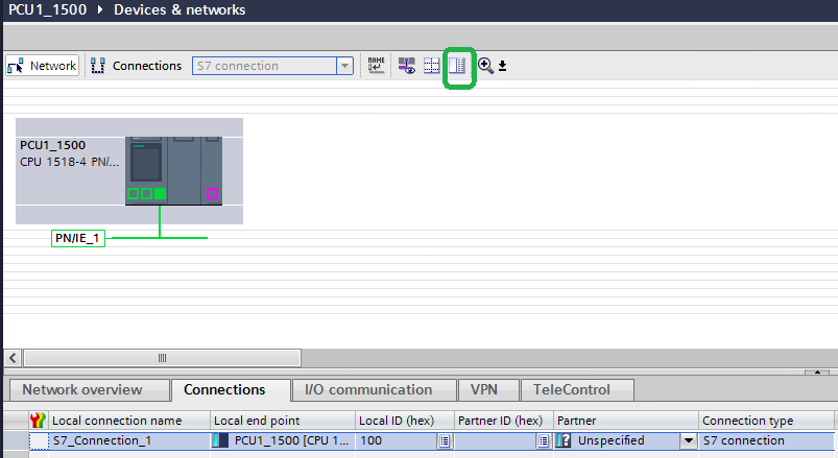
Fig. 03
Select your controller and right-click it. Select "Add new connection" from the pop-up menu.
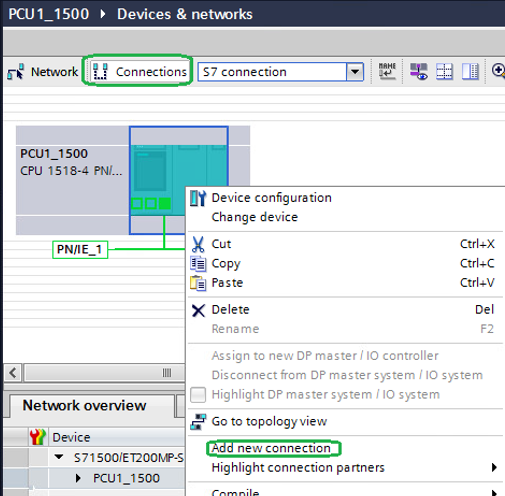
Fig. 04
Select the interface of your S7-1500 controller.
Add an unspecified S7 connection.
Select 100 hex+<Value> hex of your connection partner (PCU) as local ID.
Example: Target PCU16 corresponds to 110 hex.
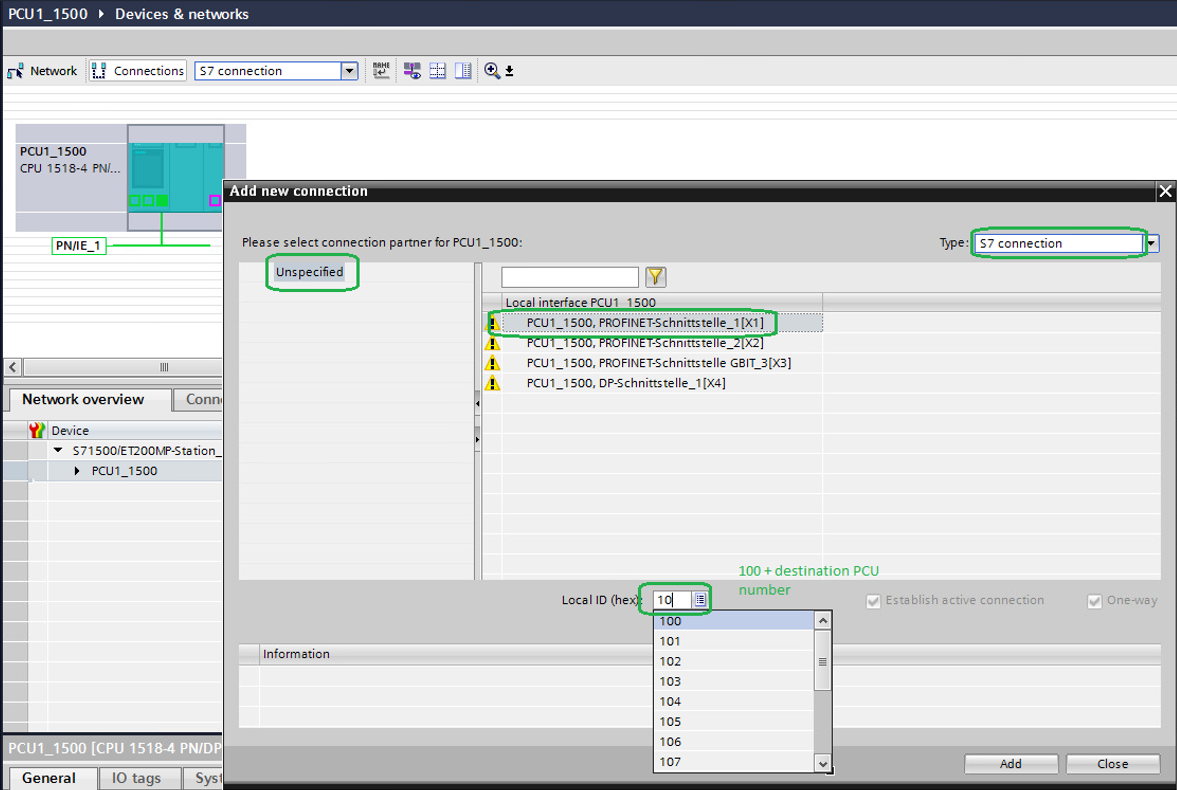
Fig. 05
Select the general settings of the new connection and assign the IP address of your connection partner.
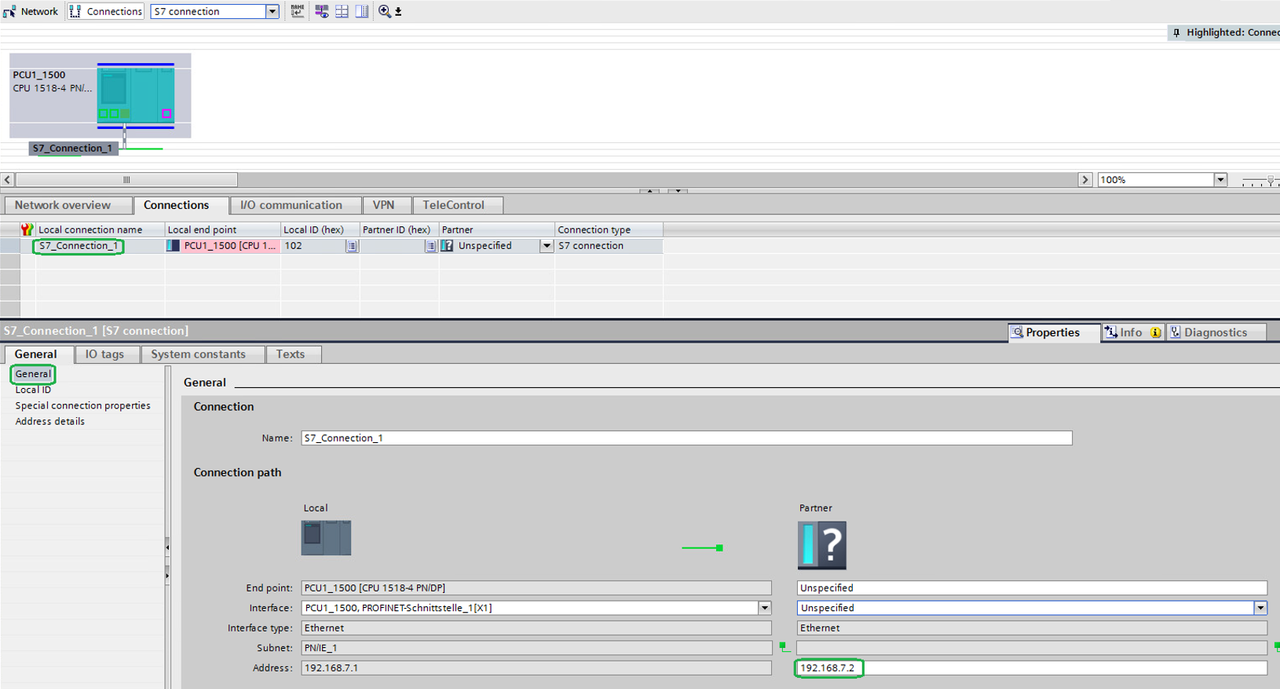
Fig. 06
Select the address details and assign the rack and slot numbers of the CPU of your connection partner.
For the unilateral S7 connection to an unspecified partner you choose "03" (hex) in the drop-down list of the connection resource.
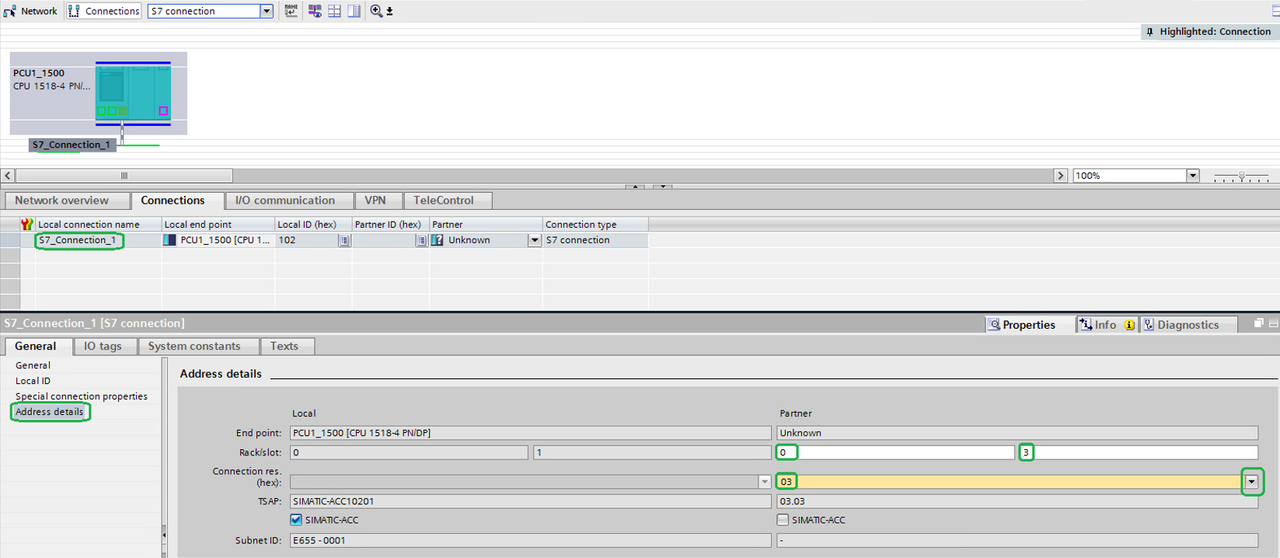
Fig. 07
Compile and download
Compile and download the changes to your S7-1500 controller.
Configuration in the SIMATIC Manager
Create new connection in NetPro
Select your controller and create a new connection. Add an unspecified S7 connection.
Select the hex value of your target controller (PCU) as local ID.
Assign the IP address of your target controller and always enable "Active connection establishment" if your target controller is an S7-1500.
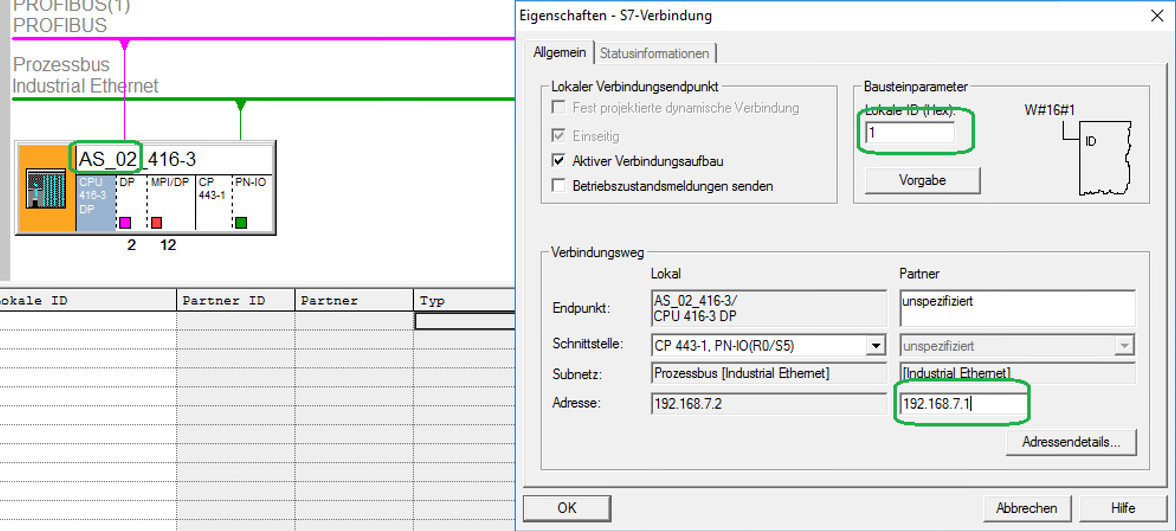
Fig. 08
Select "Address details".
Assign the rack and slot numbers of your partner controller.
Assign your local ID.
Assign the partner ID "03" for your S7-1500 partner controller. (The value is always "03" for an S7-1500.)
Select 10 hex+<value> hex of your target controller (PCU) as local ID.
Example: Target PCU16 corresponds to 20 hex.
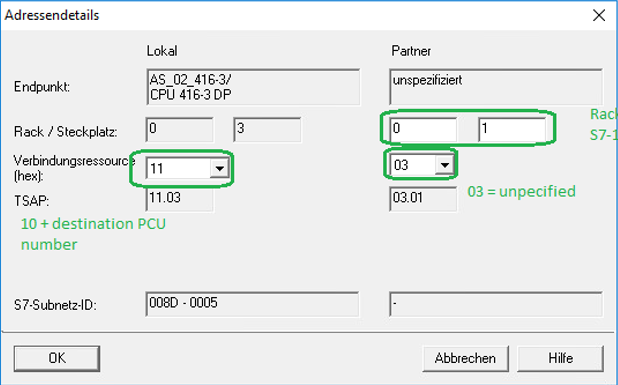
Fig. 09
Compile and download
Compile your project and download everything to the controller. Restart your controller.
Online connection
Enable "Go online" in the devices and Network view of TIA Portal.
Check the connection you created. Established connections are shown green in the Online view.
Enable "Go online" in NetPro. Select your CPU and check the connection status.
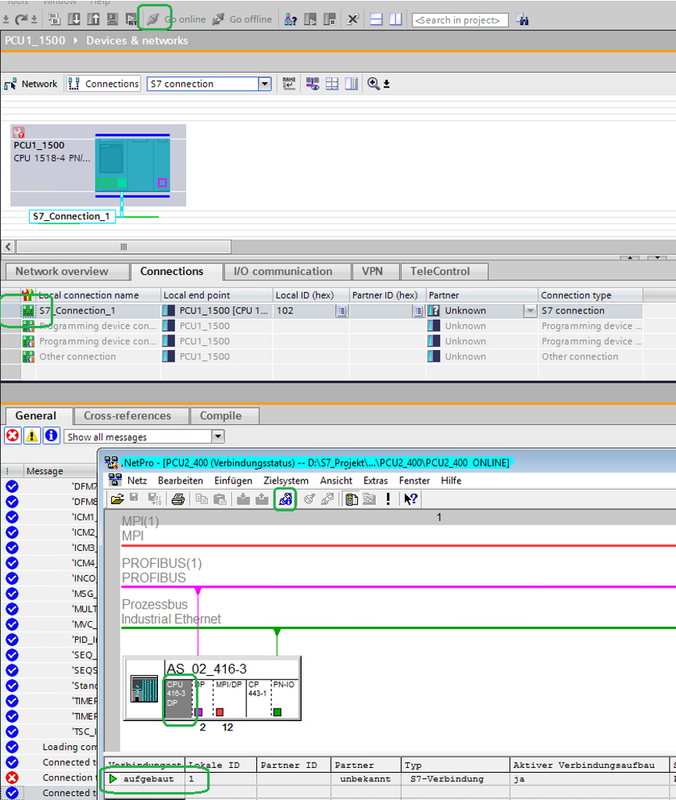
Fig. 10
Configure connection in BRAUMAT/SISTAR "XC_PCU"
Select the data record for the XC_PCU according to the partner PCU using the connection table of the manual.
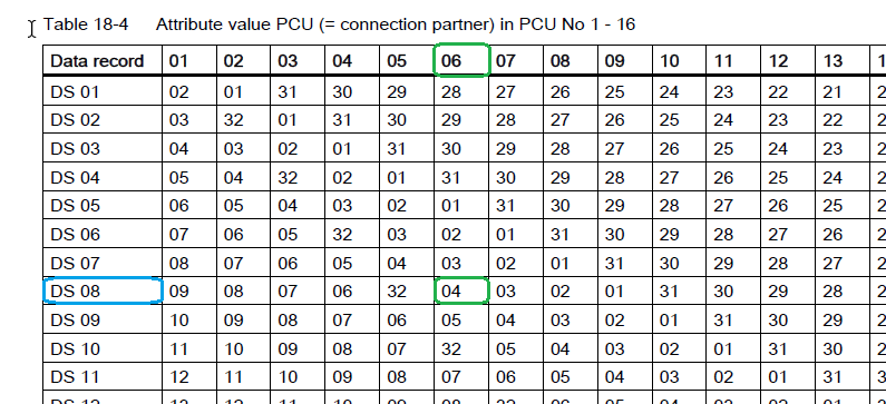
Fig. 11
Refer also to Entry ID: 109773153 or at the following link: "SIMATIC BRAUMAT/SISTAR > Cross coupling AS - AS > Parameterization of the connections > PCU allocation to data set".
Example
The connection between PCU 6 and PCU 4 uses the data record 8.
Configuration for both PCUs in the same data record.
The partner PCU number, assign connection ID (local) and enable the connection.
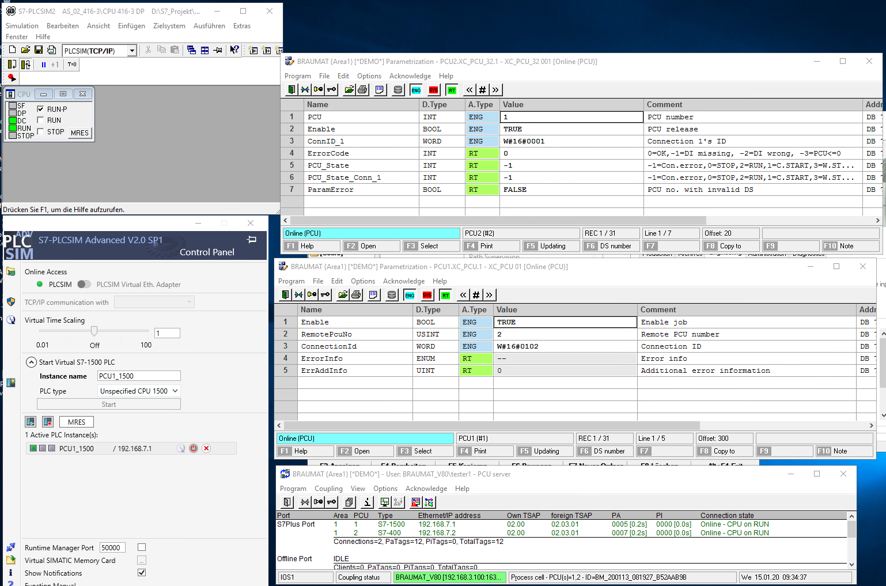
Fig. 12
Upgrade S7-400 controllers to STEP 7 V7.5 Upd2
All BRAUMAT S7-400 versions before V7.5 Upd 2 must use the cross-coupling blocks from V7.5 Upd 2. Without an update connection errors (-1) occur in the PCU_Status of the S7-1500 PCU.
The blocks are released with BRAUMAT V6.x and V7.x.
Copy the blocks from the folder "V7_V7_BM_SYS_XChange" into your S7-400 offline project folder and into your S7-400 controller.
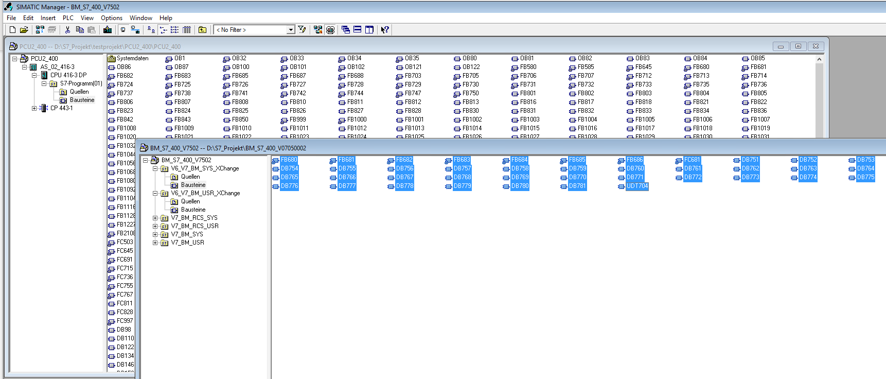
Fig. 13
After the update the connections work without errors.
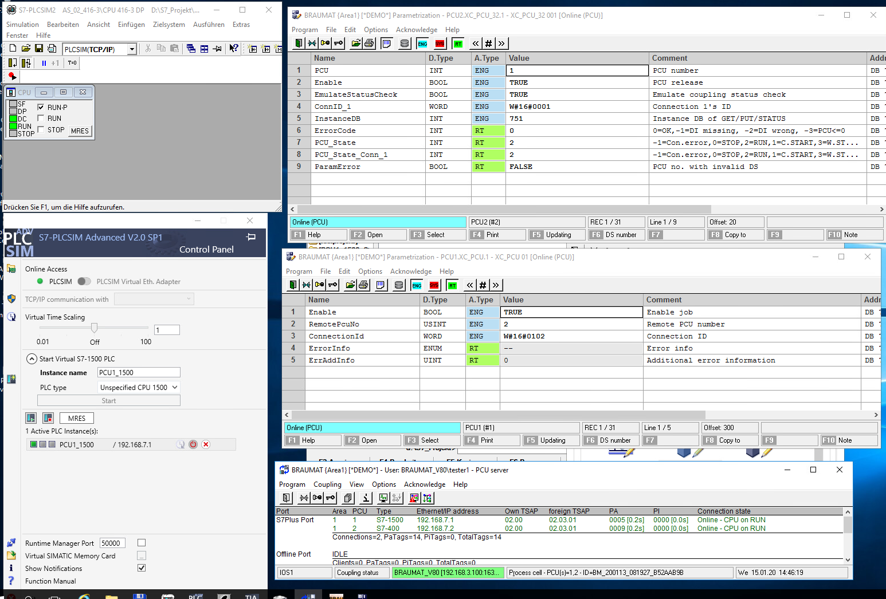
Fig. 14
Configure connection tests
To test the connection, configure a GET access in XC_JOB of both controllers.
Read the time (seconds) from the PCU_GEN block of your partner PLC into a local marker byte.
The following figure shows you the necessary steps. (Positions are marked negru and steps to be executed are marked red.)
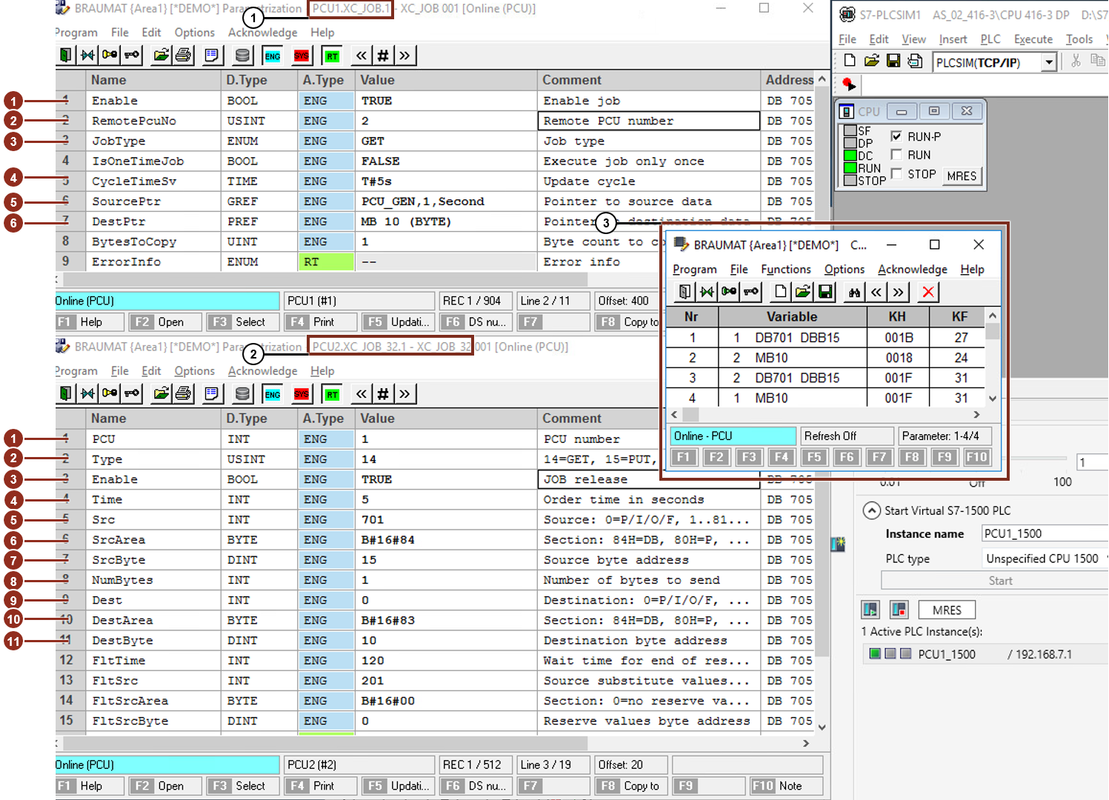
Fig. 15
Configure XC_JOB in the S7-1500 (Position 1)
Enable the "TRUE" job.
Select "RemotePcuNo" 2 for PCU 2.
Select the "JobType" "GET".
Assign 5s as the update cycle for "CycleTimeSv".
For "SourcePtr" assign "DB701 DBB15" ("PCU_GEN,1,Second").
Assign "DestPtr" marker byte 10.
Configure XC_JOB_32 in the S7-400 (Position 2)
Select "remote PCU number" 1.
Assign "Type" 14 for "GET access".
Enable the job with "TRUE" to release it.
Assign 5s as "Job time (update cycle)" 5s.
For source "Src" assign 701 for DB701.
Assign 84H as "SrcArea" to access the DB.
Assign 15 as "SrcByte" as start address in DB701.
Assign 1 as "NumBytes" to read a byte.
Assign 0 as "Dest" (no DB).
Assign 83H as "DestArea" to access the markers.
Assign 10 as "DestByte" for marker 10.
Check the status of the source and target bytes with the BRAUMAT/SISTAR function "Control" in the Diagnostics tab of the BRAUMAT/SISTAR main menu. (Position 3) |
|
| Back to top |
|
|
|

 FAQ
FAQ Search
 Memberlist
 Usergroups
 Register
 Profile
 Log in to check your private messages
 Log in


