| View previous topic :: View next topic |
| Author |
Message |
daerdon
Junior

Joined: 08 May 2018
Posts: 3
|
 Posted: 13/05/2018 22:12 Post subject: Beckoff KS2000 v4.3.1 full Posted: 13/05/2018 22:12 Post subject: Beckoff KS2000 v4.3.1 full |
 |
|
Beckoff KS2000 v4.3.1 full
https://anonfiles.com/Z6jf5dX2o5/KS2000_USB_CDM_2.12.06_zip
https://anonfiles.com/h5kf57X4o1/KS2000_V5_rar
Beckhoff KS2000 serial
P170-8686-8517
P170-7164-7663
P170-5361-7288
http://www.beckhoffautomation.ru/english.asp?download/ks2upda.htm?id=71003227100472 |
|
| Back to top |
|
 |
samikhan70
Junior 2

Joined: 14 Jan 2014
Posts: 42
|
| Posted: 04/07/2019 13:06 Post subject: |
|
|
dear friend,
please share the data of programming cable for KS2000 configuration software. thanks
_________________
samikhan |
|
| Back to top |
|
|
samikhan70
Junior 2
Joined: 14 Jan 2014
Posts: 42
|
| Posted: 04/07/2019 13:07 Post subject: |
|
|
| samikhan70 wrote: | dear friend,
please share the data of programming cable for KS2000 configuration software. thanks |
i mean rs232 cable pinout of both side.
_________________
samikhan |
|
| Back to top |
|
|
utk568
Junior
Joined: 08 Jun 2019
Posts: 3
|
| Posted: 04/07/2019 19:54 Post subject: |
|
|
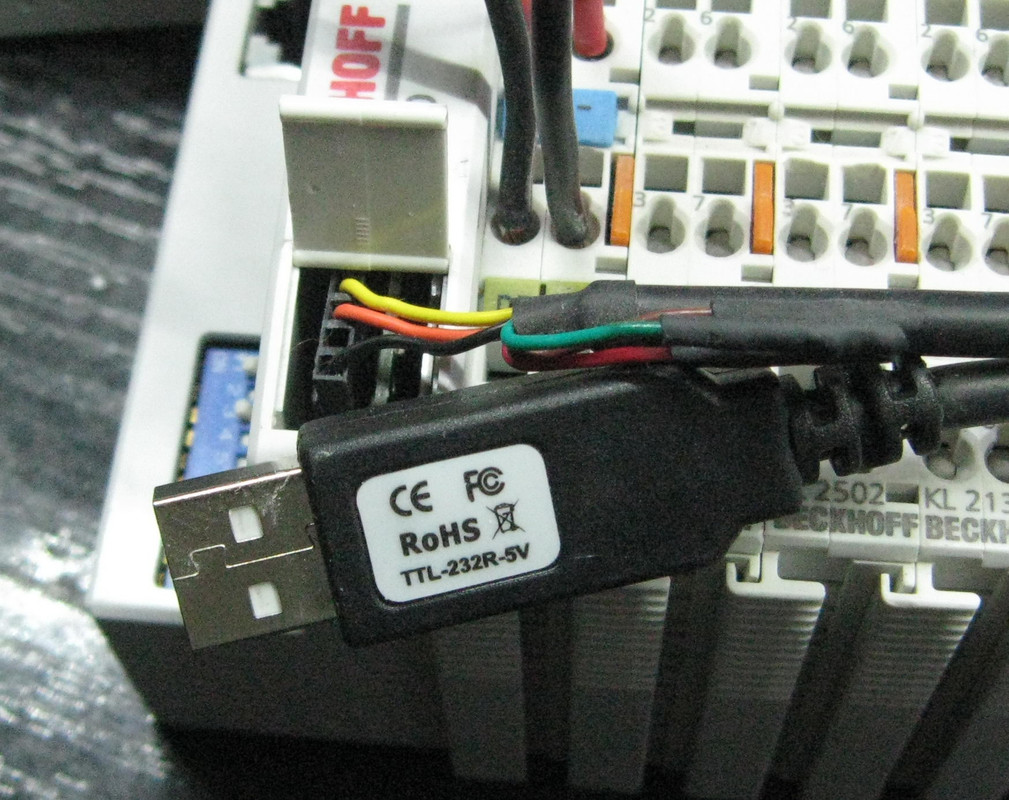
TTL 5V. With an Ftdi cable, usb-TTL.
Pins from top to bottom,
1-RXD (yellow)
2-TXD (Orange)
3-NUSE!
4-GND
drivers
https://openload.cc/t5H8Zexfnf/KS2000_USB_CDM_2.12.06_zip
https://openload.cc/F7HdZ3x4n6/KS2000_V5_exe |
|
| Back to top |
|
|
samikhan70
Junior 2
Joined: 14 Jan 2014
Posts: 42
|
| Posted: 05/07/2019 12:38 Post subject: |
|
|
Thanks a lot utk568,
can i use this cable directly on my PC serial RS232 Port. do i have to make any settings for serial?
_________________
samikhan |
|
| Back to top |
|
|
utk568
Junior
Joined: 08 Jun 2019
Posts: 3
|
| Posted: 05/07/2019 16:11 Post subject: |
|
|
| you have driver on links |
|
| Back to top |
|
|
samikhan70
Junior 2
Joined: 14 Jan 2014
Posts: 42
|
| Posted: 06/07/2019 09:58 Post subject: |
|
|
| utk568 wrote: | | you have driver on links |
i don,t want to use usb. i want to connect the bus coupler directly in my pc's rs232 serial port. which i think dont need any driver.
_________________
samikhan |
|
| Back to top |
|
|
borlix
Junior
Joined: 13 Jul 2013
Posts: 5
|
| Posted: 08/07/2019 22:26 Post subject: |
|
|
| please re upload, the link is dead... |
|
| Back to top |
|
|
daerdon
Junior
Joined: 08 May 2018
Posts: 3
|
| Posted: 09/07/2019 22:11 Post subject: |
|
|
KEYENCE.zip 565.9 MB
| Code: | | https://mega.nz/#!gXx23QZa!nwiOWawtkamIX1zRmZeoWmjqqVtMsSLa4gcqWhLo4cg |
|
|
| Back to top |
|
|
duckman
Member

Joined: 08 Jul 2013
Posts: 214
|
| Posted: 16/07/2019 01:11 Post subject: |
|
|
utk568, hi there, would you have the serial #, as otherwise it can't be used.
Thanks |
|
| Back to top |
|
|
duckman
Member
Joined: 08 Jul 2013
Posts: 214
|
| Posted: 06/08/2019 21:08 Post subject: |
|
|
| I posted above, then found some serials straight away via goggle, but you can get the serial from the keygen on this site, just do a search for the twin cat software |
|
| Back to top |
|
|
duckman
Member
Joined: 08 Jul 2013
Posts: 214
|
| Posted: 13/08/2019 01:29 Post subject: |
|
|
Well l got to talk to a BK 5220 with the KS2000 software and a USB/ttl cable like below.
https://www.ebay.com.au/itm/USB-to-TTL-Serial-Cable-Adapter-PC-PL2303HX-Chipset-USB-Cable-Computer-Cable-oB/123840201939?ssPageName=STRK%3AMEBIDX%3AIT&_trksid=p2057872.m2749.l2649
You will need to download the PL2203_Proflic_Driver of the net.
USB cable connect as White (RX) = BK5220 top terminal (TX)
Green (TX) = BK5220 (RX)
Red (+5v) = not used (+5)
Negru (GND) = BK5220 bottom terminal (0v) |
|
| Back to top |
|
|
duckman
Member
Joined: 08 Jul 2013
Posts: 214
|
| Posted: 13/08/2019 01:31 Post subject: |
|
|
| dublu post, removed |
|
| Back to top |
|
|
binary01
Member junior

Joined: 27 Nov 2014
Posts: 52
|
| Posted: 15/07/2020 18:12 Post subject: |
|
|
Need some help.
Can the usb/ttl cable
(https://www.ebay.com.au/itm/USB-to-TTL-Serial-Cable-Adapter-PC-PL2303HX-Chipset-USB-Cable-Computer-Cable-oB/123840201939?ssPageName=STRK%3AMEBIDX%3AIT&_trksid=p2057872.m2749.l2649)
work with the Beckhoff BK9050 ( also known as PX-TCP1 by Automation direct) ?
If so, how to determine the Wx, RX and Gnd pins on the BK9050? |
|
| Back to top |
|
|
duckman
Member
Joined: 08 Jul 2013
Posts: 214
|
| Posted: 16/07/2020 23:56 Post subject: |
|
|
You will need to download the manual and confirm pins, but they should be the same as what l wrote above.
Post your results for others |
|
| Back to top |
|
|
binary01
Member junior
Joined: 27 Nov 2014
Posts: 52
|
| Posted: 17/07/2020 07:02 Post subject: |
|
|
okay,
I confirmed the pins on the BK9050( Protos PX-TCP1), looking at it upright, from Left to right, the pins are as follows when connected to the USB to TTL adapter:
Black
Not used
Green
White.
Now here is the thing, I really have a Protos PX-TCP1 module, when compared it is the same as the BK9050.
The USB to TTL cable worked with the KS2000 software and the device but when used with the Protos software, a message appeared that is it not a Protos device.
From the pictures the KS 2000-Z2-USB looks exactly like the Protos PX-USB-232( it even has the beckhoff stamp on it)
The protos software automatically assigns the modbus addresses for the device.
Can a normal usb to 232 adapter work ( if i build the cable)? |
|
| Back to top |
|
|
duckman
Member
Joined: 08 Jul 2013
Posts: 214
|
| Posted: 17/07/2020 22:28 Post subject: |
|
|
RS232 can be 12v dc signal, not always but that is what it was designed for. So as long as there isn't 12v getting inputted into the usb/rs232 cable (laptop USB is 5V) it should be alright. l had tried USB/RS232 to talk to the BeckHoff without luck, so needed the USB/TTL to talk to it.
If the device via USB/TTL is talking telling you it isn't a Protos device, l would suggest it is a deviceID issue, that they have assigned the module with a different ID than the Beckhoff. |
|
| Back to top |
|
|
|

 FAQ
FAQ Search
 Memberlist
 Usergroups
 Register
 Profile
 Log in to check your private messages
 Log in


