 |
plc.myforum.ro
PLCs users www.plc.myforum.ro!
|
| View previous topic :: View next topic |
| Author |
Message |
mamiko
Member 2


Joined: 25 Dec 2017
Posts: 420
|
 Posted: 29/05/2024 19:23 Post subject: Automatioc log in HMI Unified via ID key switch Posted: 29/05/2024 19:23 Post subject: Automatioc log in HMI Unified via ID key switch |
 |
|
Automatioc log in HMI Unified via ID key switch
https://support.industry.siemens.com/cs/document/109963220/
Access to automation systems is usually protected from unauthorized operation. For this purpose, access restriction to various functions is implemented. This use case shows two types of such access protection so that only qualified personnel can access the requested functions.
Two different approaches are available, being the main difference the availability of an IO-Link communication interface.
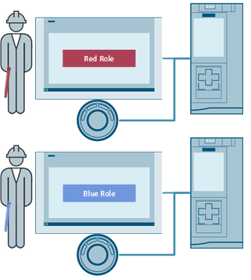
Fig. 01
ID key switch with electronic module without IO-Link communication interface
Each plant operator is assigned a color-coded ID key according to his area of responsibility.
To be able to carry out an operation on the HMI operator panel, the plant operator first inserts his ID key into the ID key switch.
To carry out further adjustments, the plant operator selects a switch position.
The position of the ID key is forwarded via the outputs of the electronic module to the IO module and evaluated by the control program.
The color coded ID key defines the maximum key position.
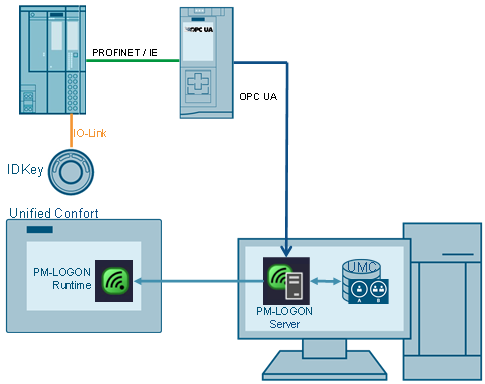
Fig. 02
ID key switch with electronic module and IO-Link communication interface
Each plant operator gets a personal ID key. The system uses a centralized user management component (UMC) and PM-LOGON to assign a UID personal code to each of the users. This is implemented connecting to a centralized user server.
To be able to carry out an operation on the HMI operator panel, the plant operator first inserts his ID key into the ID key switch. The system performs a log in if the read UID is on the PM-LOGON server. The system logoff when the ID key is extracted from the ID key switch.
To carry out further adjustments, the plant operator selects a key position.
The position of the ID key, the ID key used (color code) and the ID number is read out via a program-specific function block (FB).
Once the roles and permits have been assigned to a UMC group, no further adjustments need to be made in the project.
Documentation, Library and Projects
https://support.industry.siemens.com/cs/attachments/109963220/109963220_ID_key_Sirius_DOC_TIAP_V19_V1_0_EN.pdf
https://support.industry.siemens.com/cs/attachments/109963220/109963220_ID_key_Sirius_LIB_TIAP_V19_V1_0.zip
https://support.industry.siemens.com/cs/attachments/109963220/109963220_ID_key_Sirius_WithoutIOLink_PROJ_TIAP_V19_V1_0.zip
https://support.industry.siemens.com/cs/attachments/109963220/109963220_ID_key_Sirius_CentralUMC_PROJ_TIAP_V19_V1_0.zip
Download Url File name
https://dfiles.eu/files/dpy3a0b7w 109963220_ID_key_Sirius_LIB_TIAP_V19_V1_0.zip
https://dfiles.eu/files/1rrmxlfor 109963220_ID_key_Sirius_WithoutIOLink_PROJ_TIAP_V19_V1_0.zip
https://dfiles.eu/files/57fsa2ge2 109963220_ID_key_Sirius_CentralUMC_PROJ_TIAP_V19_V1_0.zip
https://dfiles.eu/files/itfloj0cu 109963220_ID_key_Sirius_DOC_TIAP_V19_V1_0_EN.pdf |
|
| Back to top |
|
 |
|
|
You cannot post new topics in this forum
You cannot reply to topics in this forum
You cannot edit your posts in this forum
You cannot delete your posts in this forum
You cannot vote in polls in this forum
|
Powered by phpBB © 2001, 2005 phpBB Group
Fa-ti si tu propriul forum GRATUIT, pe www.myforum.ro |
 FAQ
FAQ Search
 Memberlist
 Usergroups
 Register
 Profile
 Log in to check your private messages
 Log in


