 |
plc.myforum.ro
PLCs users www.plc.myforum.ro!
|
| View previous topic :: View next topic |
| Author |
Message |
139dam
Junior

Joined: 09 Jul 2019
Posts: 8
|
 Posted: 09/07/2020 07:45 Post subject: Automated Program Updates of SIMATIC HMI Operator Panels Posted: 09/07/2020 07:45 Post subject: Automated Program Updates of SIMATIC HMI Operator Panels |
 |
|
Automated Program Updates of SIMATIC HMI Operator Panels
https://support.industry.siemens.com/cs/document/109779527/
Automated updating of project data for the Comfort Panel with Pack&Go or with the SIMATIC Automation Tool via the application programming interface (API).
Especially when it comes to series machine manufacturing, it makes sense to create an HMI project for functionally identical machines and transfer the configuration to all SIMATIC Panels of the same type.
The objective of this application example is to show you the options for automated project downloading to several SIMATIC Panels of the same type, which only differ from each other in terms of the specified IP addresses.
The application example can be used for the following device types.
SIMATIC Basic Panels PN
SIMATIC Comfort Panels
WinCC RT Advanced
Example
You have 40 HMI Operator Panels of the same type running the same HMI project.
You perform an HMI program update and must then apply this change to all 40 Panels.
As is the standard, you connect to the first HMI Operator Panel and transfer the configuration. Then, connect to the second HMI Operator Panel and transfer the configuration, etc. until all 40 HMI Operator Panels have been updated.
With the program template from this application example (AE) you connect to the network where the 40 HMI Operator Panels are located, select the HMI configuration file, and will only need to start the download once.
Result:
The 40 HMI Operator Panels are all updated at once, which reduces the time needed to update the 40 HMI panels individually. This can be particularly important if a large number of HMI Operator Panels need to be updated during short production line downtimes.
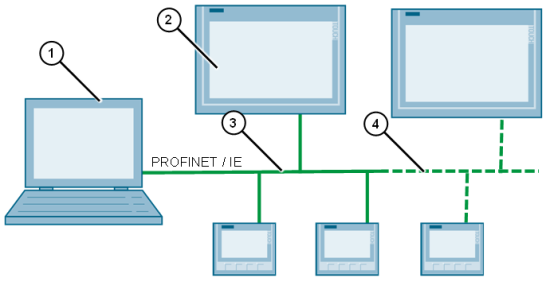
Fig. 1
(1) PC with the project configuration data and the software applications
(2) Network stations e.g. TP1200 Comfort / KTP400 Comfort
(3) PROFINET network
(4) Additional network stations
Download
https://support.industry.siemens.com/cs/attachments/109779527/109779527_AutoUpdatePanels_DOC_en.pdf
Pack&Go application example
https://support.industry.siemens.com/cs/attachments/109779527/109779527_AutoUpdatePanels_CODE_01.zip
SAT application example
https://support.industry.siemens.com/cs/attachments/109779527/109779527_AutoUpdatePanels_CODE_02.zip
https://ulozto.net/tamhle/iBLF92VyTPvi
https://bayfiles.com/f272TeE2o7/109779527_AutoUpdatePanels_CODE_01_zip
https://bayfiles.com/h37cT4E7o6/109779527_AutoUpdatePanels_CODE_02_zip
[url=http://www.girlshare.ro/3769941872.4]109779527_AutoUpdatePanels_CODE_01.zip[/url]
[url=http://www.girlshare.ro/3769941873.5]109779527_AutoUpdatePanels_CODE_02.zip[/url]
[url=http://www.girlshare.ro/3769941874.6]109779527_AutoUpdatePanels_DOC_en.pdf[/url] |
|
| Back to top |
|
 |
|
|
You cannot post new topics in this forum
You cannot reply to topics in this forum
You cannot edit your posts in this forum
You cannot delete your posts in this forum
You cannot vote in polls in this forum
|
Powered by phpBB © 2001, 2005 phpBB Group
Fa-ti si tu propriul forum GRATUIT, pe www.myforum.ro |
 FAQ
FAQ Search
 Memberlist
 Usergroups
 Register
 Profile
 Log in to check your private messages
 Log in


