 |
plc.myforum.ro
PLCs users www.plc.myforum.ro!
|
| View previous topic :: View next topic |
| Author |
Message |
valz
Member 3


Joined: 26 Jul 2015
Posts: 771
|
 Posted: 07/08/2023 18:27 Post subject: activate the time-limited trial licenses for the PM Add-ons? Posted: 07/08/2023 18:27 Post subject: activate the time-limited trial licenses for the PM Add-ons? |
 |
|
How to activate the time-limited trial licenses for the PM Add-ons?
https://support.industry.siemens.com/cs/document/109823295/
In order to be able to test the functional scope of the individual PM add-ons, a so-called trial license is included on the respective installation medium, which allows to test the individual add-on for up to 90 days. The following article describes the necessary steps to activate this license.
The installation of a trial license is possible via the application PM-LICENSE Manager. This application can be found either in the Windows Start menu under the PM-COMMON folder or in the path C:\Program Files (x86)\SIEMENS\PM\PMLICENSE.
After starting the application, the process for activating the trial license can be started via the menu item License -> Install.
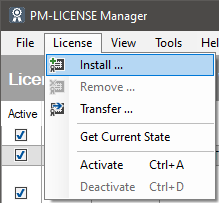
Install
A new window opens in which the respective license file can be selected. By default, the trial licenses are located in the Common\Licenses\Trial path of the installation medium. Depending on the add-on used, several different trial licenses (for the different variants of the product) may be available for selection.
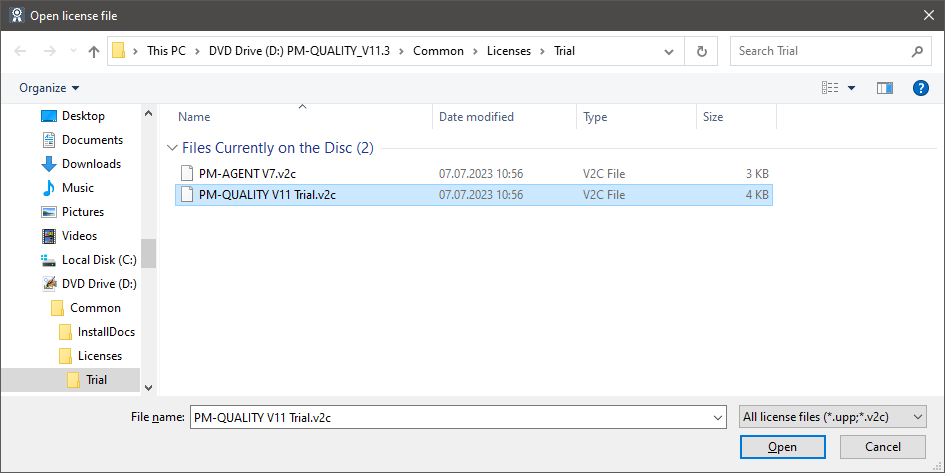
Select license file
After the installation of the trial license it is displayed in the PM-LICENSE Manager. The 90-day trial period starts as soon as the license is queried for the first time (e.g. when starting PM-SERVER).
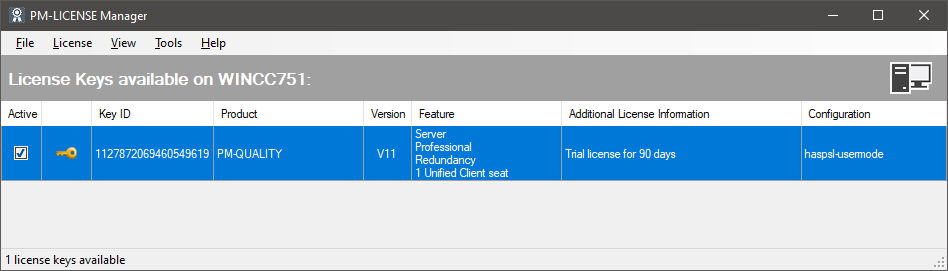
Installed license
Once the trial license has been used once, the remaining trial period is displayed in the PM-LICENSE Manager. It is not possible to reset or extend that period.
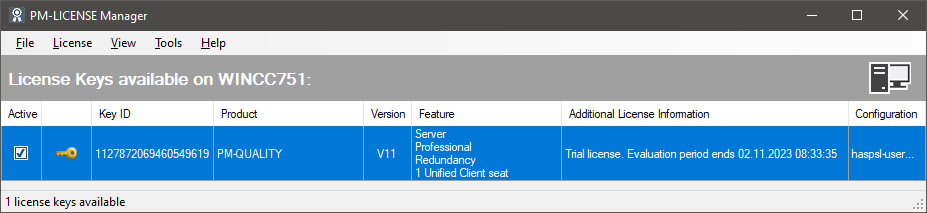
Active trial license |
|
| Back to top |
|
 |
|
|
You cannot post new topics in this forum
You cannot reply to topics in this forum
You cannot edit your posts in this forum
You cannot delete your posts in this forum
You cannot vote in polls in this forum
|
Powered by phpBB © 2001, 2005 phpBB Group
Fa-ti si tu propriul forum GRATUIT, pe www.myforum.ro |
 FAQ
FAQ Search
 Memberlist
 Usergroups
 Register
 Profile
 Log in to check your private messages
 Log in


