| View previous topic :: View next topic |
| Author |
Message |
huynhtrong
Junior 2

Joined: 23 Apr 2017
Posts: 21
Location: vietnam
|
 Posted: 29/03/2019 04:21 Post subject: Accuracy reading Power metter mfm384 and cm1241 Posted: 29/03/2019 04:21 Post subject: Accuracy reading Power metter mfm384 and cm1241 |
 |
|
Dear our friend,
I'm facing with problem when i read numeroase power metter mfm384 using modbus rtu to collect kwh data .But the accurancy ,data is difference in the screen metter .WIth v1,v2,v3 and f,pf is correct .
example some data kwh from plc reading and power meter screen:
121581.3-121810.3
121581.4-121810.4
i'm sorry my english is not good
thanks for your help.
_________________
aaaa |
|
| Back to top |
|
 |
Aminabed132
Junior

Joined: 16 Aug 2018
Posts: 7
|
| Posted: 29/03/2019 11:34 Post subject: |
|
|
121810.3 power meter screen
121581.3 kwh from plc
If this is the situation check how do you read data on Modbus... |
|
| Back to top |
|
|
huynhtrong
Junior 2
Joined: 23 Apr 2017
Posts: 21
Location: vietnam
|
| Posted: 31/03/2019 04:23 Post subject: |
|
|
| Aminabed132 wrote: | 121810.3 power meter screen
121581.3 kwh from plc
If this is the situation check how do you read data on Modbus... |
I read 2 register and convert to float .that's is code in scl :
temp1.%w1 = buffer[0];
temp1.%w0 = buffer[1];
data_convert := Dword_to_real(temp1);
with u1,w1,v1,pf,F,I is correct with value in the display power metter.
But with total kwh is difference .
Thanks for your help
_________________
aaaa |
|
| Back to top |
|
|
Aminabed132
Junior
Joined: 16 Aug 2018
Posts: 7
|
| Posted: 31/03/2019 13:47 Post subject: |
|
|
You are always transmitting a number of 16 bit registers.
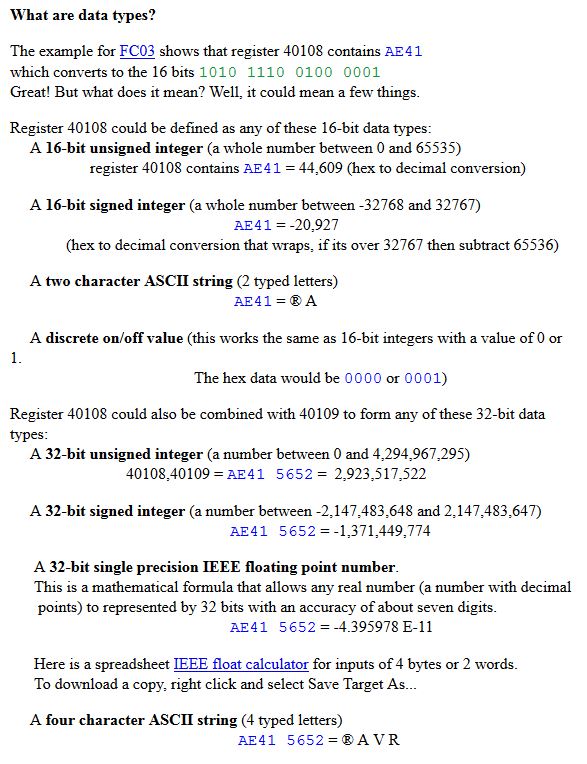
Probably the second register has 0000 and do not get error for the first two values.
If one of the registers has 1234(hex) and the other has abcd(hex) you have combine them into the 32 bit float register.
Try as 1234abcd if that doesn't look right when viewed as a float try abcd1234. It will probably be one of those two formats.
Use this 'floating point calculator'
https://www.h-schmidt.net/FloatConverter/IEEE754.html
to be very helpful.
Read the two numbers in hex. Let's say you have 12(hex) and ab(hex)
Place them into the 'hexadecimal representation' area first as 1200ab (the two leading zeroes are needed for the second part) and also try as ab0012.
See which gives the floating point number to what you are expecting and proceed. |
|
| Back to top |
|
|
huynhtrong
Junior 2
Joined: 23 Apr 2017
Posts: 21
Location: vietnam
|
| Posted: 01/04/2019 05:51 Post subject: |
|
|
| Aminabed132 wrote: | You are always transmitting a number of 16 bit registers.
Probably the second register has 0000 and do not get error for the first two values.
If one of the registers has 1234(hex) and the other has abcd(hex) you have combine them into the 32 bit float register.
Try as 1234abcd if that doesn't look right when viewed as a float try abcd1234. It will probably be one of those two formats.
Use this 'floating point calculator'
https://www.h-schmidt.net/FloatConverter/IEEE754.html
to be very helpful.
Read the two numbers in hex. Let's say you have 12(hex) and ab(hex)
Place them into the 'hexadecimal representation' area first as 1200ab (the two leading zeroes are needed for the second part) and also try as ab0012.
See which gives the floating point number to what you are expecting and proceed. |
I'm reading right value from power meter follow instruction .
I'm using s7 1200 -sm1241 reading 14 slave mfm384.I face a problem is crash module after i reading 1 day the Tx Rx led is not blink and stuck in slave 1.
Here is code :
////////////////
//step 1 :
//"Modbus_Config".Req := "Modbus_Config".Temp1;
IF "FirstScan" OR "Modbus_Config".Error THEN
"Modbus_Config".Step := 1;
"Modbus_Config".Slave_Add := 2;//load data in first scan
"Modbus_Config".EnableCaculate := true;
"Modbus_Config".Temp1 := FALSE;
END_IF;
// // sent request and move step
IF ("Modbus_Config".Step = 1 AND NOT "Modbus_Config".Temp1 AND "Modbus_Config".EnableCaculate) THEN
"Modbus_Config".Step := 2;
"Modbus_Config".Temp1 := TRUE;
END_IF;
IF ("Modbus_Config".Step = 2 AND "Modbus_Config".Temp1) THEN
"Modbus_Config".Req := "Modbus_Config".Temp1 AND NOT "Modbus_Config".Busy;
END_IF;
//recived response and next step to move data from buffer
IF ("Modbus_Config".Done AND "Modbus_Config".Step =2) THEN
"Modbus_Config".Step := 3;
END_IF;
//move data
IF "Modbus_Config".Step = 3 THEN
"Modbus_Config".Temp1 := FALSE;
//timer delay for execute
"timer_delay".TON(IN := NOT "Modbus_Config".Temp1,
PT := T#1s);
"Move_Data"(finis => "Modbus_Config".Temp2,
SlaveID := "Modbus_Config".Slave_Add);
IF "Modbus_Config".Temp2 AND "timer_delay".Q THEN
"Modbus_Config".Temp2 := FALSE;
"Modbus_Config".Step := 4;//convert data from word to real
END_IF;
END_IF;
//swap word to real data and incresae slave_address for next process
IF "Modbus_Config".Step = 4 THEN
"Modbus_Config".EnableCaculate := FALSE;
//caculate data
"ConvertData"(SlaveID := "Modbus_Config".Slave_Add,
enable := "Modbus_Config".EnableCaculate);
// call funtion move data to Data_kwh
IF "Modbus_Config".EnableCaculate THEN
"Modbus_Config".Step := 1;
"Modbus_Config".Temp1 := FALSE;
"Modbus_Config".Slave_Add := "Modbus_Config".Slave_Add + 1;
IF "Modbus_Config".Slave_Add > 14 THEN
"Modbus_Config".Slave_Add := 1;
END_IF;
END_IF;
END_IF;
thanks for your helping[/code]
_________________
aaaa |
|
| Back to top |
|
|
puphajokk
Junior
Joined: 21 Mar 2019
Posts: 1
|
| Posted: 02/04/2019 11:11 Post subject: |
|
|
use this tool..
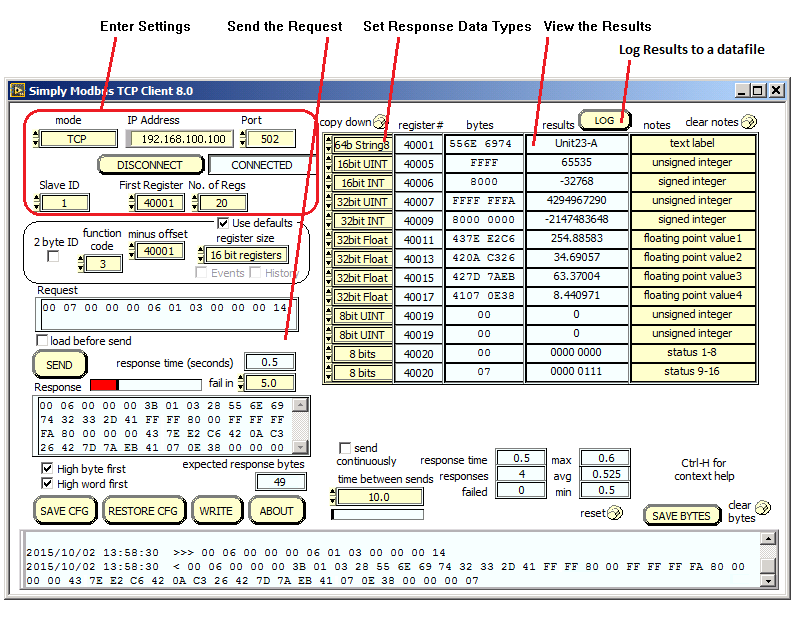
http://www.simplymodbus.ca/TCPclient.htm |
|
| Back to top |
|
|
Catas Alvaro
Junior
Joined: 19 Jan 2019
Posts: 3
|
| Posted: 02/04/2019 15:25 Post subject: |
|
|
https://plc-hmi-scadas.com/083.php
https://plc-hmi-scadas.com/TIA_Portal_Modbus_RTU.php
https://plc-hmi-scadas.com/084.php |
|
| Back to top |
|
|
Aminabed132
Junior
Joined: 16 Aug 2018
Posts: 7
|
| Posted: 02/04/2019 16:13 Post subject: |
|
|
| huynhtrong wrote: | | Aminabed132 wrote: | You are always transmitting a number of 16 bit registers.
Probably the second register has 0000 and do not get error for the first two values.
If one of the registers has 1234(hex) and the other has abcd(hex) you have combine them into the 32 bit float register.
Try as 1234abcd if that doesn't look right when viewed as a float try abcd1234. It will probably be one of those two formats.
Use this 'floating point calculator'
https://www.h-schmidt.net/FloatConverter/IEEE754.html
to be very helpful.
Read the two numbers in hex. Let's say you have 12(hex) and ab(hex)
Place them into the 'hexadecimal representation' area first as 1200ab (the two leading zeroes are needed for the second part) and also try as ab0012.
See which gives the floating point number to what you are expecting and proceed. |
I'm reading right value from power meter follow instruction .
I'm using s7 1200 -sm1241 reading 14 slave mfm384.I face a problem is crash module after i reading 1 day the Tx Rx led is not blink and stuck in slave 1.
Here is code :
////////////////
//step 1 :
//"Modbus_Config".Req := "Modbus_Config".Temp1;
IF "FirstScan" OR "Modbus_Config".Error THEN
"Modbus_Config".Step := 1;
"Modbus_Config".Slave_Add := 2;//load data in first scan
"Modbus_Config".EnableCaculate := true;
"Modbus_Config".Temp1 := FALSE;
END_IF;
// // sent request and move step
IF ("Modbus_Config".Step = 1 AND NOT "Modbus_Config".Temp1 AND "Modbus_Config".EnableCaculate) THEN
"Modbus_Config".Step := 2;
"Modbus_Config".Temp1 := TRUE;
END_IF;
IF ("Modbus_Config".Step = 2 AND "Modbus_Config".Temp1) THEN
"Modbus_Config".Req := "Modbus_Config".Temp1 AND NOT "Modbus_Config".Busy;
END_IF;
//recived response and next step to move data from buffer
IF ("Modbus_Config".Done AND "Modbus_Config".Step =2) THEN
"Modbus_Config".Step := 3;
END_IF;
//move data
IF "Modbus_Config".Step = 3 THEN
"Modbus_Config".Temp1 := FALSE;
//timer delay for execute
"timer_delay".TON(IN := NOT "Modbus_Config".Temp1,
PT := T#1s);
"Move_Data"(finis => "Modbus_Config".Temp2,
SlaveID := "Modbus_Config".Slave_Add);
IF "Modbus_Config".Temp2 AND "timer_delay".Q THEN
"Modbus_Config".Temp2 := FALSE;
"Modbus_Config".Step := 4;//convert data from word to real
END_IF;
END_IF;
//swap word to real data and incresae slave_address for next process
IF "Modbus_Config".Step = 4 THEN
"Modbus_Config".EnableCaculate := FALSE;
//caculate data
"ConvertData"(SlaveID := "Modbus_Config".Slave_Add,
enable := "Modbus_Config".EnableCaculate);
// call funtion move data to Data_kwh
IF "Modbus_Config".EnableCaculate THEN
"Modbus_Config".Step := 1;
"Modbus_Config".Temp1 := FALSE;
"Modbus_Config".Slave_Add := "Modbus_Config".Slave_Add + 1;
IF "Modbus_Config".Slave_Add > 14 THEN
"Modbus_Config".Slave_Add := 1;
END_IF;
END_IF;
END_IF;
thanks for your helping[/code] |
This code has not significance on casting values... |
|
| Back to top |
|
|
|

 FAQ
FAQ Search
 Memberlist
 Usergroups
 Register
 Profile
 Log in to check your private messages
 Log in


