 |
plc.myforum.ro
PLCs users www.plc.myforum.ro!
|
| View previous topic :: View next topic |
| Author |
Message |
valz
Member 3


Joined: 26 Jul 2015
Posts: 771
|
 Posted: 20/11/2023 21:10 Post subject: Access to a SIMATIC controller via S7 Routing Posted: 20/11/2023 21:10 Post subject: Access to a SIMATIC controller via S7 Routing |
 |
|
Access to a SIMATIC controller via S7 Routing
How do you set up an S7 routing from an S7-400 CPU to an S7-1500 CPU?
https://support.industry.siemens.com/cs/document/109824095/
Your system includes an S7-400 CPU that was configured with the SIMATIC Manager.
You have configured and loaded an S7-1500 CPU in TIA Portal to expand the system.
You want to access the S7-1500 CPU with TIA Portal via a PC (maintenance PC, for example).
Direct access to the S7-1500 CPU in TIA Portal is not possible because the PC and the S7-1500 CPU are located in different networks.
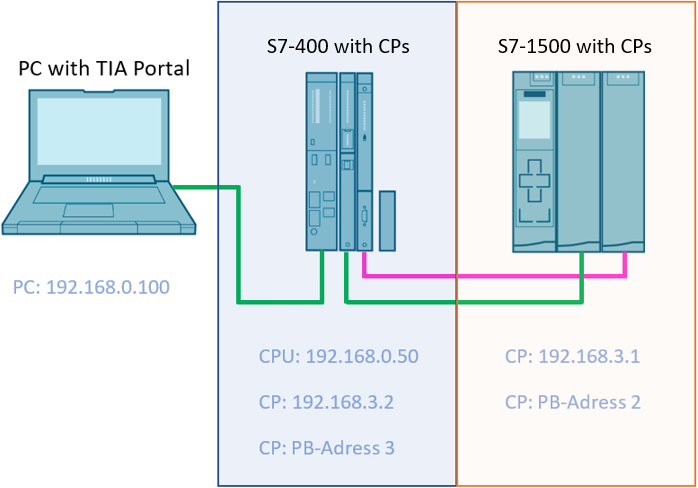
Fig. 01
Solution
To access the S7-1500 CPU, you set up an S7 routing.
In the following you will find step-by-step instructions for
Routing via Ethernet
Routing via PROFIBUS
Configuring routing via Ethernet
Have the S7 subnet ID of your S7-400 CPU (in the example "00C4-001D") ready or look it up in the SIMATIC Manager in the HW Config, as you will need it in a later step.
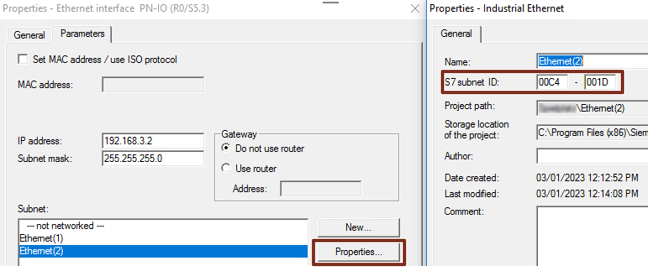
Fig. 02
Switch to TIA Portal.
Create the S7-1500 CPU along with the Ethernet CP.
Give the CP the IP address 192.168.3.1 and network it with the subnet PN/IE_5.
In the Properties of the subnet, enter the same ID as in the SIMATIC Manager as the S7 subnet ID.
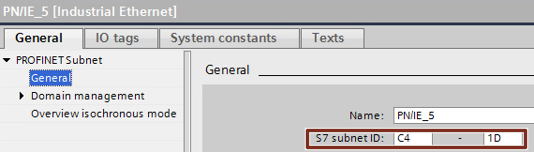
Fig. 03
Create a dummy CPU S7-400 with the identical configuration as in the SIMATIC Manager and connect the CP to the PN/IE_5 subnet.
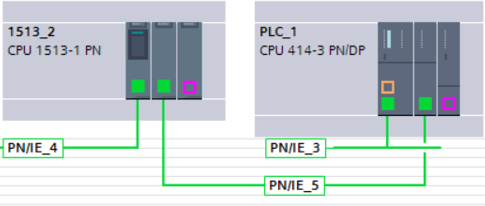
Fig. 04
Upload the S7-1500 station via direct connection to the CPU interface.
You can now use a PC to control the S7-1500 CPU on PN/IE_3 via Ethernet from TIA Portal.
Configuring routing via PROFIBUS
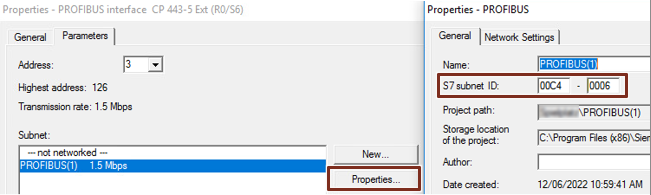
Have the S7 subnet ID of your S7-400 CPU (in the example "00C4-001D") ready or look it up in the SIMATIC Manager in the HW Config, as you will need it in a later step.
The parameters of the PROFIBUS network must match in the SIMATIC Manager and in TIA Portal. In TIA Portal, select "User-defined" as the profile under the network settings and change the parameters manually to match the settings in the SIMATIC Manager.
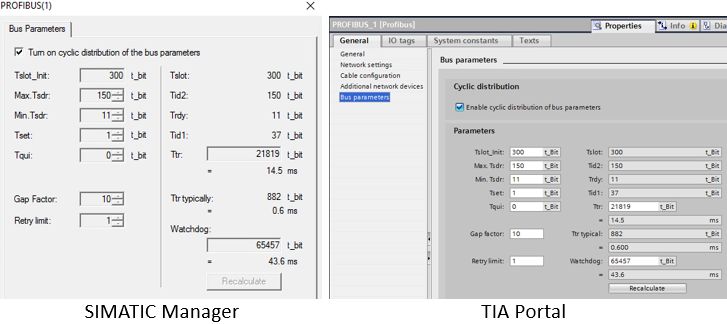
Fig. 06
Create the S7-1500 CPU along with the PROFIBUS CP.
Assign the CP the PB address 2 and network it with the PROFIBUS_1 subnet.
In the Properties of the subnet, enter the same ID as in the SIMATIC Manager for the S7 subnet ID.
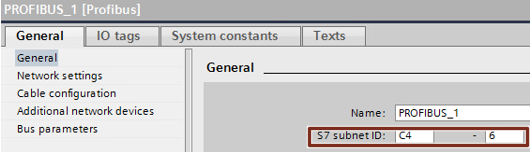
Fig. 07
Create a dummy CPU S7-400 with the same configuration as in the SIMATIC Manager and connect the CP to the PROFIBUS_1 subnet.
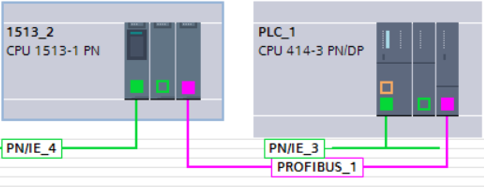
Fig. 08
Upload the S7-1500 station via direct connection to the CPU interface.
You can now use a PC to control the S7-1500 CPU on PN/IE_3 via PROFIBUS from TIA Portal. |
|
| Back to top |
|
 |
|
|
You cannot post new topics in this forum
You cannot reply to topics in this forum
You cannot edit your posts in this forum
You cannot delete your posts in this forum
You cannot vote in polls in this forum
|
Powered by phpBB © 2001, 2005 phpBB Group
Fa-ti si tu propriul forum GRATUIT, pe www.myforum.ro |
 FAQ
FAQ Search
 Memberlist
 Usergroups
 Register
 Profile
 Log in to check your private messages
 Log in


