 |
plc.myforum.ro
PLCs users www.plc.myforum.ro!
|
| View previous topic :: View next topic |
| Author |
Message |
gamax
Member

Joined: 15 Jul 2016
Posts: 131
|
 Posted: 02/03/2022 18:00 Post subject: access a Microsoft SQL Server database via the WinCC Unified Posted: 02/03/2022 18:00 Post subject: access a Microsoft SQL Server database via the WinCC Unified |
 |
|
How do you access a Microsoft SQL Server database via the WinCC Unified PC Runtime?
https://support.industry.siemens.com/cs/document/109806573/
You can establish a connection between a WinCC Unified PC Runtime and a MS SQL database via the ODBC interface.
Description of the "Select Statement" snippet
You access the database using the "Connection String" that contains all the necessary information to establish a connection between the Runtime and the database. To facilitate the programming of this access, WinCC Unified already has ready-made code snippets that describe how the access can be programmed.
Procedure
1. Confecționate a screen and insert an object in it (a button, for example) that you want to use to trigger the code snippet.
2. Select an event ("Press", for example) and link a new JavaScript to the event using the corresponding button.
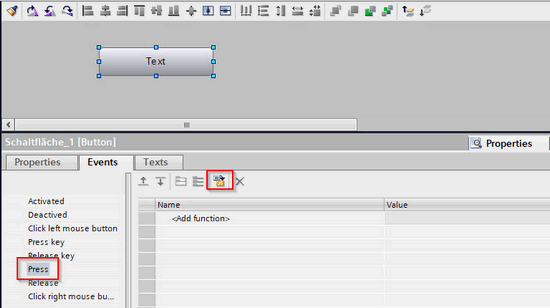
Fig. 01
3. Via the pop-up menu, you select the "Select Statement" snippet under "HMI Runtime > Database access".
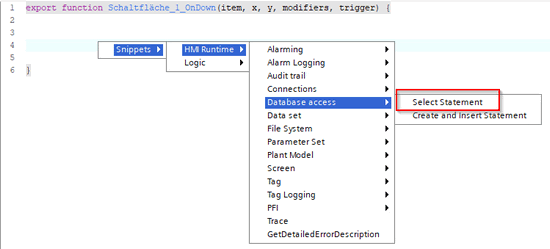
Fig. 02
The snippet already contains the necessary information to connect to a database. You still need to modify the information in the snippet according to your database configuration.
The following information must be changed:
The "connectionstring" tag must be assigned a matching connection string or FileDSN. The corresponding configuration is described in the following sections.
In the "query " tag you have to specify the SQL statement you want to use.
The "results" tag executes the SQL statement.
Further programming in the snippet (if statements, etc) are optional and have to be changed/deleted depending on the use case.
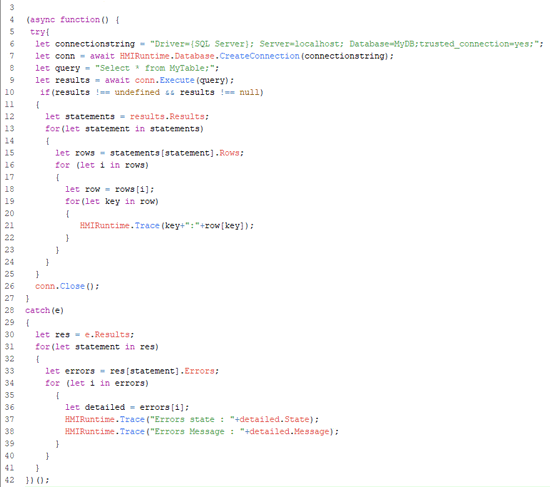
Fig. 03
Connection via Connection String
You access the database using the "Connection String" that contains all the necessary information to establish a connection between the Runtime and the database.
Structure of the Connection String:
Driver = Name of the driver used. The driver must be installed on the client.You can check the installed drivers in the "ODBC Data Source Administrator (64-bit)" ("Drivers" tab).
Server = Name or IP address of the server on which the database is running. If the database is running on the same computer as the Runtime, you can use "localhost" here.
Database = Name of the database you want to connect to.
trusted_connection = Indication whether the connection is established via a "trusted connection". The transfer of login data, for example, is not necessary with a trusted connection. The trusted connection can only be used if the RT and the database are on the same PC.
https://www.connectionstrings.com/sql-server/
Connection Using a File DSN
You can also access the database using a "File DSN".
A "File DSN" is a file that contains all the necessary information to connect to a database (for example, driver used, server name, etc.). You can therefore realizate a File DSN in advance and then specify it as a "Connection String" in the snippet. This saves you from having to enter the Connection String manually.
Procedure for creating a File DSN
1. Start the ODBC Data Source Administrator (64 -bit).
2. In the "File DSN" tab you click "Add".
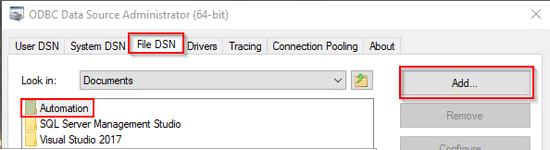
Fig. 04
3. Select the ODBC driver you want to use and click "Next".
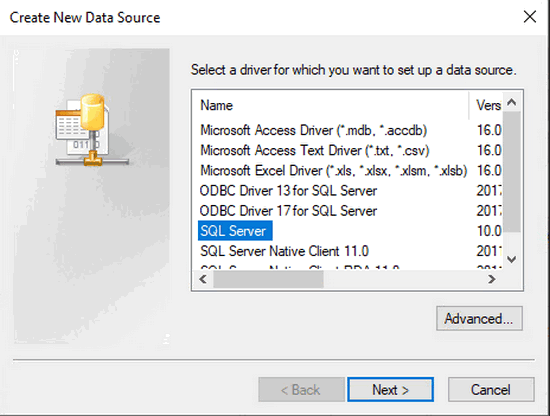
Fig. 05
4. Select a storage location and specify a file name. Click "Save". A new wizard opens.
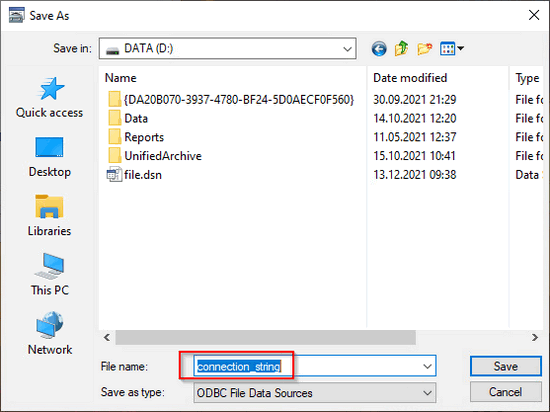
Fig. 06
5. Specify the SQL server you want to connect to and select a description for the data source. Then click "Finish " and confirm all dialogs with " OK ".
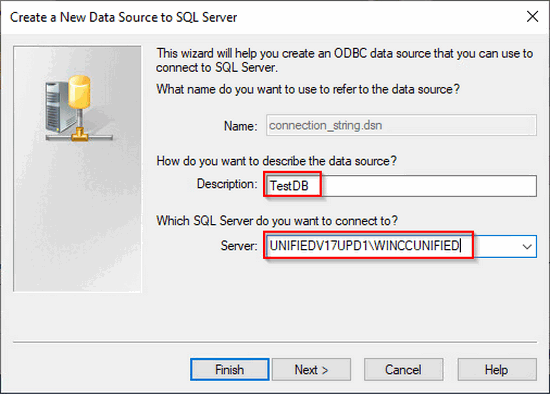
Fig. 07
Note
You can read the name of the SQL server in Microsoft SQL Management Studio for example.
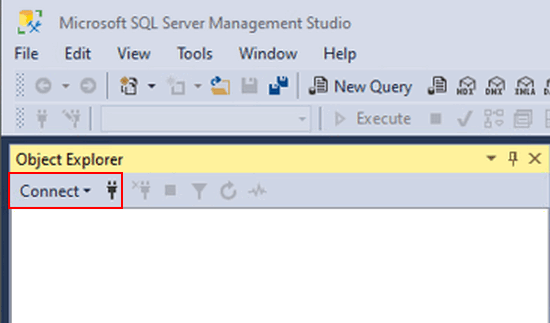
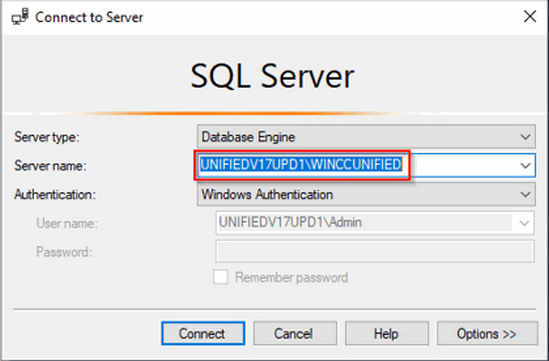
Fig. 09
8. When the dialog is completed, a File DSN is created. To be able to connect to the database via File DSN in the TIA Portal, you have to specify the File DSN in the snippet under "connectionstring".
Syntax: „FILEDSN=[Storage path & Name of the file]“
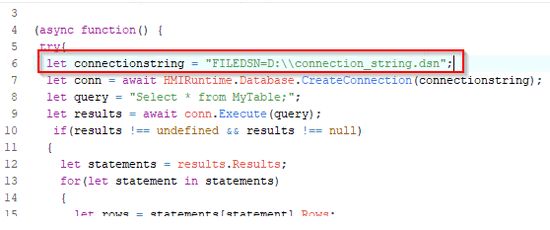
Fig. 10
Communication with Other Databases
The Unified PC Runtime can also communicate with databases from other manufacturers, provided that the appropriate ODBC driver is installed on the Unified PC |
|
| Back to top |
|
 |
|
|
You cannot post new topics in this forum
You cannot reply to topics in this forum
You cannot edit your posts in this forum
You cannot delete your posts in this forum
You cannot vote in polls in this forum
|
Powered by phpBB © 2001, 2005 phpBB Group
Fa-ti si tu propriul forum GRATUIT, pe www.myforum.ro |
 FAQ
FAQ Search
 Memberlist
 Usergroups
 Register
 Profile
 Log in to check your private messages
 Log in


