 |
plc.myforum.ro
PLCs users www.plc.myforum.ro!
|
| View previous topic :: View next topic |
| Author |
Message |
bovrrjyak
Junior

Joined: 26 Jun 2019
Posts: 5
|
 Posted: 18/02/2020 08:36 Post subject: 1,000 messages in WinCC AlarmControl (message display) Posted: 18/02/2020 08:36 Post subject: 1,000 messages in WinCC AlarmControl (message display) |
 |
|
How can you display more than the last 1,000 messages in WinCC AlarmControl (message display)?
https://support.industry.siemens.com/cs/document/109775387/how-can-you-display-more-than-the-last-1-000-messages-in-wincc-alarmcontrol- (message-display)
The WinCC AlarmControl (message display) is limited to 1,000 lines. However, a page change can be enabled, which gives access to already archived messages. The steps necessary to enable the page change are described in this FAQ response for WinCC V7 and TIA Portal Professional.
Problem
The WinCC AlarmControl is limited to 1,000 lines. However, access to further messages is required.
The limit of the WinCC AlarmControl is 1,000 messages per page. This limit cannot be extended.
It is possible to enable a page change. This allows you to choose between several data sets of up to 1,000 messages.
The following section first explains the procedure in WinCC V7 and then for WinCC TIA Portal Professional:
WinCC V7
Open the Properties of the WinCC AlarmControl.
Go to the "General" tab.
Enable the option "Enable paging".
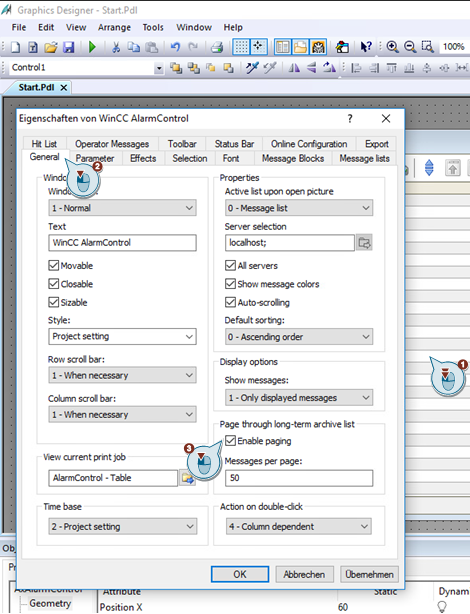
Fig. 1
Afterwards the required buttons must be added to the toolbar:
Go to the "Toolbar" tab.
Enable the "First page", "Previous page", "Next page" and "Last page" key functions.
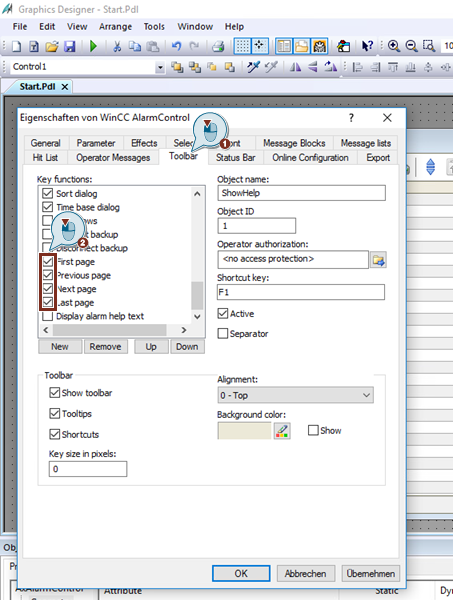
Fig. 2
You can then scroll through the Runtime.
WinCC TIA Portal Professional
Click the WinCC alarm view to open the Properties.
Go to "General" and enable the "Enable paging" option.
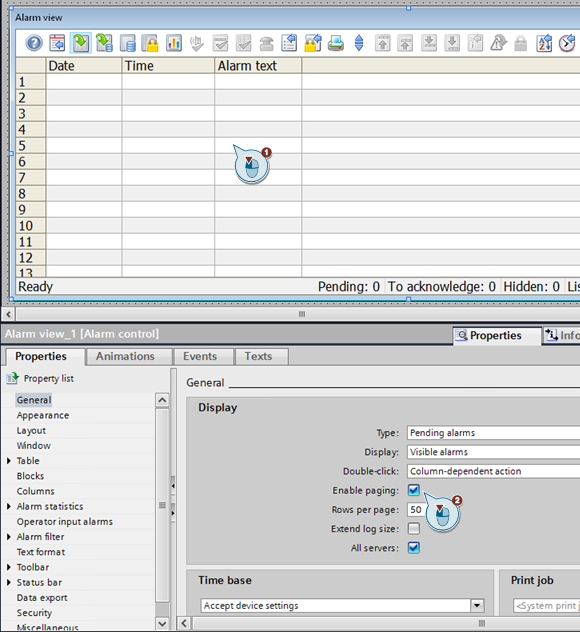
Fig. 3
Afterwards the required buttons must be added to the toolbar:
In the Properties tab go to "Toolbar - Buttons".
Enable the "First page", "Previous page", "Next page" and "Last page" buttons.
This adds the corresponding buttons.
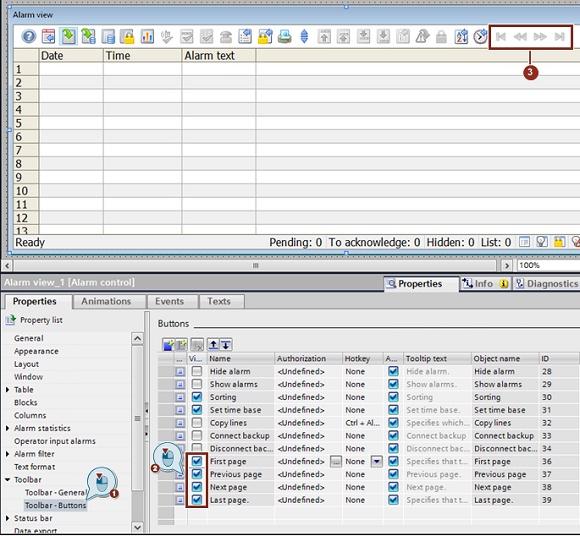
Fig. 4
You can then scroll through the Runtime. |
|
| Back to top |
|
 |
|
|
You cannot post new topics in this forum
You cannot reply to topics in this forum
You cannot edit your posts in this forum
You cannot delete your posts in this forum
You cannot vote in polls in this forum
|
Powered by phpBB © 2001, 2005 phpBB Group
Fa-ti si tu propriul forum GRATUIT, pe www.myforum.ro |
 FAQ
FAQ Search
 Memberlist
 Usergroups
 Register
 Profile
 Log in to check your private messages
 Log in


