 |
plc.myforum.ro
PLCs users www.plc.myforum.ro!
|
| View previous topic :: View next topic |
| Author |
Message |
AnteSavilt
Member 2


Joined: 13 Feb 2018
Posts: 264
Location: Croatia
|
 Posted: 30/10/2019 19:15 Post subject: "Get_Alarm" instruction in S7-1500 CPU Posted: 30/10/2019 19:15 Post subject: "Get_Alarm" instruction in S7-1500 CPU |
 |
|
Reading out Alarms with the "Get_Alarm" instruction in S7-1500 CPU
https://support.industry.siemens.com/cs/document/109748168/reading-out-alarms-with-the-get_alarm-instruction-in-s7-1500-cpu
Alarms allow the machinery operator and maintenance personnel to quickly detect process errors in the automation system, to localize them precisely, and to eliminate them. Using the "Get_Alarm" instruction, you can read out alarms in the user program via the alarm interface of the S7-1500 CPU.
https://support.industry.siemens.com/cs/#chapter_5436227_0
https://support.industry.siemens.com/cs/#chapter_5436227_2
Getting Started instruction "Get_Alarm"
With the instruction "Get_Alarm" you can read out messages in the user program via the alarm interface of the S7-1500 CPU. The instruction "Get_Alarm" logs on to the message system interface of the S7-1500 CPU like a SIMATIC HMI in order to read out an incoming or outgoing message.
Requirements
SIMATIC STEP 7 (TIA Portal) from V14
SIMATIC S7-1500 CPU as of Firmware V2.0
Downloads
https://support.industry.siemens.com/cs/attachments/109748168/109748168_GettingStarted_Get_Alarm_DOC_V23_en.pdf
https://support.industry.siemens.com/cs/attachments/109748168/109748168_Get_Alarm_GettingStarted_V21.zip
Reading out Alarms with the "Get_Alarm" instruction in S7-1500 CPU and sending them to an Alarm System
The incoming and outgoing alarms of the S7-1500 PLC_1 are read out and acquired and saved in a "alarmStorage" data block in PLC_1. Afterwards you can send these alarms from PLC_1 with the "TSEND_C" instruction as string to PLC_2. The alarms are received on the PLC_2 with the "TRCV_C" instruction and stored in a "rcvdStorage" data block. The alarms received via "Get_Alarm" can be read out via OPCUA client.
The following figure shows, how S7-1500 PLC alarms are received using the "Get_Alarm" instruction and sent to a S7-1500 PLC_2.
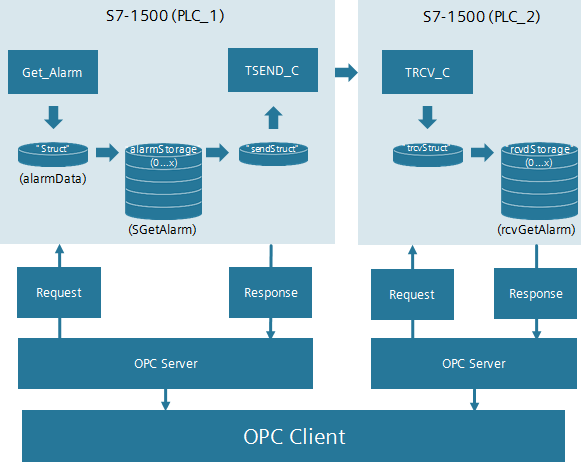
This application example describes the following aspects:
Receiving pending alarms in PLC_1 using "Get_Alarm" and sending it to PLC_2.
Reading out alarms
Acknowledging received alarms
https://support.industry.siemens.com/cs/attachments/109748168/109748168_Grundlagen_Get_Alarm_DOC_V10_en.pdf
https://support.industry.siemens.com/cs/attachments/109748168/109748168_Get_Alarm_DOC_V10_en.pdf
https://support.industry.siemens.com/cs/attachments/109748168/109748168_Get_Alarm_TIAV14SP1_CODE_V10.zip
STEP 7 TIA V15
https://support.industry.siemens.com/cs/attachments/109748168/109748168_Get_Alarm_TIAV15_CODE_V10.zip |
|
| Back to top |
|
 |
|
|
You cannot post new topics in this forum
You cannot reply to topics in this forum
You cannot edit your posts in this forum
You cannot delete your posts in this forum
You cannot vote in polls in this forum
|
Powered by phpBB © 2001, 2005 phpBB Group
Fa-ti si tu propriul forum GRATUIT, pe www.myforum.ro |
 FAQ
FAQ Search
 Memberlist
 Usergroups
 Register
 Profile
 Log in to check your private messages
 Log in


